
MouseBoost Pro 5.2.5 for Mac

MouseBoost PRO
Name: MouseBoost Pro 5.2.5 MAS [TNT].dmg.torrent (21.46MB)
Version: 5.2.5
Operating System: macOS
Program license: Free
Developer: Zhao Huiyuan
Interface language: English
Review by:
Downloads 141
Rating
4.3 14 Click to rate
Checked
   Download Torrent Download Now

MouseBoost Pro

A Finder Sync extension for macOS that replaces a sparse system right-click menu with a configurable stack of file, image, PDF, terminal, and automation actions—aimed at developers, designers, and power users who live in Finder.

Typical Mac workflow

After enabling the Finder extension in System Settings, right-click (or use configured shortcuts) on files and folders to reach dozens of utilities without opening separate apps. Common actions include true Cut-and-Paste for Finder moves, opening folders in Terminal, iTerm2, Warp, Ghostty, Kitty, or other shells, creating files from templates, copying paths in multiple formats, batch renaming, and launching favorite apps or directories from the menu.

Image and document tools cover format conversion, resizing, AI background removal, cropping presets, rotation, compression, icon batch recolor, stitching, watermarks, OCR from PDFs and scans, PDF merge/split, and Office-to-PDF export. Additional utilities include duplicate finding, encrypted ZIP creation, file locking, hide/show files, color picker, custom folder icons, app uninstall cleanup, and a clipboard history panel with iCloud sync for settings.

Customization and requirements

Every menu entry can be reordered, renamed, disabled, or pinned to the top level; custom keyboard shortcuts and Quick Access hooks for third-party file managers such as QSpace and Path Finder are supported when enabled. The app requires macOS 10.11 or later, sells as a one-time Mac App Store purchase (about $7.99 in the US listing) with Family Sharing, and reports no developer data collection. If the menu fails to appear, the vendor recommends relaunching Finder and re-enabling the extension; some iCloud Desktop & Documents setups on Sonoma need workaround preferences.

Version 5.2.5

Build 5.2.5 adds image editing from the context menu plus general stability and performance fixes according to the Mac App Store “What’s New” note—a small patch atop the broader 5.2 line that earlier introduced custom menu groups, Reduce File Size for media and documents, and Paste As options for aliases and ZIP compression.
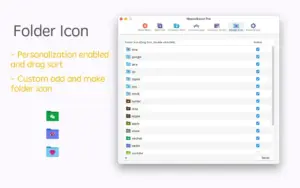

MouseBoost Pro 5.2.5 for Mac — Finder Utilities

Pros & Cons Show details

✅ PROS

  • One right-click surface consolidates 60+ Finder utilities, reducing app-switching for terminal access, path copying, and file chores.
  • Deep terminal integration covers many popular Mac shells and editors, which suits developer workflows more than generic “Open in Terminal” alone.
  • Highly customizable menu ordering, pinning, and shortcuts let you keep only the actions you use daily instead of a fixed bloated menu.
  • Built-in image, PDF, and batch-rename tools handle common asset prep without opening Preview, Photoshop, or separate OCR apps for light tasks.
  • One-time App Store purchase with Family Sharing and no listed data collection keeps licensing simple for personal Mac setups.

❌ CONS

  • Finder Sync extensions can break or hide menus after macOS updates, iCloud Desktop sync changes, or disabled extensions—setup troubleshooting is part of the product.
  • The sheer number of features makes the default menu overwhelming until you spend time curating, disabling, and pinning items.
  • Some advanced image features rely on system AI or OCR APIs and may behave differently across macOS versions or Apple Silicon generations.
  • Version 5.2.5’s public changelog is minimal (“image editing” plus stability), so it is unclear exactly which bugs were fixed without release-note detail.
  • Competing free or built-in tools (Shortcuts, Raycast file actions, Path Finder) may cover overlapping workflows if you already pay for another file manager.
✅ What's New in 5.2.5 Show details
  1. [Image editing] — Added image editing actions reachable from the Finder context menu.
  2. [Stability fixes] — Fixed known issues and improved performance and stability in this patch.
  3. [Custom menu groups] — Prior 5.2.x releases added custom context menu groups for clearer organization (5.2 line feature).
  4. [Reduce File Size] — Prior 5.2.x added Reduce File Size for images, videos, PDFs, and presentations.
  5. [Paste As] — Prior 5.2.x added Paste As with alias creation and ZIP compression support.
  6. [Settings search] — Cmd+F global search in Settings to locate features quickly (documented in the 5.2.0 line, product capability).

Older Versions

Version Publication date
MouseBoost Pro v5.2.5 Latest Current
MouseBoost Pro v5.2.0
MouseBoost Pro v5.1.0
MouseBoost Pro v5.0.1
MouseBoost Pro v4.3.0
MouseBoost Pro v4.2.0
MouseBoost Pro v4.1.5
MouseBoost Pro v4.1.4
MouseBoost Pro v4.1.3
MouseBoost Pro v4.1.0
MouseBoost Pro v4.0.3
MouseBoost Pro v4.0.2
MouseBoost Pro v4.0.1
MouseBoost Pro v4.0.0
MouseBoost Pro v3.9.2
MouseBoost Pro v3.9.1
MouseBoost Pro v3.9.0
MouseBoost Pro v3.8.9
MouseBoost Pro v3.8.8
MouseBoost Pro v3.8.7
MouseBoost Pro v3.8.5
MouseBoost Pro v3.8.3
MouseBoost Pro v3.8.1
MouseBoost Pro v3.8.0
MouseBoost Pro v3.7.8
MouseBoost Pro v3.7.7
MouseBoost Pro v3.7.5
MouseBoost Pro v3.7.1
MouseBoost Pro v3.7.0
MouseBoost Pro v3.6.9
MouseBoost Pro v3.6.8
MouseBoost Pro v3.6.7
MouseBoost Pro v3.6.6
MouseBoost Pro v3.6.5
MouseBoost Pro v3.6.4
MouseBoost Pro v3.6.3
MouseBoost Pro v3.6.2
MouseBoost Pro v3.6.1
MouseBoost Pro v3.5.8
MouseBoost Pro v3.5.7
MouseBoost Pro v3.5.6
MouseBoost Pro v3.5.5
MouseBoost Pro v3.5.4
MouseBoost Pro v3.5.3
MouseBoost Pro v3.5.1
MouseBoost Pro v3.5.0

Installation & Troubleshooting FAQ

8 questions

Common issues when installing macOS apps

Alternatives

Join the Conversation

Your email address will not be published. Required fields are marked *