
MouseBoost Pro 5.1.0 for Mac

MouseBoost PRO
Name:MouseBoost Pro 5.1.0 MAS [TNT].dmg.torrent (19.9MB)
Hash:cb96249d63ac275052cc77b908b8b01915e455a3
Review by:
Downloads 191
Rating
4.8 23 Click to rate
Checked
   Download Torrent Download Now

What MouseBoost Pro does on Mac

MouseBoost Pro is a Mac App Store Finder extension that adds more than fifty utilities to the right-click context menu for file creation, terminal access, image work, and batch file tasks.

Developed by Zhao Huiyuan (listed as 惠源 赵 on the App Store), MouseBoost Pro targets developers, designers, and power users who repeat the same Finder actions many times per day. After you enable the extension in System Settings, control-click a file or folder to reach tools that macOS does not provide natively, from cut-and-paste file moves to encrypted ZIP creation and one-click terminal launch at the current path.

Main tool groups

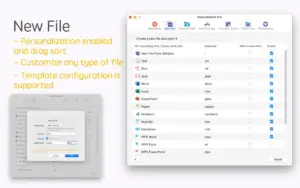
  • File creation from custom templates including .md, .json, and .gitignore
  • Cut and paste files in Finder with a true move workflow
  • Terminal and code-editor launch in eleven terminal apps plus VS Code and Sublime Text paths
  • Batch rename, copy path, force delete, hide or show files, and file locking
  • Image convert, resize, crop, background removal, icon generation, and OCR from PDF or images
  • Office-to-PDF conversion, PDF merge, encrypted ZIP, DMG packaging, and app uninstall cleanup

Version 5.1.0 additions

The 5.1.0 update expands daily-use tooling:

  • Clipboard History at Command-Shift-V with text, image, and color recall, paste queue, and iCloud sync
  • Rotate and compress image actions directly from the context menu
  • Find Duplicates with smart scan, auto-select, and one-click cleanup
  • Git Shortcuts for common Git commands without opening Terminal
  • Settings hint bar plus general stability and performance fixes

Typical Mac workflow

Enable the Finder extension once, then pin your most-used actions at the top of the menu. A developer might create a new file, open Warp at the folder path, copy the POSIX path, and commit from Git Shortcuts. A designer might crop to 16:9, remove a background, and compress before upload. Settings sync through iCloud so menu layout stays consistent across Macs signed into the same Apple ID.

Customization and setup

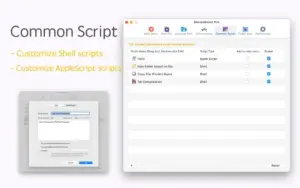
Every menu item can be reordered, renamed, disabled, or pinned. Custom Shell and AppleScript entries automate repetitive folder operations. If the menu does not appear, the developer recommends relaunching Finder and re-enabling the extension; on macOS Sonoma, iCloud Desktop and Documents folder sync can interfere with Finder extensions.

Licensing note

MouseBoost Pro costs about $6.99 on the Mac App Store as a one-time purchase with Family Sharing. The App Store listing states that the free MouseBoost app offers the same core functionality; Pro is positioned as a direct paid option. The developer reports no data collection in App Store privacy labels. macOS 10.11 or later is listed as the minimum requirement.
MouseBoost Pro 5.1.0 adds 50+ Finder context-menu MouseBoost Pro 5.1.0 for Mac — Finder Right-Click Tools

Pros & Cons Show details

✅ PROS

  • MouseBoost Pro consolidates more than fifty Finder actions into one customizable right-click menu, which reduces app switching for common file and image tasks on Mac.
  • Version 5.1.0 adds Clipboard History with Command-Shift-V, iCloud sync, and a paste queue, which helps developers and writers reuse snippets without a separate clipboard manager.
  • Terminal support covers eleven popular Mac terminal apps plus path-aware folder open, which suits shell-heavy workflows better than generic “Open in Terminal” extensions.
  • Built-in batch rename, duplicate finder, Git shortcuts, OCR, and image tools replace several small utilities that would otherwise clutter the menu bar.
  • Menu items are reorderable and disableable, and settings can sync via iCloud, so each Mac user can trim the list to a focused personal toolkit.

❌ CONS

  • The App Store listing says the free MouseBoost app has the same core features, so paying for Pro may feel redundant unless you prefer the paid listing or promotional pricing.
  • Finder Sync extensions require manual enablement and sometimes a Finder relaunch; iCloud Desktop and Documents sync on Sonoma can block the menu from appearing.
  • A menu with fifty-plus tools can become crowded unless you actively hide unused items during setup.
  • Git Shortcuts cover common commands only and are not a substitute for a full Git client, merge tools, or complex branch workflows.
  • Some advanced features such as background removal rely on system AI and macOS version behavior, so results and availability may vary across Mac models.
✅ What's New in 5.1.0 Show details
  1. [Clipboard History] — Version 5.1.0 adds a history panel at Command-Shift-V for text, images, and colors with paste queue, iCloud sync, and allowlist or blocklist filtering.
  2. [Rotate Image] — Right-click image actions now include 90° and 180° rotation plus horizontal and vertical flip from the Finder menu.
  3. [Compress Image] — New compression options offer three quality presets and a custom compression ratio without opening a separate editor.
  4. [Find Duplicates] — Smart duplicate scanning with auto-select and one-click cleanup helps reclaim disk space from redundant files in selected folders.
  5. [Git Shortcuts] — Common Git commands appear in the right-click menu so you can commit and run routine Git tasks without opening Terminal.
  6. [Settings hint bar and stability] — A guidance hint bar was added to Settings, alongside bug fixes and performance improvements for smoother context-menu response.

Older Versions

Version Publication date
MouseBoost Pro v5.1.0 Latest Current
MouseBoost Pro v5.0.1
MouseBoost Pro v4.3.0
MouseBoost Pro v4.2.0
MouseBoost Pro v4.1.5
MouseBoost Pro v4.1.4
MouseBoost Pro v4.1.3
MouseBoost Pro v4.1.0
MouseBoost Pro v4.0.3
MouseBoost Pro v4.0.2
MouseBoost Pro v4.0.1
MouseBoost Pro v4.0.0
MouseBoost Pro v3.9.2
MouseBoost Pro v3.9.1
MouseBoost Pro v3.9.0
MouseBoost Pro v3.8.9
MouseBoost Pro v3.8.8
MouseBoost Pro v3.8.7
MouseBoost Pro v3.8.5
MouseBoost Pro v3.8.3
MouseBoost Pro v3.8.1
MouseBoost Pro v3.8.0
MouseBoost Pro v3.7.8
MouseBoost Pro v3.7.7
MouseBoost Pro v3.7.5
MouseBoost Pro v3.7.1
MouseBoost Pro v3.7.0
MouseBoost Pro v3.6.9
MouseBoost Pro v3.6.8
MouseBoost Pro v3.6.7
MouseBoost Pro v3.6.6
MouseBoost Pro v3.6.5
MouseBoost Pro v3.6.4
MouseBoost Pro v3.6.3
MouseBoost Pro v3.6.2
MouseBoost Pro v3.6.1
MouseBoost Pro v3.5.8
MouseBoost Pro v3.5.7
MouseBoost Pro v3.5.6
MouseBoost Pro v3.5.5
MouseBoost Pro v3.5.4
MouseBoost Pro v3.5.3
MouseBoost Pro v3.5.1
MouseBoost Pro v3.5.0

Installation & Troubleshooting FAQ

8 questions

Common issues when installing macOS apps

Alternatives

Join the Conversation

Your email address will not be published. Required fields are marked *