
MouseBoost Pro 5.2.0 for Mac

MouseBoost PRO
Name:MouseBoost Pro 5.2.0 MAS [TNT].dmg.torrent (20.52MB)
Hash:7802d653a9e25650bb71eddee6a95776acf557e3
Review by:
Downloads 127
Rating
4.6 12 Click to rate
Checked
   Download Torrent Download Now

MouseBoost Pro

A Finder Sync extension for macOS that replaces a sparse system context menu with a configurable stack of file, image, PDF, terminal, and automation actions reachable from a single right-click.

Typical Mac workflow

Install from the Mac App Store, enable the extension under System Settings → General → Login Items & Extensions → Finder Extensions, and relaunch Finder if items do not appear—a troubleshooting step the developer documents for macOS extension caching. Control-click files or folders to create templated documents (.txt, .md, .docx, .gitignore), batch-rename with regex rules, cut-and-paste moves with Command+X, open Terminal or iTerm2 (plus Warp, Ghostty, WezTerm, Kitty, and others) at the current path, run Shell or AppleScript snippets, or pin favorite directories and apps on the menu. Clipboard history (Cmd+Shift+V by default) recalls text, images, and colors with optional iCloud sync and allowlists.

Media and document tools

Image actions cover format conversion, resizing, AI background removal, cropping presets, rotation, compression, batch icon recolor, stitching, and text watermarks. A conversion toolbox adds OCR from PDFs and scans, PDF merge and split, and Office-to-PDF export. Version 5.2.0 extends that line with PDF split by page range, image/PDF watermark tiling, and multi-image stitching with drag-to-reorder preview—useful when preparing assets or documents without opening separate apps.

Customization and third-party Finder apps

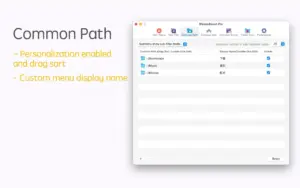
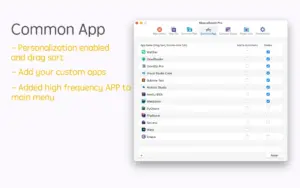
Every menu entry can be reordered, renamed, disabled, or pinned to the top level; custom keyboard shortcuts cover main actions. Settings now include Cmd+F global search to locate features quickly in a long list. Quick Access can also hook into third-party file managers such as QSpace and Path Finder when enabled in preferences, which matters if you do not live in Apple’s Finder full time.

Licensing and version 5.2.0

MouseBoost Pro is a one-time Mac App Store purchase (about $9.99 in US pricing) with Family Sharing; a separate free MouseBoost app exists with in-app upgrades. The developer reports no data collection. macOS 10.11 or later is listed, though recent features assume current Finder and OCR APIs on newer releases. Release 5.2.0 adds LAN file sharing with QR codes, richer “copy file as” formats (path, Markdown link, directory tree), Otty terminal support, and general bug fixes alongside the media and settings improvements above.
MouseBoost Pro 5.2.0 extends Finder on Mac with 60+ MouseBoost Pro 5.2.0 for Mac — Finder Right-Click Tools

Pros & Cons Show details

✅ PROS

  • More than 60 context-menu actions cover new files, batch rename, terminal launch, OCR, and image work without switching to separate single-purpose apps.
  • Per-item menu customization and keyboard shortcuts let developers and designers keep only the actions they use daily on the main right-click level.
  • Version 5.2.0 adds Cmd+F search in Settings, which makes a long feature list manageable as the menu grows each release.
  • Clipboard history with paste queue and optional iCloud sync integrates copy-paste workflows directly into Finder-centric file management.
  • One-time purchase with Family Sharing and a no-data-collection privacy label compare favorably with subscription-heavy productivity suites.

❌ CONS

  • Finder Sync extensions can fail to load after macOS updates; the developer’s fix list includes relaunching Finder, toggling the extension, and iCloud Desktop & Documents conflicts on Sonoma.
  • A dense menu with 60+ tools can feel overwhelming until you trim, pin, and assign shortcuts in preferences.
  • Some advanced actions (OCR, background removal, Office conversion) depend on macOS capabilities and may behave differently across OS versions despite the broad 10.11 minimum label.
  • Mac App Store “What’s New” on the US storefront may lag other regions, so patch details are easier to read on alternate App Store locales.
  • True Cut-and-paste and deep file operations operate within Finder extension limits, which may not match every third-party file manager’s behavior out of the box.
✅ What's New in 5.2.0 Show details
  1. Settings menu search — version 5.2.0 adds Cmd+F global search in Settings so you can locate and configure any feature without scrolling long preference lists.
  2. Icon batch recolor — right-click can batch-replace colors on PNG icons in one action, useful for generating consistent icon sets from a single source.
  3. Image and PDF watermark — 5.2.0 adds text watermarks with customizable font, color, opacity, position, and tiling on images and PDF files.
  4. Image stitching — multiple images can be combined vertically or horizontally in one click with drag-to-reorder and live preview.
  5. PDF split — 5.2.0 splits PDFs by page ranges into separate files from the context menu without opening Preview or Acrobat.
  6. WiFi LAN share — Share File sends the selected item over the local network with a QR code for quick pickup on another device.
  7. Copy file as formats — new clipboard outputs include file summary, path, filename with or without extension, Markdown link, and directory tree.
  8. Third-party file managers — Quick Access in Settings now supports QSpace, Path Finder, and custom configurations beyond Apple Finder.
  9. Otty terminal — the terminal launcher list adds Otty alongside Terminal, iTerm2, Warp, Ghostty, and other existing shells.
  10. Bug fixes — 5.2.0 closes unspecified known issues for smoother day-to-day use on recent macOS versions.

Older Versions

Version Publication date
MouseBoost Pro v5.2.0 Latest Current
MouseBoost Pro v5.1.0
MouseBoost Pro v5.0.1
MouseBoost Pro v4.3.0
MouseBoost Pro v4.2.0
MouseBoost Pro v4.1.5
MouseBoost Pro v4.1.4
MouseBoost Pro v4.1.3
MouseBoost Pro v4.1.0
MouseBoost Pro v4.0.3
MouseBoost Pro v4.0.2
MouseBoost Pro v4.0.1
MouseBoost Pro v4.0.0
MouseBoost Pro v3.9.2
MouseBoost Pro v3.9.1
MouseBoost Pro v3.9.0
MouseBoost Pro v3.8.9
MouseBoost Pro v3.8.8
MouseBoost Pro v3.8.7
MouseBoost Pro v3.8.5
MouseBoost Pro v3.8.3
MouseBoost Pro v3.8.1
MouseBoost Pro v3.8.0
MouseBoost Pro v3.7.8
MouseBoost Pro v3.7.7
MouseBoost Pro v3.7.5
MouseBoost Pro v3.7.1
MouseBoost Pro v3.7.0
MouseBoost Pro v3.6.9
MouseBoost Pro v3.6.8
MouseBoost Pro v3.6.7
MouseBoost Pro v3.6.6
MouseBoost Pro v3.6.5
MouseBoost Pro v3.6.4
MouseBoost Pro v3.6.3
MouseBoost Pro v3.6.2
MouseBoost Pro v3.6.1
MouseBoost Pro v3.5.8
MouseBoost Pro v3.5.7
MouseBoost Pro v3.5.6
MouseBoost Pro v3.5.5
MouseBoost Pro v3.5.4
MouseBoost Pro v3.5.3
MouseBoost Pro v3.5.1
MouseBoost Pro v3.5.0

Installation & Troubleshooting FAQ

8 questions

Common issues when installing macOS apps

Alternatives

Join the Conversation

Your email address will not be published. Required fields are marked *