
Proxyman 6.11.0 for Mac

Proxyman
Name:Proxyman 6.11.0 [EDiSO].dmg.torrent (36.72MB)
Hash:59f44de835dff537eb0f4a137e3d9962450e8946
Review by:
Downloads 96
Rating
4.6 20 Click to rate
Checked
   Download Torrent Download Now

What Proxyman does on Mac

Proxyman is a native macOS HTTP debugging proxy that lets developers capture, inspect, and modify HTTP and HTTPS traffic from Mac apps, browsers, iOS simulators, and physical iOS and Android devices.

Built with Swift and Apple SwiftNIO, Proxyman sits between your apps and the network as a man-in-the-middle proxy after you install its certificate. You can view request and response headers and bodies, filter flows, repeat requests, compose new calls, and apply advanced tools such as Map Local, Map Remote, Breakpoints, Scripting, Protobuf decoding, and SSL Proxying lists. The interface is designed for day-to-day API and mobile app debugging rather than one-off packet dumps.

Typical Mac workflow

After installing Proxyman and its root certificate, you enable SSL Proxying for the domains you need and start capturing. Traffic from the Mac, an iOS Simulator, or a phone on the same network appears in the flow table, where you search, pin domains, and open raw or formatted views. When a backend misbehaves, you can breakpoint a request, edit JSON on the fly, or map a local JSON file to simulate responses without redeploying a server.

Version 6.11.0 highlights

Released June 8, 2026, version 6.11.0 improves filtering and stability. New features include GraphQL query name matching for MCP rules, header key-and-value filters with highlighted matches in content views, a popover that explains response failures, and a shortcut to enable SSL Proxying for a selected domain. Improvements add a WebSocket Protobuf rule menu item, faster client lookup during busy captures, SNI host display for SOCKS CONNECT requests to IPs, and refined toolbar behavior on macOS 26.

Licensing and requirements

Proxyman requires macOS 12 or later and runs natively on Apple Silicon and Intel Macs. A free tier is available with limits; full Pro access uses paid perpetual or team subscription licenses with one year of updates included. Advanced tools such as unlimited SSL Proxying rules, Breakpoints, and Scripting sit behind the paid license according to the vendor documentation.
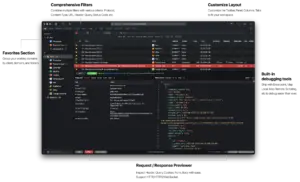
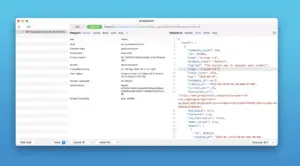
Proxyman 6.11.0 for Mac — HTTP/HTTPS Debug Proxy Proxyman 6.11.0 captures and inspects HTTP/HTTPS

Pros & Cons Show details

✅ PROS

  • The macOS app is native Swift/SwiftNIO software rather than an Electron wrapper, which helps responsiveness when capturing large sessions.
  • You can intercept HTTPS from Mac apps, iOS Simulators, and physical iOS and Android devices from one desktop tool after certificate setup.
  • Advanced debugging tools such as Breakpoints, Map Local, Map Remote, Scripting, and Protobuf support cover common API and mobile workflow needs beyond simple logging.
  • Version 6.11.0 adds sharper filtering with header key-value rules, highlighted search results, and GraphQL query matching for MCP rules.
  • Perpetual licenses let you keep using your purchased version after the included update year, with optional discounted renewal for newer builds.

❌ CONS

  • Full SSL Proxying, Breakpoints, Scripting, and other advanced tools require a paid Pro license; the free tier has meaningful capture limits.
  • HTTPS interception needs installing and trusting Proxyman certificates on each device, which adds setup steps and security considerations for production machines.
  • Version 6.11.0 is primarily filters, WebSocket Protobuf menu access, and bug fixes rather than a major new debugging paradigm.
  • Some Pro features and team collaboration options are priced per seat, which can add up for larger engineering groups.
  • Capturing mobile traffic depends on network conditions, iOS version quirks, and disabled competing VPN or proxy apps, which can block beginners.
✅ What's New in 6.11.0 Show details
  1. [GraphQL MCP rule matching] — MCP rules can now match GraphQL query names, which helps automation target specific API operations instead of broad URL patterns.
  2. [Header key-value filters] — Header Filters support both header names and values, such as Content-Type: application/json, for more precise flow narrowing.
  3. [Highlighted filter matches] — Matched filter text is highlighted in content views so you can spot hits inside large request or response bodies faster.
  4. [WebSocket Protobuf rule menu] — A dedicated WebSocket Protobuf rule menu item makes protobuf decoding setup easier for WebSocket traffic.
  5. [Response failure popover] — A new popover explains why a response failed, which speeds diagnosis when status codes or transport errors are unclear.
  6. [SSL Proxying shortcut] — A shortcut enables SSL Proxying for the selected domain without digging through multiple settings panels.
  7. [Live connection edit fix] — Editing Map Local, Scripting, or Breakpoint rules no longer closes active connections unexpectedly during debugging sessions.

Older Versions

Version Publication date
Proxyman v6.11.0 Latest Current
Proxyman v6.10.0
Proxyman v6.6.0
Proxyman v6.5.0
Proxyman v6.4.0
Proxyman v6.0.0
Proxyman v5.24.0
Proxyman v5.2
Proxyman v5.0

Installation & Troubleshooting FAQ

8 questions

Common issues when installing macOS apps

Alternatives

Join the Conversation

Your email address will not be published. Required fields are marked *