
Ghost Buster Pro 5.1.0 for Mac

ghost-buster-pro
Name:Ghost Buster Pro 5.1.0 MAS [TNT].dmg.torrent (7.55MB)
Hash:a7b65493bc59063a2c78e22903f35bb2058ca87c
Review by:
Downloads 118
Rating
4.3 31 Click to rate
Checked
   Download Torrent Download Now

Ghost Buster Pro

A lightweight Mac App Store utility from Sascha Simon that scans for support files, preferences, and caches left behind after you remove applications—aimed at users who want a fast, consent-based cleanup without a full system optimizer.

Typical Mac workflow

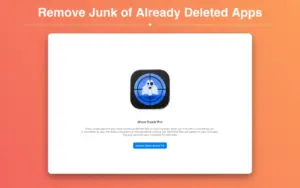
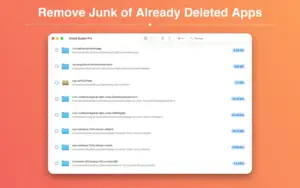
You launch Ghost Buster Pro and the search starts immediately. The app looks for data tied to applications that are no longer installed, groups what it finds, and presents the results for review. Nothing is removed automatically: you choose which items to delete and which to keep, which reduces the risk of wiping data you still need from a renamed app or a portable install.

If a result is a false positive, you can add it to a blacklist so those paths are excluded from future deletions. Version 5.0 added the ability to ignore specific search results and manage ignored entries in Settings—a workflow that remains available in the 5.1 line. The interface stays deliberately minimal: scan, review, delete, done.

Privacy, platform, and version 5.1.0

Sascha Simon states that the app collects no user data and is built without third-party analytics frameworks. Ghost Buster Pro is sold only through the Mac App Store for $1.99, supports Family Sharing, and is localized in ten languages including English, German, French, Spanish, and Simplified Chinese. Version 5.1.0, released in early July 2026 per the App Store, focuses on bug fixes and stability improvements; it requires macOS 15.6 or later. It targets orphan leftovers from deleted apps rather than deep system maintenance, duplicate finding, or uninstalling apps that are still present.
Ghost Buster Pro 5.1.0 — Orphan File Cleaner for Mac Ghost Buster Pro 5.1.0 scans macOS for leftover

Pros & Cons Show details

✅ PROS

  • The scan-on-launch workflow is fast and simple for occasional cleanup after uninstalling trial apps or old utilities.
  • Manual deletion with no automatic removal gives you control over what leaves the disk.
  • The blacklist and ignore lists help suppress false positives from apps that were renamed or partially removed.
  • The developer reports no data collection and no third-party frameworks, which suits privacy-conscious Mac users.
  • At $1.99 with Family Sharing, it is inexpensive compared with larger Mac optimization suites.

❌ CONS

  • Version 5.1.0 is a maintenance release with only generic bug-fix and stability notes in the App Store changelog.
  • Requiring macOS 15.6 or later excludes users on older macOS versions who could run earlier 5.x builds.
  • It focuses on leftovers from already removed apps, not full uninstall of installed software or duplicate-file cleanup.
  • Mac App Store distribution only—there is no direct trial or purchase path outside Apple’s store.
  • The app has few public ratings, so long-term reliability compared with established uninstallers is harder to judge from community feedback alone.
✅ What's New in 5.1.0 Show details
  1. Bug fixes — Version 5.1.0 addresses reported issues according to Sascha Simon’s App Store release notes.
  2. Stability improvements — The 5.1.0 build improves overall app stability per the same What’s New text.
  3. macOS 15.6 requirement — The App Store listing for 5.1.0 now requires macOS 15.6 or later.
  4. Smaller app bundle — The 5.1.0 Mac App Store build is listed at about 3.4 MB, down from earlier 5.x package sizes.
  5. x workflow retained — Ignore-list and blacklist behavior introduced in 5.0 remains part of the product in the 5.1 line.

Older Versions

Version Publication date
Ghost Buster Pro v5.1.0 Latest Current
Ghost Buster Pro v5.0.0
Ghost Buster Pro v4.1.2
Ghost Buster Pro v4.0.4
Ghost Buster Pro v4.0.3
Ghost Buster Pro v4.0.2
Ghost Buster Pro v3.8.1
Ghost Buster Pro v3.5.1
Ghost Buster Pro v3.4.7
Ghost Buster Pro v3.4.5
Ghost Buster Pro v3.3.2
Ghost Buster Pro v3.2.8
Ghost Buster Pro v3.2.7
Ghost Buster Pro v3.2.6
Ghost Buster Pro v3.2.4
Ghost Buster Pro v3.2.2
Ghost Buster Pro v3.1.0
Ghost Buster Pro v3.0.0
Ghost Buster Pro v2.5.1
Ghost Buster Pro v2.5.0
Ghost Buster Pro v2.4.3
Ghost Buster Pro v2.4.2
Ghost Buster Pro v2.4.1
Ghost Buster Pro v2.4.0
Ghost Buster Pro v2.3.1
Ghost Buster Pro v2.3.0
Ghost Buster Pro v2.2.2
Ghost Buster Pro v2.2.1
Ghost Buster Pro v2.2.0
Ghost Buster Pro v2.1.0
Ghost Buster Pro v2.0.0
Ghost Buster Pro v1.4.0
Ghost Buster Pro v1.3.7
Ghost Buster Pro v1.3.5
Ghost Buster Pro v1.3.3
Ghost Buster Pro v1.3.2
Ghost Buster Pro v1.3.1
Ghost Buster Pro v1.3.0
Ghost Buster Pro v1.1.2
Ghost Buster Pro v1.1.1
Ghost Buster Pro v1.1.0

Installation & Troubleshooting FAQ

7 questions

Common issues when installing macOS apps

Alternatives

Join the Conversation

Your email address will not be published. Required fields are marked *