
Comic Life 4.2.1 for Mac

Comic Life
Name:Comic Life 4 4.2.1 [TNT].dmg.torrent (92.16MB)
Review by:
Downloads 1,072
Rating
4.3 18 Click to rate
Checked
   Download Torrent Download Now    Download Link

Comic Life 4.2.1 for Mac

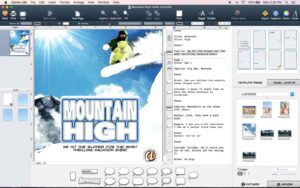
Comic Life is a Mac desktop publishing app from plasq that turns your photos into comic pages, classroom projects, or short visual stories—not a comic reader for following other people’s feeds.

What you actually do in the app

You open a template or a blank page, drop in pictures from the built-in photo browser, and add speech balloons, captions, and lettering. Comic Life 4 adds stronger photo styling than older versions: comic filters you can tune in an image panel, Instant Alpha for cutting subjects out of backgrounds, and shape tools to build custom panels and balloon outlines. A script editor lets you write dialogue first, then drag lines onto the page so layout stays organized on longer stories.

Balloons support multiple tails, burst and stroke tail styles, and an envelop action that wraps speech around text. Captions can use decorative initial caps or connect in threads across a page. Lettering includes line mode along a path (useful for sound effects), multiline titles, and 3D styling for classic comic headlines. When the page looks right, you export to PDF, EPUB, CBZ, or images, or print through AirPrint.

Who uses it

Teachers and students use Comic Life for history timelines, book reports, and language projects because the workflow is visual and fast. Families turn vacations into photo comics; hobbyists storyboard ideas before drawing. It is a poor match if you only want to read Marvel or webtoons online—you need a reader app, not a layout tool. Compared with general design apps, Comic Life is narrower but quicker for balloons, halftones, and comic typography out of the box.

Buying and running on your Mac

Comic Life 4 is Mac-only in this product line (older Comic Life 3 still exists for Mac and Windows). plasq sells a direct download with a 30-day trial from their store, and the Mac App Store offers Comic Life 4 and upgrade bundles for owners of Comic Life 3. Educational volume pricing is available from the vendor. The app requires macOS 11.3 or later and runs natively on Intel and Apple Silicon Macs. Version 4.2.1 is the build referenced in this catalog entry; plasq’s public site did not list itemized changes for that build when this text was prepared—check the App Store “What’s New” on your install for the exact patch list.

More: plasq — Comic Life 4 for Mac
Pros & Cons Show details

✅ PROS

  • Over 60 templates and 70+ comic fonts give students and hobbyists a fast start without designing panels from scratch in a general graphics app.
  • The script editor with drag-to-page workflow suits multi-page school projects and storyboards better than placing text boxes manually in Pages or Canva.
  • Next-generation photo filters, Instant Alpha, and halftone or speedline fills are built for comic looks instead of generic photo filters.
  • Export to PDF, EPUB, CBZ, and print supports sharing homework, zines, and classroom handouts without a separate export tool.
  • Native Intel and Apple Silicon support on macOS 11.3+ fits current school Mac labs without Rosetta-only friction.

❌ CONS

  • Comic Life 4 is Mac-only in the current line, so mixed Mac/Windows classrooms may need Comic Life 3 on Windows or another tool on PCs.
  • Pricing varies by channel (direct store vs App Store upgrade bundle), which can confuse buyers comparing one-time vs bundle offers.
  • Public changelog detail for build 4.2.1 is not on plasq’s website, so you rely on App Store release notes for exact fixes.
  • The app focuses on photo comics and layout, not professional illustration—digital painters may still prefer Clip Studio or Photoshop for art.
  • Large comics with many high-resolution photos can stress RAM on base MacBook Air models during filter previews and export.
✅ What's New in 4.2.1 Show details
  1. [Bug fixes and stability improvements] — Documented for 4.1.4 on the Mac App Store line; typical maintenance before or alongside a 4.2.x catalog build.
  2. [Comic Life 4 platform features] — Version 4.x ships next-gen photo filters, an image tuning panel, and Instant Alpha from the 4.0 feature set described by plasq.
  3. [Balloon and caption tooling] — Envelop action, caption threads, decorative initial caps, and shape operations for outlines remain core 4.x layout improvements over Comic Life 3.
  4. [Lettering along paths] — Line lettering mode and multiline block titles support sound effects and chapter headers without manual vector work.
  5. [macOS 11.3+ and Apple Silicon] — The 4.x Mac build targets current macOS and universal Intel/ARM Macs per store metadata.
  6. [Verify 4.2.1 changes locally] — Open Comic Life → App Store updates or plasq support if you need the exact 4.2.1 patch list not yet posted on the vendor site.

Older Versions

Version Publication date
Comic Life v4.2.1 Latest Current
Comic Life v3.5.24
Comic Life v3.5.20
Comic Life v3.5.19
Comic Life v3.5.18
Comic Life v3.5.17
Comic Life v3.5.11

Installation & Troubleshooting FAQ

8 questions

Common issues when installing macOS apps

Alternatives

1 Comment

  1. Mount the image and launch Open Gatekeeper Friendly.

    Press Enter to bypass Gatekeeper in the Terminal window.

    Drag the application to the Applications folder.

    The application is ready to use.

    Compatibility
    macOS 11.3 and later

Join the Conversation

Your email address will not be published. Required fields are marked *