
Folder-Factory 7.13.0 for Mac

Folder-Factory
Name:Folder-Factory 7.13.1 [TNT].dmg.torrent (17.54MB)
Review by:
Downloads 515
Rating
4.4 8 Click to rate
Checked
   Download Torrent Download Now

Folder-Factory 7.13.0 for Mac

Folder-Factory is a Mac App Store utility from TryBest (developer Yong Chen) for designing and applying custom folder icons. It is an icon editor, not a file sorter: it changes how folders look in Finder so you can spot projects, clients, or media types at a glance.

What the app does

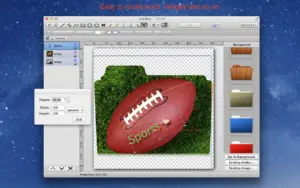
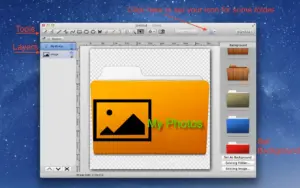
You drag folders or files into the app, then layer images, text, freehand sketches, and vector shapes on top of the standard folder template. The result replaces the folder’s icon in macOS. That can help when the Desktop or Documents tree is crowded and color or a logo is faster to recognize than reading every folder name.

The store description lists drawing tools such as eyedropper, fill, line, rectangle, ellipse, rounded rectangle, pen, eraser, text, and image placement. You can use curved text, adjust stroke and fill colors, work with transparency, and apply shadow, gradient, and reflection effects. Standard editing commands include undo/redo and cut/copy/paste.

Workflow details

Folder-Factory supports Retina displays and drag-and-drop for files and folders. You can place text and graphics precisely on the icon canvas, adjust opacity (including semi-transparent or “invisible” folder looks on older marketing copy), and combine picture plus label on one icon. The interface is aimed at quick, template-style edits rather than full vector illustration.

Version 7.13.0 and platform

Version 7.13.0 appeared on the Mac App Store on 15 May 2026. Apple’s version history for that build only states “Fix some issues” without a detailed changelog. A later store build, 7.13.1 (21 May 2026), adds compatibility fixes for macOS 26; if you install from the App Store today, you may receive the newer build automatically.

Requirements: macOS 10.13 or later. The current listing is about 14.4 MB, priced at $4.99, with Family Sharing supported. Languages on the store page include English, French, German, Hungarian, Italian, Japanese, Portuguese, Russian, and Chinese variants. The developer’s privacy label states that data is not collected.

Support and expectations

Support email on the App Store listing: [email protected]. Folder-Factory does not rename, move, or tidy files inside folders; tools like Hazel or Folder Tidy solve different problems. Custom icons may revert or need reapplication after major macOS updates or if you reset Finder icon caches—behavior can vary by system setup.
Pros & Cons Show details

✅ PROS

  • Focused scope makes it straightforward to learn: open a folder, add art or text, apply—without learning a general design suite.
  • Broad in-app toolset (shapes, pen, text, images, gradients, shadows) covers most quick labeling needs without exporting from Photoshop first.
  • Drag-and-drop folders and undo/redo support fit repetitive labeling of project directories or client folders.
  • One-time App Store purchase (currently $4.99) avoids a subscription for occasional icon work.
  • Retina support and multi-language store listing suit HiDPI Macs and non-English users.
  • Developer states no data collection in the App Store privacy section, which may matter on work machines with strict policies.

❌ CONS

  • Version 7.13.0’s public release note is only “Fix some issues,” so you cannot see what was fixed without trying the build or moving to a newer App Store version.
  • macOS 26 (Tahoe) compatibility is called out in 7.13.1, not documented for 7.13.0; catalog users on the newest OS should prefer the latest store build.
  • Custom folder icons are cosmetic; the app does not organize, search, or automate file placement inside folders.
  • Very few App Store ratings are visible, so long-term quality and update cadence are harder to judge than for mainstream utilities.
  • Accessibility features are not declared on the App Store, which may limit usability for assistive technology users.
  • Heavy use of custom icons across many volumes can make backups and sync setups more confusing if icons are not preserved the same way on another Mac.
✅ What's New in 7.13.0 Show details
  1. [Bug fixes] — Apple’s note for 7.13.0 is limited to “Fix some issues”; individual bugs are not named on the store page.
  2. [Maintenance between 7.12 and 7.13.1] — This build sits after 7.12.0 (selection tool and font menu improvements) and before 7.13.1; it does not repeat those feature bullets in its own changelog.
  3. [No listed new tools in 7.13.0] — The store entry does not announce new drawing tools or effects for this version—treat it as stability rather than a feature release.
  4. [macOS 26 fixes not in 7.13.0] — Compatibility work for macOS 26 is documented for 7.13.1 (21 May 2026), not for 7.13.0; upgrade via the App Store if you need that fix.
  5. [App Store delivery] — 7.13.0 is distributed through the Mac App Store (TryBest, © 2012–2026); updates install through Apple’s normal update channel.

Older Versions

Version Publication date
Folder-Factory v7.13.0 Latest Current
Folder-Factory v7.12.0
Folder-Factory v7.11.1
Folder-Factory v7.11.0
Folder-Factory v7.10.1
Folder-Factory v7.10.0
Folder-Factory v7.9.0
Folder-Factory v7.8.0
Folder-Factory v7.7.1
Folder-Factory v7.7.0
Folder-Factory v7.6.1
Folder-Factory v7.6.0
Folder-Factory v7.5.0
Folder-Factory v7.2.2
Folder-Factory v7.2.1
Folder-Factory v7.0.1
Folder-Factory v7.0.0
Folder-Factory v6.0.0
Folder-Factory v5.9.2
Folder-Factory v5.9.1
Folder-Factory v5.9.0
Folder-Factory v5.8.1
Folder-Factory v5.7.12
Folder-Factory v5.7.11
Folder-Factory v5.7.10
Folder-Factory v5.7.9
Folder-Factory v5.7.8

Installation & Troubleshooting FAQ

8 questions

Common issues when installing macOS apps

Alternatives

1 Comment

  1. Mount the image and launch Open Gatekeeper Friendly.

    Press Enter to bypass Gatekeeper in the Terminal window.

    Drag the application to the Applications folder.

    The application is ready to use.

    You may need to disable SIP. Learn more >

Join the Conversation

Your email address will not be published. Required fields are marked *