

Lightroom Classic for desktop
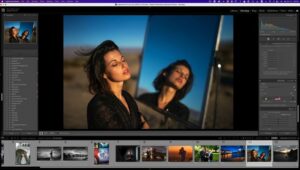
Edit and organize photos in the app built for a desktop workflow. Lightroom Classic pairs fast one-click adjustments with deep controls so you can polish images and keep large libraries under control—then share however you need.
When the file doesn’t match the memory of the scene, Classic gives you the tools to fix it: richer color, life in flat shots, distraction removal, and geometry fixes—plus ongoing performance work so import, preview generation, and moving between Library and Develop feels snappier.
Standout capabilities
Performance: Faster import and preview builds, and quicker transitions across modules when hardware allows.
Selective edits: Range masking helps target regions by color, luminance, or depth so adjustments stay where you intend.
HDR panoramas: Merge bracketed exposures into HDR frames and stitch panoramas in a streamlined pipeline.
GPU-assisted editing: Uses your system GPU to accelerate demanding adjustments.
Organization: Color labels for collections, collection sets, and smart collections keep sets visually scannable.
Camera support: Regular updates add camera and lens profiles as gear ships.
Beyond the desktop: Adobe’s cloud-based Lightroom ecosystem complements Classic—storage, search, and edits across devices depend on your plan and sync choices.
Technical details
- Version: 15.2.1
- Publisher: Adobe
- Interface languages (examples): English, Russian, German, Spanish, Italian, Traditional Chinese, Simplified Chinese, Korean, Dutch, Portuguese, Thai, French, Swedish, Japanese
- Compatibility: macOS 13.1 or later
- Architecture: Apple silicon (ARM) and Intel (x86-64)
Install, trials, and subscriptions: official Adobe Creative Cloud only.




I followed the instructions in English and worked first time on Mac Studio M1 Max.
The most important part of the process once you unzip the downloaded file is put the folder in your Applications Folder then go from there.
Thank you Sirena & Team for uploading, really appreciate the hard work.
PeaceOut
Hello, im currently stuck at the startup. Every time I open LR it closes straight away when it’s on the splashscreen (reading preferences). I’ve tried holding the option key whilst starting up, but it still just closes straight away with a lightroom report. I am working on a Mac Pro 5,1 with Sequoia 15.7.7. With all the supportive hardware. Am i doing something wrong before i’ve even attempted to activate it? Any help would be much appreciated
Develop module works but the Ai generated remover says “Your Computer is not connected to the internet” any way to fix this?
i can’t install on my macbook pro m1 pro .plz help me how to install it
is there a monter group version of this app?
hello all,
thanks a lot for this release,
installation was succesful via adobe cloud (official) but eventhough i used lulu to block adobe to reach internet,
it says unable to verify your credential and close the program.
is it possible to have a complete installation guide step by step with screen capture because i new to macbook (one week) and
The activation tool app won’t open, says it’s damaged (just like all the previous ones, but unlike them the ‘open anyway’ does not show in the System Settings). I run the FIX which seems to do nothing. What am I doing wrong?
The software is working perfectly fine, thanks. However, due to not having internet connection to Adobe servers (naturally), I have no access to AI removal tools inside. Is there a way to gain access to AI removing tools?
You’re never going to gain access to the AI tools without paying an Adobe subscription.
Finally got it to work on my M4 Studio…the “activation part of the PDF was a bit vague; it hinted at placing the activation tool IN THE APPLICATION section…i think it should’ve been a bit more clearer; anyhow after using the FIX a few times it eventually popped up and asked me to choose the LC with the + sign.
Happy days as the DEVELOP section is working…many thanks to the uploader, it’s very much appreciated 🙂
You’re always welcome — I do my best for you 😉
where is the monter group version of this dmg?
How do i use the activator it keeps saying it is damaged
I ran to this during Installing CCXP v5.2.4.1
The installer’s integrity is compromised: the developer’s authorship has been erased
How can I get pass this?
Hola, tengo un MacBook Pro MS3 y no me deja instalar el programa, me da error, ni aunque vaya a privacidad y le de a instalar igualmente
Donde puedo encontrar el procedimiento para instalar de manera correcta el programa?
I installed it on my MacBook Pro M4, but it is asking me to activate it by logging into my email account. What should I do? None of the patches work, because every time I try to use them, my Mac tells me to move them to the Trash.
go to settings privacy and press on install anyway.
this should help
Version 15.2.1 runs fine on my Intel 2020 Mac running OS 15.7.5
Has anyone tried this yet? Does it work?
I cant install the programe I’m MacBook Pro M4 pro
Insufficient data.
jakie rzeczy wprowadza ta aktualizacja?