
SaneClip 2.3.11 for Mac

SaneClip
Name:SaneClip 2.3.11.dmg.torrent (7.19MB)
Hash:346f9150e9c02dd392e1952f16b68a38d4e6e669
Review by:
Downloads 143
Rating
4.2 30 Click to rate
Checked
   Download Torrent Download Now

SaneClip

A privacy-oriented clipboard manager for macOS that keeps copied text and images in searchable local history, with optional encryption, Touch ID lock, and sync to a free iPhone and iPad companion through your own iCloud account.

Typical Mac workflow

SaneClip runs from the menu bar and records clips as you copy in other apps, tagging each entry by source with color coding so you can scan history visually. Open history with the default shortcut (Cmd+Shift+Control+Y), search or filter, then paste an older item with one click on the direct-download build—or copy to the clipboard and press Cmd+V on the Mac App Store build, where sandbox rules block simulated keystrokes. Pins keep boilerplate handy; Pro adds snippets with placeholders, a paste stack for batch form filling, text transforms, clipboard rules that strip URL tracking parameters, and OCR sidecars for screenshots. Password-manager apps can be excluded so secrets never enter the log.

Free, trial, and Pro

Version 2.3.11 changes how you evaluate paid features: new direct-download installs get 14 days of full Pro access with no credit card, then fall back to Basic if you do not purchase. Basic still includes 50-item history, search, pinning, screenshot capture, app exclusions, and the mobile companion. Pro unlocks unlimited history, Touch ID history lock, AES-256-GCM encryption at rest, smart paste, rules, export/import, and related power tools for a one-time $14.99 fee according to the vendor site—no subscription.

Sync and distribution channels

Optional iCloud sync moves records through CloudKit in your Apple account, not a SaneApps server; with History Encryption enabled, synced payloads are encrypted before upload. Recent 2.3.x releases refined how Mac clips appear on iPhone and iPad while the companion app is active and tuned iOS pasteboard prompts. Two Mac builds exist: the Sparkle direct download supports one-click auto-paste and self-updates; the Mac App Store build matches on core features but requires manual Cmd+V after selecting a clip. The iOS app is a separate free App Store download.

Requirements and transparency

The vendor documents Apple Silicon (M1 or later) and macOS 15 on support pages, while the marketing site also lists macOS 14 Sonoma; the current Homebrew cask depends on Sequoia. Source code is published under PolyForm Shield on GitHub for audit, though it is source-available rather than OSI open source. Version 2.3.11 itself is a small release focused on the Pro trial policy; broader clipboard and sync improvements shipped in preceding 2.3.x builds that users receive when updating to this build.
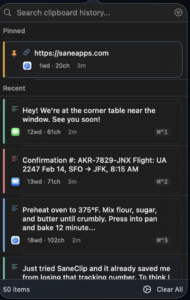

SaneClip 2.3.11 for Mac — Secure Clipboard Manager

Pros & Cons Show details

✅ PROS

  • Local-first storage with optional AES-256-GCM encryption and Touch ID lock addresses clipboard history risks that plaintext managers often ignore.
  • Version 2.3.11 lets you try full Pro for 14 days without a credit card while keeping Basic free afterward, lowering the cost of evaluation.
  • iCloud sync uses your own CloudKit container rather than a vendor sync server, which fits privacy-conscious Mac and iOS workflows.
  • The free iPhone and iPad companion adds widgets, Share Sheet capture, and Shortcuts so synced clips are usable away from the desk.
  • Direct-download builds support one-click auto-paste and published source code, which is uncommon among clipboard utilities at this price point.

❌ CONS

  • Current Mac App Store and support documentation target macOS 15 and Apple Silicon, which excludes Intel Macs and users still on older macOS releases.
  • Mac App Store builds cannot auto-paste into other apps because of sandbox limits, so those users must press Cmd+V after every history pick.
  • Basic tier caps history at 50 items, so heavy copy-paste workflows need Pro or frequent manual cleanup.
  • English is the only listed App Store language today, which limits accessibility for non-English Mac users despite broad feature coverage.
  • Licensing differs between direct download, App Store, and Setapp channels, so feature parity and trial behavior may not match across install sources.
✅ What's New in 2.3.11 Show details
  1. 14-day Pro trial — version 2.3.11 (and 2.3.10) lets new direct-download users try all Pro features for 14 days without payment details, then continue on free Basic.
  2. Basic after trial — when the trial ends without purchase, core history, search, pinning, and companion sync remain available instead of locking the app entirely.
  3. iPhone save prompt — release 2.3.9 restored the visible clipboard save prompt on iOS so users know when the companion captures the pasteboard.
  4. Multi-clip paste saving — 2.3.9 improves saving when several pasteboard items are available during multi-clip paste workflows on iOS.
  5. Menu bar icon visibility — 2.3.9 adds a setting to hide the menu bar icon while preserving app access for users who want a cleaner menu bar.
  6. Foreground iCloud sync — 2.3.7 keeps Mac clipboard text appearing on iPhone and iPad automatically while the companion app is foregrounded, without redundant local save banners for synced clips.

Installation & Troubleshooting FAQ

8 questions

Common issues when installing macOS apps

Alternatives

Join the Conversation

Your email address will not be published. Required fields are marked *