
Tagr 5.14.1 for Mac

Tagr 5
Name:Tagr 5.14.1 MAS [TNT].dmg.torrent (10.27MB)
Review by:
Downloads 638
Rating
4.6 23 Click to rate
Checked
   Download Torrent Download Now

Tagr 5.14.1 for Mac

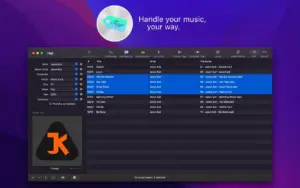
Tagr 5 is a Mac App Store music metadata editor by Harald Schubert (entwicklungsfreu.de). It is built for owners of local libraries who want to fix tags, embed cover art, rename files to a consistent pattern, and pull album data from Discogs—without handing control to iTunes or Apple Music alone.

Editing and formats

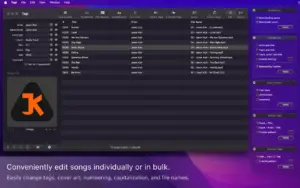
You can edit one file or many at once. Supported formats listed on the store page include MP3 (ID3 v1, v2.3, and v2.4), M4A/M4B (AAC and ALAC), WAV, FLAC, and AIFF. Tags cover track and disc numbers, title, artist, album artist, composer, album, genre, year, comment, compilation flag, lyrics, and BPM.

Common tasks include embedding artwork, applying uppercase/lowercase/title-case rules, auto-generating track numbers, and using predefined or custom file naming schemes. You can extract tags from filenames or titles with patterns, merge tags into new fields (useful for podcasts), and export or import metadata as tab-separated values for spreadsheet workflows.

Discogs and preview

Tagr can search discogs.com for album metadata and artwork, then apply results to a selection. Quick Look lets you preview tracks while editing. The developer site notes integration with Apple Music for dragging files in and pushing updates back, and that file access goes through the TagLib library.

File naming and sandbox (5.14.1)

Version 5.14.1 is the current Mac App Store build. Release notes highlight an important sandbox change: because of Apple security restrictions, renaming individually added files is no longer possible outside the home folder you set in Tagr preferences. If you rely on free renaming across arbitrary paths, configure that home folder or work inside it. The same update also lists stability improvements and unspecified bug fixes.

Version 5.14.0 (March 2026) added Spanish and fixed toolbar icons in the customization view; interface languages on the store now list English, German, and Spanish.

Platform and licensing

Requires macOS 10.14 or later. The listing is about 6.2 MB, priced at $8.99, with Family Sharing. The developer states that data is not collected. A demo video is referenced on entwicklungsfreu.de.
Pros & Cons Show details

✅ PROS

  • Batch editing of tags, capitalization, and numbering suits large rips or downloads where every album arrived with inconsistent metadata.
  • Broad format support (MP3, M4A/M4B, WAV, FLAC, AIFF) covers most local libraries without maintaining separate tools per codec.
  • Discogs search with cover browsing speeds up filling missing album, year, and artwork fields compared with typing everything manually.
  • Custom file naming and tag-extraction patterns give predictable filenames for DJ software, car stereos, or folder-based players that sort by track number.
  • TSV export/import is practical when you want to audit hundreds of rows in a spreadsheet before writing tags back.
  • Small install size and a stated no-data-collection privacy label keep the app lightweight for offline library work on a personal Mac.

❌ CONS

  • The app is a paid Mac App Store purchase ($8.99); there is no subscription, but it is not a free tagger like some command-line alternatives.
  • Version 5.14.1 restricts renaming individually added files outside the configured home folder because of macOS sandboxing—power users with files scattered across drives must adjust workflow or preferences.
  • Discogs lookup requires network access and depends on Discogs match quality; obscure releases may still need manual edits.
  • Very few public App Store ratings are shown, so stability and update cadence are harder to judge than for mainstream music apps.
  • Accessibility support is not declared on the App Store, which may limit use with assistive technologies.
  • It focuses on file tagging and renaming, not library streaming, sync, or duplicate detection; you may still need other tools for those jobs.
✅ What's New in 5.14.1 Show details
  1. [Sandbox renaming limit] — Individually added files can no longer be renamed outside the home folder set in Tagr preferences, due to Apple sandbox rules; this affects how you add and rename tracks on macOS.
  2. [Home folder preference] — You should set and use the configured home folder when relying on per-file rename workflows, or renaming may silently not apply where it used to.
  3. [Stability improvements] — The 5.14.1 notes cite general stability work; specific defects are not listed on the store page.
  4. [Bug fixes] — Unspecified bug fixes ship with 5.14.1; check the build after upgrade if you hit editor or table issues.
  5. [Spanish (5.14.0)] — The prior 5.14.0 release added Spanish and fixed toolbar icons in the customization view; 5.14.1 does not repeat those items but builds on that localization line.

Older Versions

Version Publication date
Tagr v5.14.1 Latest Current
Tagr v5.14.0
Tagr v5.13.0
Tagr v5.12.0
Tagr v5.11.2
Tagr v5.9.1
Tagr v5.8.1
Tagr v5.8.0
Tagr v5.7.0
Tagr v5.6.3
Tagr v5.6.2
Tagr v5.6.0
Tagr v5.5.2
Tagr v5.5.1
Tagr v5.5.0
Tagr v5.4.1
Tagr v5.4.0
Tagr v5.3.0
Tagr v5.2.0

Installation & Troubleshooting FAQ

8 questions

Common issues when installing macOS apps

Alternatives

Join the Conversation

Your email address will not be published. Required fields are marked *