Feeder 4.8.4 for Mac

Feeder
Name:Feeder 4.8.4 [TNT].dmg.torrent (16.76MB)
Review by:
Downloads 244
Rating
4.2 10 Click to rate
Checked
   Download Torrent Download Now    Download Link

Feeder 4.8.4 for Mac

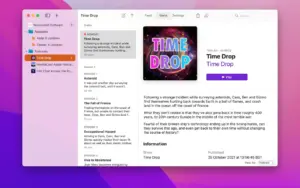
Feeder from Reinvented Software is a Mac app for people who create and publish their own RSS feeds—not for reading other people’s news. If you run a podcast, a site with an RSS channel, or Sparkle appcast updates for your software, Feeder is where you write episodes or posts and push the feed live.

How you work with it

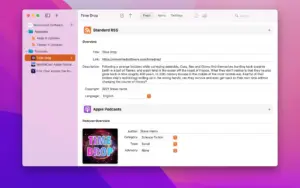
You start by creating a new feed or importing an existing one from a URL or file. Adding an item feels similar to writing email: a rich text editor for shownotes, with HTML or Markdown when you need more control. Templates and autocomplete speed up recurring boilerplate. Before publishing, you can preview how a podcast episode will look in Apple Podcasts, check artwork and metadata against Apple’s requirements, and search past items in the feed.

When an item is ready, Feeder uploads the feed and media in one step. Publishing targets include FTP, SFTP, Amazon S3 (and S3-compatible hosts), WebDAV, or a local folder. Feeds, images, and enclosures can go to different servers if your setup requires it. You can schedule publication, ping update services, notify WebSub hubs, and cross-post to WordPress. Podcasters can add transcripts, Spotify country limits, Podlove chapters, and Podcast Index tags; developers can build Sparkle appcasts with automatic DSA/edDSA signatures.

Sync and collaboration

Feeder 4 stores feeds in iCloud so the same library appears on all your Macs. Optional iCloud storage for unpublished enclosures keeps large audio files available everywhere. You can share a feed with another Feeder user for collaborative editing—useful for small teams maintaining one podcast or news channel.

Who it is for

Independent podcasters who want to own their feed URL, bloggers syndicating with RSS, and Mac developers shipping Sparkle updates are the core audience. It is a poor fit if you only want to subscribe to blogs—NetNewsWire and similar readers do that job. Feeder assumes you control hosting and want direct publish paths without a middleman platform lock-in.

Licensing and this version

Feeder sells for $49.99 on the Mac App Store with Family Sharing, or as a direct download with a 15-day trial from Reinvented Software. It requires macOS 12.4 or later on the App Store listing (12.0 on the vendor download page). Version 4.8.4 (May 2026) is a maintenance release focused on iCloud sync and macOS 26 menu polish; detailed changes are in the release notes linked below.

More: Reinvented Software — Feeder
Pros & Cons Show details

✅ PROS

  • You own the feed file and hosting path, so moving podcast hosts or analytics later does not trap your subscribers on a third-party platform.
  • Apple Podcasts preview and validation help podcasters catch artwork, metadata, and episode layout issues before publish.
  • One-click publishing over FTP, SFTP, S3, WebDAV, or disk export covers most self-hosted and cloud workflows without separate upload tools.
  • iCloud sync and shared editing let one feed stay consistent across Macs and small teams without emailing XML files.
  • Sparkle appcast support with signature generation and release-note preview is a practical fit for Mac developers who already ship updates through RSS.

❌ CONS

  • At $49.99 it targets creators who publish regularly; casual one-off feed edits may not justify the cost versus simpler tools.
  • It is not an RSS reader—if you only follow blogs and podcasts, Feeder solves the wrong problem.
  • English-only interface on the App Store listing may limit teams that need localized UI.
  • Version 4.8.4 changes are incremental (iCloud and UI polish), not a major feature drop for users still on 4.8.0.
  • macOS 12.4 minimum and a paid license exclude users on older systems or those expecting a free publishing tool.
✅ What's New in 4.8.4 Show details
  1. [iCloud merge after manual reload] — Changes from iCloud merge more reliably when you manually reload a feed, reducing sync conflicts during editing.
  2. [iCloud fetch progress] — Progress feedback while fetching everything from iCloud is clearer, so large libraries are easier to monitor.
  3. [macOS 26 menus] — Menu appearance is updated for macOS 26, aligning with recent Tahoe UI changes in the 4.8 line.
  4. [Updated FTP software] — The bundled FTP stack is refreshed for compatibility and reliability when publishing over FTP/SFTP.
  5. [May 2026 maintenance release] — 4.8.4 follows 4.8’s macOS 26 Liquid Glass work with targeted fixes rather than new editor or publishing features.

Older Versions

Version Publication date
Feeder v4.8.4 Latest Current
Feeder v4.8.3
Feeder v4.8.2
Feeder v4.8.1
Feeder v4.8.0
Feeder v4.7.4
Feeder v4.7.3
Feeder v4.7.2
Feeder v4.7.1
Feeder v4.7
Feeder v4.6.6
Feeder v4.6.5
Feeder v4.6.4
Feeder v4.6.3
Feeder v4.6.2
Feeder v4.6.1
Feeder v4.6.0
Feeder v4.5.5
Feeder v4.5.4
Feeder v4.5.3
Feeder v4.5.2
Feeder v4.5.1
Feeder 4.4.5 (5937) v4.4.5.5937
Feeder v4.4.4
Feeder v4.4.3
Feeder v4.4
Feeder v4.3.11
Feeder v4.3.10
Feeder v4.3.9
Feeder v4.3.8
Feeder v4.3.7
Feeder v4.3.5
Feeder v4.3.3
Feeder v4.3.2
Feeder v4.3.1
Feeder v4.3
Feeder v4.2.5
Feeder v4.2.4
Feeder v4.2.2
Feeder v4.2.1
Feeder v4.2
Feeder v4.1.5
Feeder v4.1.4
Feeder v4.1.3
Feeder v4.1.2
Feeder v4.1.1
Feeder v4.1
Feeder v4.0.10
Feeder v4.0.9
Feeder v4.0.8
Feeder v4.0.7
Feeder v4.0.6
Feeder v4.0.5
Feeder v4.0.4
Feeder v3.7.5
Feeder v3.7.4
Feeder v3.7.3
Feeder v3.7
Feeder v3.6.6
Feeder v3.6.4
Feeder 3 v3.3.6.7

Installation & Troubleshooting FAQ

8 questions

Common issues when installing macOS apps

Alternatives

1 Comment

  1. Mount the disk image (.dmg) and open Open Gatekeeper friendly.

    Press Enter in the Terminal window to bypass Gatekeeper.

    Drag the app into your Applications folder.

    IMPORTANT: System Integrity Protection (SIP) must be disabled. Learn more >

    Compatibility

    macOS 11 and later

Join the Conversation

Your email address will not be published. Required fields are marked *