
WhyFi 1.4.3 for Mac

WhyFi
Name:WhyFi 1.4.3 [EDiSO].dmg.torrent (5.73MB)
Hash:0b11e165de79411b53df7e73c14f373f4b4cdfc5
Review by:
Downloads 101
Rating
4.6 12 Click to rate
Checked
   Download Torrent Download Now

WhyFi

A macOS menu-bar utility that continuously measures your wireless link and separates problems into Wi-Fi signal, router latency, internet quality, and DNS so you know what to fix instead of staring at Apple’s bar graph.

Typical Mac workflow

You install WhyFi from whyfi.network, enter your license key, and leave it running in the menu bar. The icon uses a simple face and color coding — green, orange, or red — tied to a 0–100 WhyFi Score that weighs latency, jitter, and packet loss rather than a single worst metric. Click the icon to read signal strength, noise floor, SNR, transmit rate, router ping, internet ping, jitter, and DNS lookup time, with short advice for each layer: move closer for weak Wi-Fi, restart the router for high LAN latency, or accept that a high WAN ping is mostly an ISP issue.

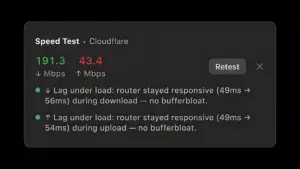
When you need more than passive monitoring, WhyFi Radar updates four times per second as you walk around a room and scores each spot so you can find a stronger location without guessing. A built-in speed test runs through Cloudflare and includes bufferbloat detection, which matters before video calls or screen sharing. A channel scanner highlights congested bands, one-click DNS switching jumps to Google or Cloudflare resolvers, and captive-portal detection flags hotel or airport login pages. You can export a shareable stats image or copy a plain-text diagnostic report to paste into an AI assistant for follow-up troubleshooting.

Licensing and version 1.4.3

WhyFi costs $10 as a one-time purchase with no subscription; according to the vendor, sales are donated to Jet Set Petz, a Bali charity that vaccinates and sterilizes street animals. The app requires macOS 13 Ventura or later and runs on Apple Silicon and Intel Macs. Version 1.4.3 (build 23), released 2 July 2026, rebuilds the speed test for better accuracy and usability and removes the TCP connections metric the developer considered unhelpful. Updates arrive through the vendor’s Sparkle feed, and a Homebrew cask is also available for installation.

WhyFi 1.4.3 — Wi-Fi Diagnostics Menu Bar for Mac

Pros & Cons Show details

✅ PROS

  • Layered Wi-Fi, router, ISP, and DNS breakdown is clearer than macOS Wireless Diagnostics for day-to-day monitoring.
  • WhyFi Radar and the channel scanner help you find a better desk location or less crowded Wi-Fi channel without a separate survey tool.
  • A $10 one-time license undercuts many premium analyzers like WiFi Explorer or NetSpot for basic home troubleshooting.
  • Bufferbloat-aware speed tests and exportable diagnostic reports suit video-call and remote-work debugging workflows.
  • Battery-conscious polling and a compact menu-bar footprint keep the app unobtrusive during normal Mac use.

❌ CONS

  • Version 1.4.3 is a small refinement release with only speed-test and UI metric changes documented in the appcast.
  • Requires macOS 13 or later, so it does not run on older Monterey or Big Sur Macs.
  • Paid license with no Mac App Store distribution; you buy and download directly from the vendor site.
  • Less suited to professional site-survey mapping than dedicated tools such as NetSpot or WiFi Explorer Pro.
  • Speed tests and some checks rely on external endpoints like Cloudflare, which may not reflect every ISP or corporate network policy.
✅ What's New in 1.4.3 Show details
  1. Speed test rebuild — Version 1.4.3 rebuilds the built-in speed test for more accurate download, upload, and latency readings.
  2. Speed test UX — The same rebuild makes the speed-test flow more pleasant to run from the menu-bar popover.
  3. TCP metric removed — The TCP connections monitor introduced in 1.1.1 is dropped because the vendor found it was not useful.
  4. Build 23 release — Version 1.4.3 (build 23) shipped on 2 July 2026 through the official Sparkle update feed.
  5. Intel Mac continuity — Universal Apple Silicon and Intel support from version 1.4.2 remains available in the 1.4.3 installer.
  6. macOS 13 floor unchanged — The appcast still requires macOS 13.0 Ventura or later for this build.

Older Versions

Version Publication date
WhyFi v1.4.3 Latest Current
WhyFi v1.4.2
WhyFi v1.3.0

Installation & Troubleshooting FAQ

8 questions

Common issues when installing macOS apps

Alternatives

Join the Conversation

Your email address will not be published. Required fields are marked *