
Clipsy – Clipboard Manager 2.3 for Mac

Clipsy: Clipboard Manager
Name:Clipsy 2.3 [TNT].iso.torrent (11.87MB)
Review by:
Downloads 281
Rating
4.6 16 Click to rate
Checked
   Download Torrent Download Now    Download Link

Clipsy – Clipboard Manager 2.3 for Mac

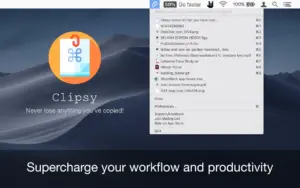
Clipsy is a menu bar clipboard manager from AppYogi Software for macOS. It keeps a rolling history of what you copy—text, links, images, and files—so you can paste an older item without recopying from the source app.

Everyday workflow

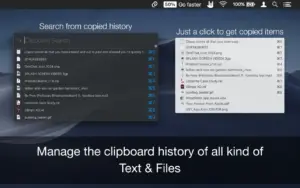
The app runs quietly at the top of the screen. Open the menu to scroll recent clips, or use a keyboard shortcut to search when you remember only part of a sentence or a filename. Thumbnails and file-type indicators help tell screenshots apart from URLs and documents in a long list.

  • Stores up to 9,999 clipboard records according to the App Store description
  • Search through history from the menu bar or via shortcut
  • Edit copied text and URLs before pasting again
  • Exclude specific apps so passwords or secure tools are not logged (Preferences → Behavior)
  • Optional “recently used on top” sorting in General preferences (per AppYogi support docs)

Who it suits

Writers, developers, support staff, and anyone who copies the same boilerplate repeatedly benefit from a lightweight history tool. Clipsy is simpler than full snippet managers: it mirrors the system clipboard rather than replacing it with a structured database you build by hand.

Licensing and version 2.3

Clipsy is sold on the Mac App Store (about $0.99–$4.99 depending on region and promotions; AppYogi’s site has mentioned a free trial link). It requires macOS 10.12 or later, supports Family Sharing, and is available in many languages. Version 2.3 is a maintenance release: shortcut fixes, performance improvements, and general bug fixes per the store “What’s New” text.
Pros & Cons Show details

✅ PROS

  • Menu bar access keeps clipboard history one click away without a separate window cluttering the desktop.
  • Support for text, images, links, and general files covers typical copy-paste work beyond plain strings.
  • Keyboard shortcut search helps recover a clip when the list is long (up to 9,999 entries per vendor copy).
  • Per-app exclusion reduces risk of logging clips from password managers or banking apps when configured in Behavior settings.
  • Low price on the App Store and small install size (~6 MB) make it an easy add-on compared with heavier clipboard suites.

❌ CONS

  • Version 2.3’s changelog is generic (shortcuts, performance, bugs) with no detailed feature list on the store page.
  • AppYogi’s privacy label lists identifiers and diagnostics collection, unlike some competitors that claim no data collected.
  • Editing and search are solid for a budget tool, but power users may miss features like regex filters, iCloud sync, or rich snippet organization found in Paste or Raycast clipboard tools.
  • macOS 10.12 minimum is broad for compatibility but the app may not adopt the newest macOS design language on current releases.
  • Accessibility support is not declared on the App Store listing.
✅ What's New in 2.3 Show details
  1. [Shortcut issue fix] — Keyboard shortcuts for clipboard history and search should behave reliably again after the 2.3 update.
  2. [Performance improvements] — The vendor reports general speed and responsiveness gains when browsing or searching large histories.
  3. [Bug fixes] — Unspecified stability fixes bundled in 2.3; contact [email protected] for issue reports.
  4. [Version 2.3 release] — Current App Store build (about 6.4 MB) replaces earlier 2.2/2.1 lines on the same product ID.
  5. [Ongoing AppYogi support] — Release notes invite feedback for future updates via the listed support email.

Older Versions

Version Publication date
Clipsy – Clipboard Manager v2.3 Latest Current
Clipsy – Clipboard Manager v2.2
Clipsy – Clipboard Manager v2.1
Clipsy - Clipboard Manager v1.9
Clipsy – Clipboard Manager v1.8
Clipsy – Clipboard Manager v1.7
Clipsy: Clipboard Manager v1.6
Clipsy – Clipboard Manager v1.5

Installation & Troubleshooting FAQ

8 questions

Common issues when installing macOS apps

Alternatives

1 Comment

  1. Clipboard managers are pretty handy. I wonder how this one compares to others I’ve tried.

Join the Conversation

Your email address will not be published. Required fields are marked *