
WhyFi 1.4.2 for Mac

WhyFi
Name:WhyFi 1.4.2 [EDiSO].dmg.torrent (6.01MB)
Hash:d34caa7aef7e23e2fd22286c1d278eef4a4568f7
Review by:
Downloads 150
Rating
4.6 18 Click to rate
Checked
   Download Torrent Download Now

WhyFi on Mac

WhyFi is a macOS menu bar utility that continuously watches your Wi-Fi connection and breaks problems into layers—signal to the router, router latency on your LAN, and internet or DNS issues beyond it.

What you see day to day

Click the menu bar icon for signal strength, noise floor, SNR, transmit rate, router ping, internet ping, jitter, and DNS lookup time. A color-coded face and WhyFi Score (0–100, from the 1.4 line) summarize health at a glance. When something degrades, the app suggests practical fixes: move closer for weak signal, restart the router for LAN latency, or contact your ISP when WAN latency spikes.

Extra tools

WhyFi Radar updates several times per second so you can walk around and find the strongest spot, with nearby networks shown for congestion context. Built-in speed tests use Cloudflare and include latency-under-load checks for bufferbloat that ruins video calls. You can export a diagnostic report for pasting into ChatGPT or Claude when you want a second opinion.

Version 1.4.2

Build 1.4.2 (22), released April 24, 2026, adds Intel Mac support alongside existing Apple Silicon builds. The app requires macOS 13.0 or later. WhyFi is a one-time $10 purchase from the developer site with no subscription; according to the vendor, sales support the Jet Set Petz animal charity in Bali.
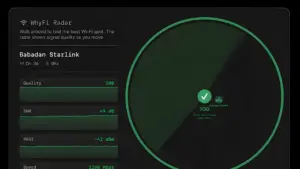
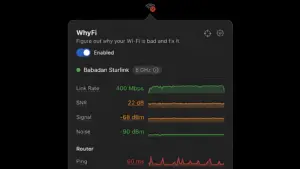
WhyFi 1.4.2 for Mac: menu bar Wi-Fi monitor WhyFi 1.4.2 — Wi-Fi Diagnostics for Mac

Pros & Cons Show details

✅ PROS

  • Layered diagnosis separates Wi-Fi signal, router, ISP, and DNS problems so you stop guessing which part of the chain is failing.
  • Always-visible menu bar monitoring catches intermittent slowdowns that one-off speed tests on a website might miss.
  • WhyFi Radar and bufferbloat testing help you pick better physical locations and spot video-call instability before meetings start.
  • Version 1.4.2 extends support to Intel Macs, so older MacBook owners can use the same tool as Apple Silicon users.
  • One-time $10 pricing without a subscription is inexpensive compared with professional Wi-Fi survey suites like NetSpot or WiFi Explorer.
  • Exportable diagnostic reports make it easy to share evidence with landlords, IT staff, or AI assistants when you need help interpreting results.

❌ CONS

  • Version 1.4.2 is a platform expansion release with no new diagnostic features beyond Intel Mac compatibility.
  • Paid license is required after evaluation; macOS built-in Wireless Diagnostics remains free for basic troubleshooting.
  • The app focuses on Wi-Fi and upstream path health, not deep channel surveys, heatmaps, or enterprise network mapping.
  • Continuous monitoring in the menu bar uses background resources, which may matter on battery-powered MacBooks you want fully idle.
  • No Mac App Store distribution; installs come from the developer CDN or Homebrew, which some managed Mac environments block.
  • ISP-side problems are identified but not fixable inside the app, so you still depend on your provider when WAN latency is the bottleneck.
✅ What's New in 1.4.2 Show details
  1. [Intel Mac support] — WhyFi now runs on Intel-based Macs in addition to Apple Silicon, per the 1.4.2 release description.
  2. [Universal hardware reach] — The same 1.4.2 (build 22) channel delivers installers for both chip families through the official update feed and Homebrew cask.
  3. [macOS 13 minimum unchanged] — The appcast still requires macOS 13.0 Ventura or later for this build.
  4. [April 2026 release] — Build 22 shipped on April 24, 2026 via updates.whyfi.network with Sparkle-signed enclosures from cdn.amore.computer.
  5. [Larger binary footprint] — The 1.4.2 DMG is about 4.9 MB versus roughly 3.4 MB for 1.4.1, consistent with expanded platform support in the package.

Older Versions

Version Publication date
WhyFi v1.4.2 Latest Current
WhyFi v1.3.0

Installation & Troubleshooting FAQ

8 questions

Common issues when installing macOS apps

Alternatives

Important

Run the downloaded image and drag the app to the Applications folder shortcut.

Once the copy is complete, you can launch the app from Launchpad.

Compatibility
macOS 13 and later

Architecture
ARM, x86 (64-bit)

Join the Conversation

Your email address will not be published. Required fields are marked *