Octavo 1.1 for Mac

Octavo
Name:Octavo 1.1 [EDiSO].dmg.torrent (10.54MB)
Hash:6c60e9a345c1f91818f7d6ac3a738f3f77a1d710
Review by:
Downloads 142
Rating
4.2 25 Click to rate
Checked
   Download Torrent Download Now

What Octavo does on Mac

Octavo is a native macOS app for PDF imposition and booklet printing that rearranges pages into the correct sheet order for folding, stapling, hole punching, or binding.

Developed by Double and Thrice Ltd., Octavo targets anyone who has wasted paper figuring out duplex booklet page order. You import a PDF or images, clean up crooked scans with rotate, crop, straighten, and perspective tools, then apply an imposition style such as saddle-stitch, multi-signature, comb binding, tri-fold, business cards, 8-page mini zine, or concertina zine. Live preview shows reader spreads and imposed sheets before you print or export.

Typical Mac workflow

Export your layout from Word, InDesign, or another tool as a PDF, drop it into Octavo, choose saddle-stitch booklet, set inside and outside margins, add fold and crop marks, and print duplex to your home or office printer. Octavo handles blank-page padding, media assignments per sheet, and manual duplex workflows when auto-duplex is unavailable. Mini zines can be printed without purchasing the full unlock.

Version 1.1

Build 1.1 adds Octavo Templates so you can save frequently used imposition settings and pick them from a template gallery when creating a new document. Fixes address page number placement on 1-up duplex layouts, spine-edge right layouts, spine handling in 1-up and comb-binding reader spreads, and page-strip scrolling while dragging pages.

Licensing and requirements

Octavo requires macOS 15.6 or later and is a one-time $24.99 unlock on the Mac App Store with a free trial; exported prints show a small banner until you purchase. The developer reports no data collection. English and German are supported.
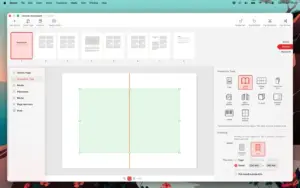
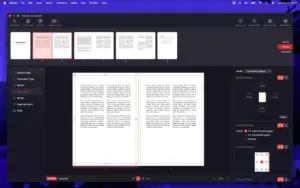
Octavo 1.1 imposes PDFs for saddle-stitch booklets Octavo 1.1 for Mac — Booklet Imposition & Printing

Pros & Cons Show details

✅ PROS

  • Octavo automates booklet imposition math for saddle-stitch, signatures, comb binding, tri-folds, labels, and zines without professional prepress software.
  • Built-in PDF cleanup with straighten, perspective correction, margins, and filters helps salvage scans before imposing pages.
  • Deep macOS printing integration supports duplex detection, tray selection, printer marks, and manual duplex for consumer printers.
  • Version 1.1 adds reusable Octavo Templates and a gallery chooser, which speeds repeat jobs such as event programs or zine runs.
  • One-time purchase around $24.99 avoids subscriptions, and mini zines remain usable without buying the full unlock.

❌ CONS

  • Octavo imposes and prints finished PDFs; it is not a full layout or typography tool like InDesign for designing books from scratch.
  • macOS 15.6 is the minimum, which excludes Macs still on older supported macOS versions.
  • Trial output includes a banner on printed pages until you unlock, which limits clean test prints for client deliverables.
  • Version 1.1 focuses on templates and layout fixes rather than adding new imposition styles beyond the existing lineup.
  • The app is Mac-only with English and German UI, so cross-platform teams cannot share the same tool on Windows.
✅ What's New in 1.1 Show details
  1. [Octavo Templates] — You can save frequently used imposition settings as Octavo Templates for faster repeat booklet and label jobs.
  2. [Template gallery] — A template chooser gallery appears when creating a new document so saved setups are easy to reuse.
  3. [1-up duplex page numbers fix] — Fixed incorrect page number locations on the 1-up duplex imposition type.
  4. [Spine-edge right layouts] — Improvements to spine-edge right layouts and spine-edge handling in 1-up and comb-binding reader spreads.
  5. [Page strip drag fix] — The page strip no longer jumps back to the start when you drag pages while the list is scrolled.

Installation & Troubleshooting FAQ

8 questions

Common issues when installing macOS apps

Alternatives

Important

Run the downloaded image and drag the application to the Applications folder shortcut.

Once the copy is complete, you can launch the application from Launchpad.

Compatibility
macOS 15.6 and later

Architecture
ARM, x86 (64-bit)

Join the Conversation

Your email address will not be published. Required fields are marked *