

UltraEdit for Mac and Windows — a powerful text editor for large files, code, and remote workflows
UltraEdit is a professional text, code, and hex editor built for people who need speed, precision, and reliability on real-world workloads. It is widely used for software development, data processing, log analysis, and server-side file editing—especially when files become too large for lightweight editors.
Unlike minimalist tools that struggle with scale, UltraEdit is designed to stay responsive with very large documents, advanced search operations, and multi-file editing sessions. For developers and technical teams, it combines editing power, workflow automation, and remote access tools in one desktop application.
Why UltraEdit stands out
Handles huge files: UltraEdit is known for editing files larger than 4 GB, making it a practical choice for logs, exports, dumps, and machine-generated datasets.
Built for precision editing: Multi-caret and multi-selection editing let you modify multiple lines and positions at once. Column mode is ideal for structured text, fixed-width data, and quick mass edits.
Advanced search and replace: Power users get regex support, “find in files,” replace across folders, result listing, bookmarks, and navigable output—critical for refactoring and text-heavy maintenance tasks.
Remote file workflows: Integrated FTP/SFTP support allows direct work with server files, including upload/download and synchronized editing scenarios.
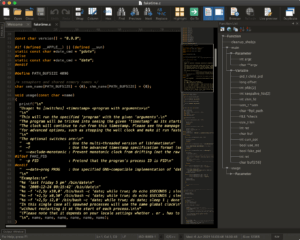
Code-friendly environment: Syntax highlighting, configurable themes, project/file organization tools, and customization options support long coding sessions without UI friction.
Designed for developers, IT teams, and technical writers
UltraEdit fits teams that work with mixed file types and mixed environments. You can edit code, inspect plain text, adjust configuration files, and process large machine output—all inside one interface. The editor is also helpful in DevOps and infrastructure workflows where files are distributed across local folders, network paths, and remote servers.
For data-heavy tasks, features like column editing, robust bookmarking, and high-volume search make repetitive operations faster and less error-prone. For coding tasks, multi-caret editing and configurable syntax behavior reduce manual overhead in everyday refactoring.
In practical terms, UltraEdit sits between classic “light editors” and full IDEs: lighter than a heavyweight IDE, but significantly more capable than basic text tools when files, search scope, and complexity grow.
Key features at a glance
- Large file editing: reliable work with multi-GB files
- Column mode: vertical/block editing for structured text
- Multi-caret editing: parallel edits across many locations
- Regex search/replace: advanced pattern-based operations
- Find/replace in files: directory-wide text operations
- Integrated FTP/SFTP: remote editing and transfer support
- Project/file navigation: tab and file management for large sessions
- Theme and UI customization: adapt workspace to your workflow
- Hex and text editing capabilities: useful for low-level inspection
Who should use UltraEdit
UltraEdit is a strong fit for software developers, sysadmins, QA engineers, web teams, and analysts who routinely edit large files or perform batch text operations. It is also useful for technical documentation and content engineering teams working with structured markup and automation-friendly text workflows.
If your daily editor must handle scale, remote systems, and deep search control—not just simple note editing—UltraEdit is one of the most practical professional options.
Technical note
For latest capabilities, supported platforms, and release details, always check the official UltraEdit product pages and feature documentation.




after several minutes crash