System Dashboard Pro 3.1.5 for Mac

System Dashboard Pro
Name: System Dashboard Pro 3.1.5 MAS [TNT].dmg.torrent (7.69MB)
Version: 3.1.5
Operating System: macOS
Program license: Free
Developer: Sascha Simon
Interface language: English
Review by:
Downloads 850
Rating
4.2 36 Click to rate
Checked
   Download Torrent Download Now    Download Link

System Dashboard Pro 3.1.5 for Mac

System Dashboard Pro is a Mac utility from developer Sascha Simon. It is the expanded follow-up to his older System Dashboard app: same idea of watching how hard your Mac is working, but with more panels and detail on current macOS versions.

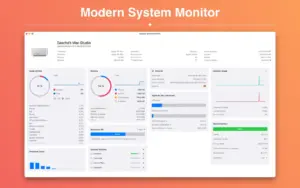
When something feels slow—a fan spinning up, Safari stuttering, or a download that never finishes—you usually open Activity Monitor and jump between tabs. System Dashboard Pro puts the common checks in one place. You see macOS version and machine info at a glance, then panels for processor load (current and recent history plus top processes), memory the same way, network addresses and live up/down speeds with open connection counts, and disk space plus transfer speed on internal drives.

On a MacBook you also get battery health, cycle count, and related stats. External USB sticks and SD cards show up in their own section, and you can eject one device or all of them from there. Temperature readings are optional: the App Store notes that a separate free plugin is required for sensor values, so plan on that if heat is what you care about.

The app is small (about 3 MB on the store listing), English-only in the store metadata, and priced at $2.99 with Family Sharing. It needs macOS 15.6 or later, which is a fairly new floor—check compatibility before installing on older Macs. Version 3.1.5 is a stability update with bug fixes rather than a feature-heavy release; if you already use the free System Dashboard, Pro is the richer dashboard Simon rebuilt for Apple Silicon–era systems.

Pros & Cons Show details

✅ PROS

  • One window covers CPU, RAM, network, disks, and battery instead of switching Activity Monitor tabs during troubleshooting.
  • Recent load history and top process lists make it easier to spot what spiked usage before you force-quit the wrong app.
  • External drive listing with batch eject is handy when SD cards or USB sticks stay mounted after imports or backups.
  • At $2.99 with no subscription and a “data not collected” privacy label, it is inexpensive compared with long-running monitors like iStat Menus.
  • The developer writes native macOS code without third-party frameworks, which aligns with his stated focus on privacy and lean apps.

❌ CONS

  • macOS 15.6 minimum excludes users on Ventura, Sonoma, or older hardware that cannot upgrade.
  • Temperature data requires an extra free plugin, so out-of-the-box you do not get full thermal monitoring.
  • The App Store listing is English-only and has few public ratings, so long-term support quality is harder to judge from reviews.
  • Version 3.1.5 only documents bug fixes and stability, not new monitoring features for users coming from 3.1.x.
  • It is a dashboard window app, not a deeply customizable menu bar suite like some rivals that embed live graphs in the menu bar full-time.
✅ What's New in 3.1.5 Show details
  1. [Bug fixes] — 3.1.5 addresses unspecified issues reported in earlier 3.1.x builds on current macOS.
  2. [Stability improvements] — The vendor describes this release as improving overall app stability rather than adding panels or metrics.
  3. [Version 3.1.5 on App Store] — Listed as the current Mac App Store build for System Dashboard Pro (Sascha Simon).
  4. [macOS 15.6 requirement unchanged] — Store compatibility still requires macOS 15.6 or later on this line.
  5. [Maintenance cadence] — Follows the 3.x “Pro” rewrite focused on modern Macs; 3.1.5 is a patch release on that branch.

Older Versions

Version Publication date
System Dashboard Pro v3.2.0 Latest
System Dashboard Pro v3.1.5 Current
System Dashboard Pro v3.1.1
System Dashboard Pro v3.1.0
System Dashboard Pro v3.0.6
System Dashboard Pro v3.0.5
System Dashboard Pro v3.0.4
System Dashboard Pro v3.0.3
System Dashboard Pro v3.0.2
System Dashboard Pro v3.0.0
System Dashboard Pro v2.4.2
System Dashboard Pro v2.2.4
System Dashboard Pro v2.2.1
System Dashboard Pro v2.1.7
System Dashboard Pro v2.0.3
System Dashboard Pro v1.10.10
System Dashboard Pro v1.10.9
System Dashboard Pro v1.10.8
System Dashboard Pro v1.10.6
System Dashboard Pro v1.10.4
System Dashboard Pro v1.10.2
System Dashboard Pro v1.10.1
System Dashboard Pro v1.10.0
System Dashboard Pro v1.9.2
System Dashboard Pro v1.9.0
System Dashboard Pro v1.8.0
System Dashboard Pro v1.7.1
System Dashboard Pro v1.7.0
System Dashboard Pro v1.6.1
System Dashboard Pro v1.5.1
System Dashboard Pro v1.5.0
System Dashboard Pro v1.4.8
System Dashboard Pro v1.4.4
System Dashboard Pro v1.4.3
System Dashboard Pro v1.4.2
System Dashboard Pro v1.4.0
System Dashboard Pro v1.3.1
System Dashboard Pro v1.3.0
System Dashboard Pro v1.2.2
System Dashboard Pro v1.1.1
System Dashboard Pro v1.0.4
System Dashboard Pro v1.0.3
System Dashboard Pro v1.0.2

Installation & Troubleshooting FAQ

8 questions

Common issues when installing macOS apps

Alternatives

1 Comment

  1. Mount the image and launch Open Gatekeeper Friendly.

    Press Enter to bypass Gatekeeper in the Terminal window.

    Drag the application to the Applications folder.

    The application is ready to use.

    Compatibility
    macOS 15 and later

Join the Conversation

Your email address will not be published. Required fields are marked *