System Dashboard Pro
A compact Mac utility that puts the checks you normally spread across Activity Monitor, Network settings, and Finder disk info onto one scrollable dashboard.
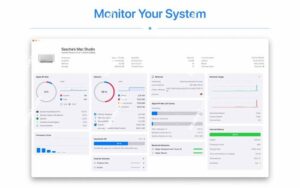
When a Mac feels sluggish or a fan spins up, the usual workflow is to open Activity Monitor, hop between CPU and Memory tabs, then check storage or Wi-Fi elsewhere. System Dashboard Pro is Sascha Simon’s paid follow-up to his free System Dashboard: same single-page idea, rebuilt for recent macOS releases with extra panels and tighter layout. You launch it, read the numbers, and close it—there is no background agent or menu-bar widget in the store description; it behaves like a focused inspection window.
What each panel shows
The General section summarizes macOS version and machine details. Processor and Memory panels show current load plus a short recent history graph, along with a ranked list of the heaviest processes—useful when you need a name to quit, not just a percentage. Network Information covers local and external IP and WLAN link rate; Network Usage adds live download and upload speeds and open connection counts. On MacBooks, Internal Battery reports cycles and health indicators. Hard Disk tracks used and free space and transfer speed on the boot volume; External Drives lists removable media such as SD cards and USB sticks and lets you eject one device or all at once from the same view.
Temperature sensor readings are available when you install the developer’s separate free plugin; without it, that block stays empty. The interface supports a dark appearance according to the App Store accessibility notes. The install is small (about 3.2 MB on the store listing), English-only in metadata, and priced at $2.99 with Family Sharing for up to six members. Privacy labeling states that no data is collected from the app.
Who it fits—and version 3.2.0
It suits Mac owners who want a readable snapshot without learning iStat Menus or third-party suites. It is not a log archive, alerting platform, or remote server monitor; power users may still prefer Activity Monitor for sampling intervals, Instruments for profiling, or dedicated network tools for deep packet inspection. Compatibility requires macOS 15.6 or later, which is a high floor—verify your Mac’s OS before buying if you are not on the latest Sequoia point release.
Version 3.2.0 (listed July 7, 2026 on the Mac App Store) is a polish release: updated visuals and slight performance improvements per the official What’s New text, without advertised new metrics or panels. If you already run the free System Dashboard on older macOS versions, Pro is the modern rewrite; 3.2.0 is worth installing for a refreshed UI and snappier redraws rather than new monitoring categories.