
Soulver 3.16.2 for Mac

Soulver
Name:Soulver 3 3.16.2 [TNT].dmg.torrent (20.73MB)
Review by:
Downloads 522
Rating
4.5 15 Click to rate
Checked
   Download Torrent Download Now    Download Link

Soulver 3.16.2 for Mac

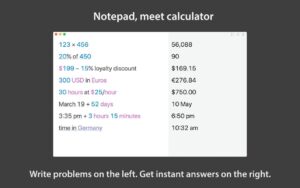
Soulver is a notepad calculator from Acqualia: you write everyday math in normal language on separate lines, and each line shows a live answer. It sits between a basic calculator and a spreadsheet—faster than Excel for quick “what if” work, clearer than Calculator for multi-step problems.

How it feels to use

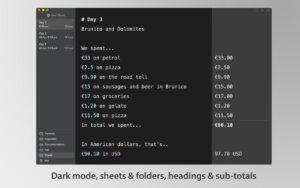
Each sheet is like a note with numbers. You might type 20% of $899, March 12 + 3 weeks, or 10am New York to London and see results update as you edit. Previous lines can feed later ones (like a lightweight spreadsheet), and you can name values as variables. A running total at the bottom sums your work; headings and comments help you structure longer budgets or project estimates.

  • Percentages, tips, and discounts in words, not cryptic key sequences
  • 300+ unit conversions built in, plus live currency and crypto rates when online
  • Date, time zone, and business-day math with public holidays for your region
  • Cooking measures, video timecodes, compound interest, and mortgage-style functions

Sheets, sync, and Mac fit

Calculations live in sheets that save automatically. Turn on iCloud in sheetbook settings to sync with Soulver on iPad and iPhone. The Mac app is a one-time purchase (about $39 after a 30-day trial that does not auto-charge, per the store listing), requires macOS 13.5 or later, and is optimized for Apple Silicon and recent macOS releases according to the developer.

Optional in-app add-ons cover advanced stock tickers and related live data; core math works offline, while live rates need a network connection.

Version 3.16.2 in short

This build adds natural-language helpers for sunrise, sunset, and daylight hours by place, quarter-based date phrases such as next quarter, and superscript exponents like 100². It also fixes an edge case in one exponent calculation. If you used Soulver 2, you can import old files and enable iCloud to pair with the Mac edition.
Pros & Cons Show details

✅ PROS

  • Plain-English lines reduce errors compared with traditional calculators when you mix words, units, and currency in one workflow.
  • Every step stays visible and editable, which makes it easy to audit a budget or tweak one assumption without rebuilding a spreadsheet.
  • Live currency, optional stock data, weather, and holiday-aware business-day math cover common real-world math without leaving the app.
  • Line references, variables, and subtotals give spreadsheet-like power without building cell formulas.
  • One-time Mac purchase with a no-commitment trial and iCloud sheet sync fits users who avoid subscription calculators.

❌ CONS

  • Full Mac unlock is $39 plus optional paid add-ons for extended stock and AI features listed on the App Store.
  • Live conversions and weather require internet; offline use is limited to local math without fresh rates.
  • Soulver is not a full spreadsheet—large models, pivot tables, and heavy data analysis still belong in Excel or Numbers.
  • macOS 13.5 minimum and separate paid iPhone/iPad apps mean the ecosystem is not a single universal purchase across all devices.
  • Accessibility features are not declared on the App Store listing, so VoiceOver support is unclear from public metadata.
✅ What's New in 3.16.2 Show details
  1. [Sunrise, sunset, and daylight] — Phrases like sunrise in Tokyo, sunset in Paris on Dec 21, and daylight hours in Reykjavik answer location-based sun and daylight questions in natural language.
  2. [Quarter date math] — Expressions using quarter, including next quarter, last quarter, and days until next quarter, extend calendar reasoning for planning and reporting.
  3. [Superscript exponents] — Characters such as 100² are interpreted as 100^2, so typed superscripts work without manual caret syntax.
  4. [Exponent accuracy fix] — A specific exponent-related calculation edge case was corrected (noted in release notes with community thanks).
  5. [3.16.2 maintenance on 3.16 line] — Builds on the broader 3.16 calculator and UI improvements from earlier 3.16.x releases on the same branch.

Older Versions

Version Publication date
Soulver v3.16.2 Latest Current
Soulver v3.15.2
Soulver v3.15.1
Soulver v3.15.0.1
Soulver v3.14.4
Soulver v3.14.3
Soulver v3.14.2
Soulver v3.14.1
Soulver v3.13.1
Soulver v3.13.0
Soulver v3.12.0
Soulver v3.10.425
Soulver v3.10.2
Soulver v3.10.1
Soulver v3.9.2
Soulver v3.9.1
Soulver v3.8.0
Soulver v3.7.3
Soulver v3.7.2
Soulver v3.7.0
Soulver v3.6.2
Soulver v3.6.1
Soulver v3.6
Soulver v3.5.9.1
Soulver v3.5.9
Soulver v3.5.8
Soulver v3.5.7
Soulver v3.5.5
Soulver v3.5.4
Soulver v3.5.2
Soulver v3.5.1
Soulver v3.5
Soulver v3.4.18
Soulver v3.4.17
Soulver v3.4.16
Soulver v3.4.15
Soulver v3.4.14
Soulver v3.4.13
Soulver v3.4.12
Soulver v3.4.11
Soulver v3.4.10.1
Soulver v3.4.10
Soulver v3.4.9
Soulver v3.4.8
Soulver v3.4.6
Soulver v3.4.5
Soulver v3.4.4
Soulver v3.4.3
Soulver v3.4.1
Soulver v3.4.0.1
Soulver 3.3 (90) v3.3.90
Soulver v3.2.2
Soulver v3.1.1.1
Soulver v3.1.1
Soulver v3.0.4
Soulver v3.0.2
Soulver v2.9.0
Soulver v2.7.1
Soulver v2.7.0

Installation & Troubleshooting FAQ

8 questions

Common issues when installing macOS apps

Alternatives

Join the Conversation

Your email address will not be published. Required fields are marked *