
Magnet PRO 3.0.7 for Mac

Magnet Pro
Name:Magnet 3.0.7 MAS [TNT].dmg.torrent (6.1MB)
Review by:
Downloads 1,534
Rating
4.6 24 Click to rate
Checked
   Download Torrent Download Now

Magnet PRO 3.0.7 for Mac

Magnet is a long-standing macOS window manager from CrowdCafe that snaps application windows into halves, thirds, quarters, sixths (on ultra-wide displays), and fullscreen using screen edges and corners. Catalog listings labeled Magnet PRO refer to the full commercial app—the same product sold on the Mac App Store—not a separate SKU from the vendor.

What Magnet does

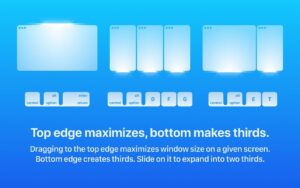
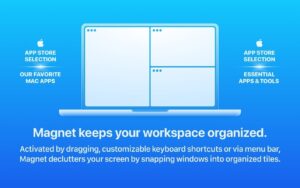
Instead of manually resizing each window, you drag a window to a screen edge or corner, use customizable keyboard shortcuts, or choose layouts from the menu bar icon or the green window button menu (all optional). Magnet can arrange left/right/top/bottom halves, left/center/right thirds, two-thirds combinations, quarters, fullscreen, and sixths on wide monitors. According to the developer site, up to six external displays and vertical orientations are supported, with trigger areas and visuals widely configurable.

The app targets anyone who compares documents side by side, codes with documentation open, or runs several apps at once and wants predictable tiling without learning a complex tiling window manager.

Configuration and sync

Magnet ships with a built-in command set and allows custom commands with adjustable layout and appearance settings. Optional iCloud sync keeps shortcuts and preferences aligned across Macs signed into the same Apple ID. The menu bar icon can be hidden if you prefer shortcuts or drag-only control.

Version 3.0.7

Version 3.0.7 (build 208) was released on the Mac App Store on 12 April 2025. Apple’s What’s New text for this build is brief: performance optimizations and minor bug fixes with interface improvements. There is no detailed public changelog listing individual fixes—treat 3.0.7 as a maintenance update on the Magnet 3 line rather than a feature release.

Licensing and requirements

Magnet is a one-time purchase on the Mac App Store (listed around $4.99 in the US store; regional pricing varies). The listing states a perpetual license with no subscription, no in-app purchases, and no data collection by the developer. It requires macOS 13.0 or later, runs on Intel and Apple Silicon Macs, and is marketed as optimized for macOS 15 Sequoia while supporting Ventura and Sonoma. Seller of record on the App Store is BOOTCODE A.S.; the product brand and site are CrowdCafe.
Pros & Cons Show details

✅ PROS

  • Edge and corner snapping is fast to learn: drag once for half-screen or quarter layouts without memorizing a large shortcut set.
  • Keyboard shortcuts and custom commands suit power users who want repeatable layouts without using the mouse.
  • Multi-monitor and vertical-display support fits real desks with external panels and portrait monitors.
  • Optional iCloud sync keeps your shortcut and preference setup consistent across multiple Macs.
  • One-time App Store purchase with free updates avoids subscription fatigue common among utility apps.
  • Small footprint and menu-bar-centric design stay out of the way compared with heavier workspace suites.

❌ CONS

  • Version 3.0.7’s official release notes are vague, so buyers cannot see which bugs were fixed without trying the build themselves.
  • Free alternatives such as Rectangle offer overlapping snap features, so Magnet’s value is mainly polish and familiarity rather than unique capabilities.
  • Advanced tiling (custom zones, complex layouts, scripting) is limited compared with dedicated power-user window managers.
  • Distribution is officially through the Mac App Store; there is no separate direct-license channel from CrowdCafe for users who avoid MAS.
  • Drag-to-edge snapping can clash if you also run another window manager or aggressive hot-corner tools until you disable overlaps.
  • macOS itself continues to add window tiling features in newer releases, which may reduce the need for a third-party snap tool for some users.
✅ What's New in 3.0.7 Show details
  1. [Performance] — Optimized performance for faster response times when snapping windows via drag triggers, shortcuts, or menu commands.
  2. [Snap latency] — The same optimization should make repeated quarter/half/third arrangements feel snappier during heavy multitasking, though no benchmarks are published.
  3. [Stability] — Various minor bug fixes are noted without per-issue detail on the App Store.
  4. [Interface] — User interface improvements are included but not enumerated publicly in 3.0.7 release notes.
  5. [Release metadata] — Build 208 shipped as 3.0.7 on 12 April 2025 as a patch release on Magnet 3, not a major feature update per available documentation.

Older Versions

Version Publication date
Magnet PRO v3.0.7 Latest Current
Magnet Pro v2.4.8
Magnet Pro v2.4.2
Magnet Pro v2.4.1
Magnet Pro v2.4

Installation & Troubleshooting FAQ

8 questions

Common issues when installing macOS apps

Alternatives

2 Comments

  1. I’ve been using a legit version of Magnet for over a decade… best app i FORGET ABOUT every time… It’s that good. While I own a legit copy, I also can confirm the 3.0.7 k’d version runs well on an M1.

  2. Mount the image and launch Open Gatekeeper Friendly.

    Press Enter to bypass Gatekeeper in the Terminal window.

    Drag the application to the Applications folder.

    The application is ready to use.

Join the Conversation

Your email address will not be published. Required fields are marked *