
Mole 1.11.0 for Mac

Mole
Name: Mole 1.11.0 [EDiSO].dmg.torrent (19.13MB)
Version: 1.11.0
Operating System: macOS
Program license: Free
Developer: Tw93
Interface language: English, Chinese
Review by:
Downloads 239
Rating
4.3 12 Click to rate
Checked
   Download Torrent Download Now

Mole

A native macOS maintenance app that combines cache cleanup, thorough uninstall leftovers, disk mapping, one-tap maintenance, and live system status—jobs many people split across several utilities.

How the Mac app is organized

The GUI is built around five tools. Clean scans common reclaimable categories—app and system caches, logs, browser temp files, developer and AI tool leftovers, communication and cloud clutter, design-tool junk, miscellaneous temps, and Trash—sorted by deletion impact with hardlink-aware sizing. Software covers app updates across Mac App Store, Sparkle, Electron, Homebrew, and related sources; manages startup items; and uninstalls with a wide leftover scan (preferences, support files, launch agents, receipts, Dock entries, and more). Optimize runs a maintenance pass for caches and services such as Quick Look, fonts, Launch Services, and related housekeeping. Analyze shows a treemap of disk use with drill-down and Finder actions. Status watches CPU, memory, GPU, disk I/O, network, battery, thermals, fans where supported, and related health signals, with a menu bar HUD for at-a-glance metrics.

Safety is part of the product story: scans run locally, candidates are reviewable before removal, and the cleanup philosophy tracks the popular open-source Mole CLI. The paid Mac app adds native workflows the terminal tool does not—visual review, in-app updates, startup management, fan controls on supported hardware, Privacy Check for camera/microphone use, and related menu-bar helpers. Scanning is free; each tool can be tried a limited number of times before a license is required, according to the vendor.

Licensing, requirements, and version 1.11.0

Licensing is a $19 one-time purchase with lifetime updates and two Macs per license, plus a 14-day refund window. macOS 14 or later is required; Apple Silicon and Intel are supported. Version 1.11.0 (July 2026) deepens Clean with an Uninstalled App Leftovers section and broader AI-tool cleanup (including Grok, while leaving chat history), reclaims purgeable space and VM caches such as UTM/Tart, lightens menu-bar memory after the window is tucked away, and fixes activation false positives that could lock Clean. Network speed now prefers the physical interface under VPN/TUN, Software updates and Homebrew progress reporting improve, Optimize can strip risky leftovers from old tuning apps, and the interface gains accessibility and localization polish.

Mole fits users who want one calm native cleaner/monitor instead of a subscription suite, and who still value dry-run-style review before deleting. Power users who prefer only the free CLI can stay on GitHub/`brew install mole`; this catalog card is for the native GUI build.
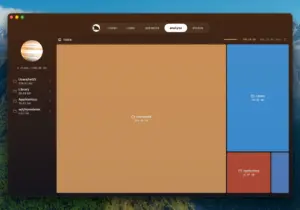

Mole 1.11.0 for Mac — Cleaner & Monitor

Pros & Cons Show details

✅ PROS

  • One native app covers cleanup, uninstall leftovers, disk maps, maintenance, and live status instead of juggling several paid tools.
  • Cleanup candidates are presented for review before deletion, which matches a conservative “show first” approach rather than silent bulk deletes.
  • A one-time $19 license with lifetime updates and two Macs avoids a recurring cleaner subscription.
  • Version 1.11.0 improves real-world Mac use: leftover detection, purgeable space, VPN-accurate network speeds, and lighter menu-bar memory.

❌ CONS

  • macOS 14 or later is required, so older Macs on unsupported releases cannot run the current app.
  • Beyond free scans and limited tool trials, continued full use needs a paid license (distinct from the free open-source CLI).
  • Deep cleanup and leftover removal still demand user judgment—aggressive selection can remove caches you may want rebuilt later.
  • Menu-bar monitoring, fan controls, and some sensors depend on hardware and macOS support, so results vary across Mac models.
✅ What's New in 1.11.0 Show details
  1. [Uninstalled app leftovers] — Clean gains a section for data left by removed apps, without treating apps on external drives as leftovers; AI-tool cleanup now covers Grok while leaving chat history.
  2. [Lighter menu-bar memory] — After the window sits in the menu bar for a few minutes, Mole releases window memory and trims icon caches.
  3. [Purgeable space & VM caches] — Reclaims macOS purgeable space reserved for local backups; UTM and Tart VM caches join cleanup; root-owned Trash apps (e.g. iMovie, GarageBand) delete after one-time admin approval.
  4. [Activation reliability] — Genuine copies are no longer flagged unofficial when macOS stamps the bundle, fixing Clean lockups that reinstalling could not clear.
  5. [Accurate network speed] — Menu bar and Status read the physical interface instead of the tunnel, so VPN/TUN proxies no longer skew speeds.
  6. [Menu bar Both style] — Shows the runner beside a compact two-line metrics band; login-launched Mole opens the window immediately from the menu bar.
  7. [Software updates polish] — Homebrew shows real download progress/size; batch upgrades report real failures; dismissable update dots; self-recovery when leftover files block in-app updates.
  8. [Optimize defaults reset] — Finds hidden prefs from old tuning apps (App Nap kill switch, skipped disk-image verification) and removes only those so macOS returns to safer defaults.

Older Versions

Version Publication date
Mole v1.11.0 Latest Current
Mole v1.9.0
Mole v1.8.0

Installation & Troubleshooting FAQ

8 questions

Common issues when installing macOS apps

Alternatives

Join the Conversation

Your email address will not be published. Required fields are marked *