
Mimestream 1.10.0 for Mac

Mimestream
Name:Mimestream 1.10.0 [EDiSO].dmg.torrent (11.64MB)
Review by:
Downloads 412
Rating
4.4 10 Click to rate
Checked
   Download Torrent Download Now

Mimestream for Mac

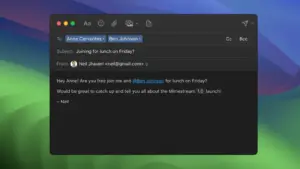
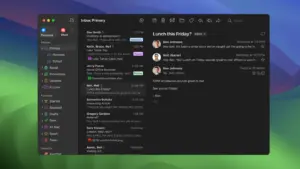
Mimestream is a native macOS email client built specifically for Gmail via the Gmail API, designed for users who want Apple Mail-style desktop speed with Gmail-native features.

What Mimestream does

Unlike generic IMAP clients, Mimestream integrates directly with Gmail concepts such as labels, categories, filters, aliases, and Gmail-powered search. It supports multiple accounts, profile separation, and a unified inbox workflow for users who manage personal and work identities in one app.

The app focuses on fast triage and keyboard-driven use, with swipe actions, message filters, reminders integration, rich compose workflows, and deep macOS behaviors (notifications, Focus integration, sharing, multiple windows, and Apple Silicon optimization).

Privacy and architecture

According to the vendor, Mimestream stores mail data and tokens locally on your device and connects directly to Google services without a third-party sync relay. The app also includes tracking prevention against common tracking services embedded in emails.

Version status for 1.10.0 request

At the time of writing, official public release notes do not list version 1.10.0. The release notes page lists 1.9.16 as the latest stable version. If your catalog build is labeled 1.10.0, verify whether it is an internal/pre-release build or a channel-specific package not yet reflected on the public release page.

Requirements and licensing

Mimestream requires macOS 12 Monterey or newer (vendor homepage). It is a commercial app with a free trial flow and subscription/license management through a Mimestream account.
Pros & Cons Show details

✅ PROS

  • True Gmail API integration gives better label/search behavior than many generic IMAP clients.
  • Native macOS performance and UI make large inbox triage feel fast and responsive.
  • Strong multi-account workflow (profiles + unified inbox) suits mixed personal/work setups.
  • Privacy posture is clear: local data/token storage and direct Gmail connections.
  • Frequent maintenance updates suggest active support and fast compatibility fixes.

❌ CONS

  • No public official notes for 1.10.0 currently, which makes version-specific validation harder.
  • Gmail-focused design is not ideal if you need one client for many non-Gmail providers.
  • Power features can take setup time (profiles, filters, labels, swipe actions) before full productivity gains.
  • Requires modern macOS (12+), so legacy systems are excluded.
  • Subscription/account model may be a downside for users preferring perpetual one-time licenses.
✅ What's New in 1.10.0 Show details
  1. [macOS 26.4 compatibility] — Added compatibility fixes for macOS 26.4.
  2. [Message rendering] — Fixed incorrect message width when text size is changed on macOS 26.4.
  3. [Compose performance] — Reduced lag while typing replies in long threads with many attachments.
  4. [Push reliability] — Fixed cases where private push connections failed on some routers.
  5. [Cache behavior] — Fixed adaptive cache edge cases where older threads with new messages were evicted incorrectly.
  6. [Compose/image UI] — Fixed inline image dragging and corrected selection border rendering when zoomed.
  7. [Maintenance cleanup] — Updated Google sign-in branding and adopted newer Core Data APIs.

Older Versions

Version Publication date
Mimestream v1.10.0 Latest Current
Mimestream v1.9.14
Mimestream v1.9.11
Mimestream v1.9.8
Mimestream v1.9.5
Mimestream v1.9.3

Installation & Troubleshooting FAQ

8 questions

Common issues when installing macOS apps

Alternatives

Join the Conversation

Your email address will not be published. Required fields are marked *