
Linguist 3.4 for Mac

Linguist MAS macOS
Name:Linguist 3.4 MAS [TNT].dmg.torrent (9.9MB)
Review by:
Downloads 848
Rating
4.4 30 Click to rate
Checked
   Download Torrent Download Now

Linguist 3.4 for Mac

Linguist (listed on the Mac App Store as Translate Now: Linguist / Translate Now Image Translator) is a macOS translation utility from AppYogi Software that translates text, documents, and images across more than 100 languages from the menu bar or a dedicated window.

What Linguist does

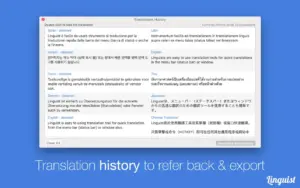
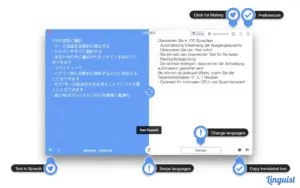
Linguist is built for quick everyday translation on Mac. You can set preferred source and target languages, translate selected text from any app or website with a global hotkey, and copy results to the clipboard automatically. It supports document translation for PDF, TXT, DOC, and RTF files, plus translation history with export options.

Version 3.4 adds image translation with OCR: import or paste an image or screenshot, extract text optically, and translate it into your chosen language. The app also provides synonyms, pronunciation playback, and both menu-bar and window modes for different workflows.

Who it is for

It suits students, travelers, remote workers, and anyone who reads foreign-language content, screenshots, or files on Mac and wants fast translation without switching to a browser tab.

Version 3.4

According to the Mac App Store release notes, version 3.4 focuses on OCR-based image translation, improved translation accuracy and performance, and general stability fixes. This is the headline feature release after the 3.3 line documented on third-party update trackers.

Licensing and requirements

Linguist is free to download with in-app purchases (subscription and one-time unlock options appear on the App Store). Translations require an active internet connection. The app requires macOS 10.11 or later and runs on Intel and Apple Silicon Macs per store metadata.
Pros & Cons Show details

✅ PROS

  • OCR image translation in 3.4 makes screenshot and photo text usable without retyping.
  • Global hotkey plus menu bar mode keeps translation one shortcut away in any app.
  • Supports 100+ languages plus document formats (PDF, DOC, TXT, RTF) in one tool.
  • Translation history and export help reuse past lookups for study or work.
  • Lightweight app footprint (~5 MB) with low setup overhead compared with full CAT suites.

❌ CONS

  • Requires internet for all translations; no fully offline engine is documented.
  • Free tier uses in-app purchases/subscriptions, which may frustrate users expecting a one-time tool.
  • App Store listing name changed (Translate Now / Image Translator), which can confuse catalog searches for “Linguist”.
  • OCR quality depends on source image clarity and language; complex layouts may need manual correction.
  • Detailed per-build changelog beyond App Store summary is not published on the vendor site.
✅ What's New in 3.4 Show details
  1. [Image translation OCR] — Added image translation: import or paste images/screenshots, extract text with OCR, and translate it.
  2. [Screenshot workflow] — Makes foreign text in screenshots translatable without manual re-entry.
  3. [Translation accuracy] — Improved translation accuracy and performance per App Store release notes.
  4. [Stability] — Bug fixes and stability improvements included in the 3.4 maintenance pass.
  5. [Release character] — Version 3.4 is a feature-focused update centered on OCR image translation rather than a full UI redesign.

Older Versions

Version Publication date
Linguist v3.4 Latest Current
Linguist v3.0
Linguist v2.9
Linguist v2.6
Linguist v2.5
Linguist v2.4
Linguist v2.3
Linguist v2.2
Linguist v2.1
Linguist v2.0
Linguist v1.9
Linguist v1.8

Installation & Troubleshooting FAQ

8 questions

Common issues when installing macOS apps

Alternatives

Join the Conversation

Your email address will not be published. Required fields are marked *