
Keep It 2.8.8 for Mac

Keep It
Name:Keep It 2.8.8 [TNT].dmg.torrent (36.82MB)
Hash:9bc66a7a21935fb985335db14dc6444887096018
Review by:
Downloads 180
Rating
4.5 32 Click to rate
Checked
   Download Torrent Download Now

Keep It

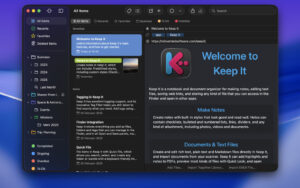
A Mac notebook and document organizer that stores everything as real files in the Finder—notes, Markdown, PDFs, scans, web saves, and attachments—so you can search, tag, and open them from any app.

Keep It from Reinvented Software (successor to the Yojimbo lineage) targets people who want one library for research, receipts, project docs, and quick notes without locking data inside a proprietary database only the app can read. Items live as files, folders, and Finder tags under a Keep It library location, visible in Open/Save panels and Spotlight. You create styled notes with checklists and attachments, edit rich text, plain text, and Markdown, save web links as minimal pages or PDFs, scan documents, edit PDFs, and preview other formats with Quick Look. Folders, bundles, labels, saved searches, and a tag filter help you file and retrieve material; Quick Open and Quick File speed keyboard-driven navigation.

Typical Mac workflow

Drag a PDF invoice into Keep It, tag it “taxes,” and file it in a client folder—it appears in the Finder with the same tags. Clip a Safari article via the extension, link it from a Markdown project note, and find both later with content search or saved searches. Scan a paper receipt with Import View to set name and tags before it lands in the library. Use Compact Mode beside your editor, or sync the library through iCloud to iPhone and iPad. Shortcuts, AppleScript, and Automator automate imports; Mail rules can archive messages. Version 2.8 added smarter Insert Link panels, scanner import options, Append Link and Find Items Shortcuts actions, and PDF thumbnails on notes in list view.

Keep It 2.8.8 requires macOS 14 Sonoma or later. A 15-day fully functional trial is available from the developer’s direct download; a Mac App Store edition also exists with its own licensing model. iCloud sync and shared folders work across Mac, iPhone, and iPad when enabled. The app competes with Evernote, Bear, and Obsidian-adjacent workflows but emphasizes Finder-native files and broad file-type support over wiki-style linking alone.

Version 2.8.8

Release 2.8.8 (June 24, 2026) is a small maintenance update. Official notes fix missing timeouts during PDF text recognition in some languages, repeated attempts to extract information from items that previously failed, and incorrect auto-generated names for notes that contain checklists. No new features are listed for 2.8.8; scanner, linking, and Shortcuts improvements belong to the 2.8 line released in March 2026.
Keep It 2.8.8 for Mac — Notebook & File Organizer

Pros & Cons Show details

✅ PROS

  • Finder integration exposes library files, folders, and tags to Spotlight, Time Machine, and other Mac apps.
  • Supports notes, Markdown, PDFs, scans, web archives, mail, and arbitrary file types in one searchable library.
  • Powerful search covers content, metadata, checklists, image features, and text in scanned PDFs.
  • iCloud sync and shared folders extend the same library to iPhone and iPad with Keep It mobile apps.
  • Shortcuts, AppleScript, share extension, and Mail integration fit automation-heavy Mac workflows.
  • Version 2.8 refined scanner import, item linking, and Shortcuts actions for everyday capture.

❌ CONS

  • Version 2.8.8 lists only three bug fixes—no feature changes in this build.
  • Requires macOS 14 Sonoma or later; older Macs must stay on legacy Keep It branches.
  • Less suited to wiki-style bidirectional links than Obsidian or dedicated PKM tools.
  • Mac App Store and direct-download licenses differ; subscription/IAP behavior applies on the store build.
  • Large iCloud libraries can take time to fetch and sync on first setup across devices.
  • Niche compared with mainstream note apps—setup of folders, bundles, and saved searches takes learning.
✅ What's New in 2.8.8 Show details
  1. [PDF OCR timeout] — Fixed missing timeouts when performing text recognition on PDFs in some languages.
  2. [Failed extraction retry] — Fixed Keep It reattempting to extract information from items that had already failed.
  3. [Checklist note names] — Fixed incorrect auto-generated names for notes that contain checklists.
  4. [June 2026 release] — Version 2.8.8 shipped on June 24, 2026 per Reinvented Software download notes.
  5. [macOS 14+ unchanged] — System requirement remains macOS 14 Sonoma or later for the 2.8.x line.
  6. [Maintenance scope] — This build is stability-focused; scanner, linking, and Shortcuts changes remain from Keep It 2.8.

Older Versions

Version Publication date
Keep It v2.8.8 Latest Current
Keep It v2.8.7
Keep It v2.8.5
Keep It v2.8.2
Keep It v2.8.0
Keep It v2.7.10
Keep It v2.7.9
Keep It v2.7.8
Keep It v2.7.6
Keep It v2.7.5
Keep It v2.7.4
Keep It v2.7.3
Keep It v2.7.2
Keep It v2.6.8
Keep It v2.6.7
Keep It v2.6.6
Keep It v2.6.5
Keep It v2.6.4
Keep It v2.6.3
Keep It v2.6.1
Keep It v2.6.0
Keep It v2.5.8
Keep It v2.5.7
Keep It v2.5.6
Keep It v2.5.5
Keep It v2.5.3
Keep It v2.5.2
Keep It v2.5.1
Keep It v2.5.0
Keep It v2.4.11
Keep It v2.4.10
Keep It v2.4.8
Keep It v2.4.7
Keep It v2.4.6
Keep It v2.4.5
Keep It v2.4.4
Keep It v2.4.3
Keep It v2.4.2
Keep It v2.4.1
Keep It v2.4.0
Keep It v2.3.8
Keep It v2.3.7
Keep It v2.3.5

Installation & Troubleshooting FAQ

8 questions

Common issues when installing macOS apps

Alternatives

Important

Mount the image and launch Open Gatekeeper Friendly.

Press Enter to bypass Gatekeeper in the Terminal window.

Drag the application to the Applications folder.

WARNING! SIP must be disabled. Learn more >

Compatibility
macOS 11.3 and later

Architecture
ARM, x86 (64-bit)

Join the Conversation

Your email address will not be published. Required fields are marked *