
Keep It 2.8.7 for Mac

Keep It
Name:Keep It 2.8.7 [TNT].dmg.torrent (36.82MB)
Hash:b2cc6b4fb1583147b5af35a9b5563b35d1db5dee
Review by:
Downloads 158
Rating
4.8 11 Click to rate
Checked
   Download Torrent Download Now

What Keep It does on Mac

Keep It is a notebook and document organizer that stores everything as real files and folders you can browse in the Finder, not only inside the app.

Reinvented Software built Keep It for people who collect notes, PDFs, web pages, scans, and attachments and want one reliable place to file and retrieve them. You create styled notes with checklists and dividers, edit rich text, plain text, and Markdown, preview almost any file type, and organize items with folders, bundles, tags, and labels. Because the library lives on disk, you can open, back up, or share files with other apps without exporting first.

How a typical Mac workflow looks

Most users start by choosing a library location and importing or creating items with Quick File or drag and drop. Folders give you hierarchy; bundles let the same item appear in more than one list; saved searches and Quick Open help you jump to content by name or content. Web links can be saved as PDFs or archives for offline reading, mail messages can be archived with attachments, and Shortcuts or AppleScript can automate repetitive filing tasks.

Finder integration and sync

Keep It 2’s Finder integration means tags and files you add in the app are visible in standard Open and Save panels elsewhere on your Mac. iCloud sharing lets you sync folders and items with other Keep It users on Mac, iPhone, and iPad when you use the separate iOS app. Compact Mode shrinks the window to a single column for side-by-side work with email or a browser.

Licensing and version 2.8.7

On the Mac App Store, Keep It is free to download with subscription in-app purchases; from Reinvented Software you can buy a one-time license for the current major version with a 15-day trial. Version 2.8.7 requires macOS 14 Sonoma or later (the App Store listing specifies macOS 14.6+). This June 2026 update is a maintenance release focused on rename handling, link editing, Finder sync for deleted items, and font substitution for note styles.
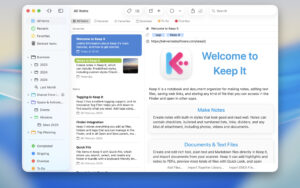

Keep It 2.8.7 for Mac — Notes & Document Organizer

Pros & Cons Show details

✅ PROS

  • Your library is stored as normal files and folders in the Finder, so backups, Spotlight, and third-party tools can work with content outside Keep It.
  • Notes, rich text, plain text, Markdown, PDFs, web archives, and scans live in one searchable library instead of scattered apps and downloads folders.
  • Quick Open, saved searches, tag filters, and full-text search make it practical to retrieve items months later without remembering exact folder paths.
  • Finder integration and Services or Share extensions let you file content from Mail, Safari, and other apps without switching workflows constantly.
  • iCloud folder sharing and encryption for individual files support personal knowledge bases that may include sensitive documents.

❌ CONS

  • The Mac App Store build relies on subscriptions, while the direct license is a separate purchase model, which can confuse users who expect one payment path.
  • iPhone and iPad support requires a separate Keep It app, so cross-device use is not included in the Mac download alone.
  • Deep Finder integration and bundles, labels, and saved searches take time to learn compared with a simple notes app like Apple Notes.
  • macOS 14 Sonoma is the minimum for current 2.8.x builds, so older Macs must use legacy versions from the developer’s downloads page.
  • Version 2.8.7 itself adds only bug fixes, so users waiting for major new features will not see feature changes in this build.
✅ What's New in 2.8.7 Show details
  1. [Maintenance release scope] — Version 2.8.7 (June 9, 2026) is a patch focused on stability; Reinvented Software documents four user-facing fixes below.
  2. [Rich text rename fix] — Renaming rich text files with an incorrect extension no longer leaves items in a broken or inconsistent state in the library.
  3. [Link suggestion alignment] — Suggestions when editing text links in notes, rich text, and Markdown files align correctly, making in-app linking less awkward to edit.
  4. [Finder integration for deleted items] — Deleted items sync more reliably between Keep It and the Finder, reducing orphaned or mismatched files after removal.
  5. [Note style font substitution] — When a note style references a font not installed on your Mac, Keep It substitutes fonts more predictably so styled notes remain readable.

Older Versions

Version Publication date
Keep It v2.8.7 Latest Current
Keep It v2.8.5
Keep It v2.8.2
Keep It v2.8.0
Keep It v2.7.10
Keep It v2.7.9
Keep It v2.7.8
Keep It v2.7.6
Keep It v2.7.5
Keep It v2.7.4
Keep It v2.7.3
Keep It v2.7.2
Keep It v2.6.8
Keep It v2.6.7
Keep It v2.6.6
Keep It v2.6.5
Keep It v2.6.4
Keep It v2.6.3
Keep It v2.6.1
Keep It v2.6.0
Keep It v2.5.8
Keep It v2.5.7
Keep It v2.5.6
Keep It v2.5.5
Keep It v2.5.3
Keep It v2.5.2
Keep It v2.5.1
Keep It v2.5.0
Keep It v2.4.11
Keep It v2.4.10
Keep It v2.4.8
Keep It v2.4.7
Keep It v2.4.6
Keep It v2.4.5
Keep It v2.4.4
Keep It v2.4.3
Keep It v2.4.2
Keep It v2.4.1
Keep It v2.4.0
Keep It v2.3.8
Keep It v2.3.7
Keep It v2.3.5

Installation & Troubleshooting FAQ

8 questions

Common issues when installing macOS apps

Alternatives

Important

Mount the image and launch Open Gatekeeper Friendly.

Press Enter to bypass Gatekeeper in the Terminal window.

Drag the application to the Applications folder.

WARNING! SIP must be disabled. Learn more >

Compatibility
macOS 11.3 and later

Architecture
ARM, x86 (64-bit)

Join the Conversation

Your email address will not be published. Required fields are marked *