
iNet Network Scanner 4.0.1 for Mac

iNet Network Scanner
Name:iNet Network Scanner 4.0.1 MAS [TNT].dmg.torrent (327.41MB)
Hash:38e1574446d325699dec88656cbc6f3ba6bac5e2
Review by:
Downloads 168
Rating
4.6 32 Click to rate
Checked
   Download Torrent Download Now

iNet Network Scanner

A native Mac network utility from BananaGlue GmbH that shows which phones, computers, routers, and other gear are on your LAN, what they are called, and which services they expose.

Typical Mac workflow

You pick a network interface or custom IP range and run a scan to populate a live device list with IP and MAC addresses. Rename entries and assign icons so unfamiliar hardware is easy to spot when a neighbor or IoT gadget joins Wi‑Fi. Export results to CSV or PDF for documentation, then open SSH, VNC, or HTTP sessions from a device row when you need to investigate further.

The Bonjour monitor lists mDNS services as they appear, which helps trace printers, media servers, and Apple ecosystem devices. Wake on LAN can wake sleeping Macs or PCs over the LAN or internet, sleep or restart Macs remotely, and store favorites for repeat tasks. Airport Monitor adds traffic graphs and WLAN quality readouts for supported Apple base stations, though the vendor notes SNMP limits on the latest 802.11ac Airport models.

Licensing and version 4.0.1

iNet sells for $24.99 as a one-time Mac App Store purchase with Family Sharing; the developer states it collects no user data and includes future updates without a subscription. It requires macOS 12.4 or later. Version 4.0.1 refreshes the interface for current macOS design standards, adds Dark Mode support, and modernizes the codebase for stability on upcoming macOS releases while keeping the scanner, Bonjour, Wake on LAN, and Airport tools in one app.
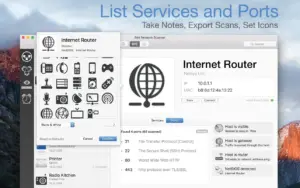
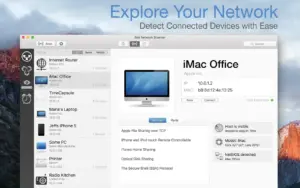
 iNet Network Scanner 4.0.1 scans your Mac network iNet Network Scanner 4.0.1 — Network Tool for Mac

Pros & Cons Show details

✅ PROS

  • A single Mac app combines device scanning, Bonjour service monitoring, Wake on LAN, and Airport status instead of juggling several CLI utilities.
  • Custom device names, icon sets, and exportable CSV or PDF reports make home and small-office audits easier to read and share.
  • Direct SSH, VNC, and HTTP shortcuts from scan results speed troubleshooting without copying addresses manually.
  • One-time pricing with no subscription and a stated no-data-collection policy suits privacy-conscious network admins.
  • Version 4.0.1 updates the UI and Dark Mode support so the long-running tool fits modern macOS desktops.

❌ CONS

  • Version 4.0.1 focuses on design and codebase work rather than adding major new network-analysis features in its Mac App Store notes.
  • Airport Monitor does not support the latest 802.11ac Airport hardware because Apple removed SNMP, per the vendor.
  • At $24.99 it costs more than basic free LAN scanners if you only need a quick device list.
  • Mac App Store distribution only; there is no direct-download edition for locked-down machines.
  • Advanced enterprise discovery, VLAN mapping, and deep packet inspection are outside this consumer-friendly toolbox scope.
✅ What's New in 4.0.1 Show details
  1. Modern macOS design — Version 4.0.1 updates iNet so the interface blends with the current macOS look and feel per Mac App Store release notes.
  2. Dark Mode support — The 4.0.1 Mac build adds Dark Mode for easier viewing in low-light environments.
  3. Codebase modernization — The developer modernized the app foundation to stay fast, stable, and ready for upcoming macOS releases.
  4. Mac build 4.0.1 — Apple lists 4.0.1 as the current Mac App Store version for the standalone Mac edition (App ID 403304796).
  5. Independent app maintenance — Release notes thank users for supporting a privacy-first, Germany-developed network tool without subscriptions.
  6. Feature set unchanged — Scanner, Bonjour monitor, Wake on LAN, and Airport tools remain the documented core; 4.0.1 is primarily a visual and stability update.

Older Versions

Version Publication date
iNet Network Scanner v4.0.1 Latest Current
iNet Network Scanner v3.2.4
iNet Network Scanner v3.2.3
iNet Network Scanner v3.2.2
iNet Network Scanner v3.2.1
iNet Network Scanner v3.2
iNet Network Scanner v3.1.9
iNet Network Scanner v3.1.8
iNet Network Scanner v3.1.7
iNet Network Scanner v3.1.5
iNet Network Scanner v3.1.4
iNet Network Scanner v3.1.3
iNet Network Scanner v3.1.2
iNet Network Scanner v3.1.1
iNet Network Scanner v3.1.0
iNet Network Scanner v3.0.6
iNet Network Scanner v3.0.5
iNet Network Scanner v3.0.4
iNet Network Scanner v3.0.3
iNet Network Scanner v3.0.2
iNet Network Scanner v3.0.1
iNet Network Scanner v3.0.0
iNet Network Scanner v2.9.7
iNet Network Scanner v2.9.6
iNet Network Scanner v2.9.4
iNet Network Scanner v2.9.3
iNet Network Scanner v2.9.2
iNet Network Scanner v2.9.1
iNet Network Scanner v2.9.0
iNet Network Scanner v2.8.60
iNet Network Scanner v2.8.51
iNet Network Scanner v2.8.5
iNet Network Scanner v2.8.4
iNet Network Scanner v2.8.3
iNet Network Scanner v2.8.2
iNet Network Scanner v2.8
iNet Network Scanner v2.7.91
iNet Network Scanner v2.7.9
iNet Network Scanner v2.7.7
iNet Network Scanner v2.7.6
iNet Network Scanner v2.7.5
iNet Network Scanner v2.7.4
iNet Network Scanner v2.7.3
iNet Network Scanner v2.7.2
iNet Network Scanner v2.6.8
iNet Network Scanner v2.6.7
iNet Network Scanner v2.6.5
iNet Network Scanner v2.6.3

Installation & Troubleshooting FAQ

8 questions

Common issues when installing macOS apps

Alternatives

Join the Conversation

Your email address will not be published. Required fields are marked *