LaunchPalette – App Switcher 1.15 for Mac

LaunchPalette
Name:LaunchPalette 1.15.dmg.torrent (6.45MB)
Hash:8b6159baa56f5aa45c33a63ff0574e9931ab7ba0
Review by:
Downloads 106
Rating
4.4 20 Click to rate
Checked
   Download Torrent Download Now

LaunchPalette is a Mac App Store utility that maps apps, folders, project windows, and scripts to nested keyboard palettes so you can jump to the right context without reaching for the mouse or macOS’s default ⌘Tab carousel.

How it works on Mac

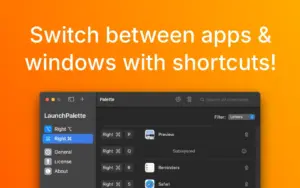
You assign shortcuts—often using the right Command key so left ⌘ stays free for copy, paste, and standard app shortcuts—to open or focus Safari, Mail, a specific Xcode workspace, a folder, or a shell script. Pressing the same shortcut again can hide the app or, with the free LaunchPalette Helper companion installed, cycle through that app’s windows in last-used order. Multiple palettes can use different modifier combinations (Control, Option, Command), and registered files keep working if you rename or move them on disk.

Who it fits

LaunchPalette suits developers and power users who live in several IDEs, terminals, and browsers and want muscle-memory shortcuts instead of hunting windows. It complements—not replaces—Spotlight and ⌘Tab: you define intentional “go to this project” bindings rather than recency-only switching. The app is free with a 7-day trial; unlimited use unlocks via one-time lifetime purchase (about $12.99 on the US App Store, with occasional promos) or a low monthly subscription. Requires macOS 13.0 or later; Intel and Apple Silicon are supported.

Version 1.15

Release 1.15 refines how LaunchPalette focuses applications that own several windows: switching should feel smoother and raise the most relevant window instead of an arbitrary one. Earlier 1.12 added per-palette enable/disable toggles; 1.14.x builds shipped general stability work. The Mac App Store “What’s New” text for 1.15 is brief, so treat this version as a focused behavior improvement rather than a major feature drop.
Pros & Cons Show details

✅ PROS

  • LaunchPalette lets you bind specific apps and Xcode project windows to memorable shortcut groups (for example Right ⌘ plus a letter chain) without conflicting with normal left ⌘ shortcuts.
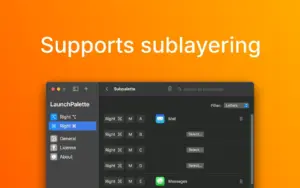
  • Nested palettes support more targets than a single hotkey row, which scales better when you juggle dozens of repos and communication apps on Mac.
  • Rename-safe tracking updates shortcuts when you move registered folders or project files, reducing broken bindings after disk reorganisation.
  • The optional LaunchPalette Helper adds MRU window cycling and cross-app window focus features that macOS does not expose through the main app alone.
  • Version 1.15 improves multi-window app switching so the foreground window better matches the project or context you intended to reach.

❌ CONS

  • LaunchPalette has a learning curve: you must design, memorise, and maintain your own palette layout before it beats built-in ⌘Tab for casual users.
  • Smart window cycling and some advanced focus behaviour require a separate Helper install from GitHub, not only the Mac App Store app.
  • Version 1.15 changes focus logic only; it does not add new palette types, scripting features, or UI overhauls compared with 1.12–1.14.
  • Unlimited use sits behind IAP after a short trial; teams need to contact the developer separately for bulk licensing.
  • It is macOS-only and Mac App Store–distributed; there is no Windows/Linux counterpart or direct DMG channel outside Apple’s store rules.
✅ What's New in 1.15 Show details
  1. [Smoother app switching] — Version 1.15 improves how LaunchPalette brings an application forward when you trigger its palette shortcut.
  2. [Relevant window focus] — For apps with multiple open windows, the switcher aims to surface the most relevant window rather than an unrelated one in the same app.
  3. [Multi-window workflow] — The change targets common IDE and browser setups where several project windows share one app bundle ID.
  4. [Focused 1.15 scope] — Public release notes for 1.15 are short; this build is a behaviour refinement, not a palette-editor or scripting expansion.
  5. [Prior 1.12 feature still present] — Per-palette enable and disable toggles from version 1.12 remain part of the app; 1.15 does not remove them.

Installation & Troubleshooting FAQ

8 questions

Common issues when installing macOS apps

Alternatives

1 Comment

  1. Run the downloaded image and drag the app to the Applications folder shortcut.

    Once the copy is complete, you can launch the app from Launchpad.

    Compatibility
    macOS 13 and later

    Architecture
    ARM, x86 (64-bit)

Join the Conversation

Your email address will not be published. Required fields are marked *