
BusyCal 2026.2.3 for Mac

BusyCal
Name:BusyCal 2026.2.3 [atb].dmg.torrent (66.5MB)
Hash:30883fad5dd3d615735d0f684c4aed002ed25cfc
Review by:
Downloads 208
Rating
4.5 20 Click to rate
Checked
   Download Torrent Download Now

A flexible calendar for demanding Mac schedules

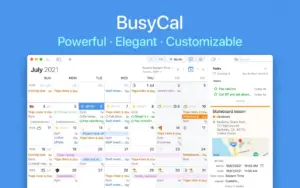
BusyCal is a macOS calendar and task manager that replaces Apple Calendar for users who need deeper control over views, alarms, filters, and multi-account sync.

Views and workflow on Mac

Day, Week, Month, Year, and List views can be tuned for density, fonts, colors, and which panels appear. Calendar Sets let you switch between work, personal, and shared calendars in one click, while Smart Filters save complex searches and layout presets for quick recall.

  • Integrated tasks appear on due dates and carry forward until completed.
  • Natural-language input speeds up creating events with locations, attendees, and alarms.
  • A menu bar companion shows a mini-calendar and upcoming items even when the main window is closed.

Sync, privacy, and accounts

BusyCal connects to iCloud, Google, Microsoft 365, Exchange, CalDAV, Reminders, Todoist, and more, so one Mac app can host calendars from several services. A free edition covers basic needs; premium features unlock after purchase or subscription, with a 14-day trial on the Mac App Store build.

Time blocking and alerts

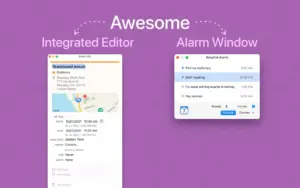
Travel-time planning, weather, tags, sticky notes, and conference-call detection help you manage real-world scheduling. BusyCal also ships its own alarm window with snooze controls that work even when the main app is not running.

BusyCal 2026.2.3

Version 2026.2.3 requires macOS 11.5 or later and adds automatic cross-calendar time blocking with synced rules across Mac and iPhone, plus scripting hooks and alarm-window improvements documented in the official release notes.
BusyCal 2026.2.3 is a customizable Mac BusyCal 2026.2.3 for Mac — Calendar & Tasks

Pros & Cons Show details

✅ PROS

  • Highly customizable Day, Week, Month, Year, and List views let Mac users shape the calendar around personal or professional workflows instead of a fixed layout.
  • Integrated tasks, Reminders sync, and a sortable task sidebar keep deadlines visible on the calendar rather than in a separate app.
  • Broad account support—including iCloud, Google, Microsoft 365, Exchange, and third-party CalDAV—makes BusyCal practical as a single hub for mixed calendar sources.
  • The dedicated alarm window with flexible snooze options helps ensure notifications are not missed when the main BusyCal window is closed.
  • Version 2026.2.3 introduces automatic time-blocking across calendars and account boundaries, which is useful for protecting focus time on a separate calendar.
  • Natural-language event entry, travel-time blocking, Smart Filters, and a capable menu bar extension reduce everyday scheduling friction on macOS.

❌ CONS

  • Full premium functionality on the Mac App Store build requires a subscription or prior purchase, so cost can exceed Apple’s free Calendar over time.
  • The interface and feature depth carry a learning curve compared with simpler calendar apps aimed at casual users.
  • Rule editing for automatic time blocking is available on macOS only in 2026.2.3, so iPhone users can sync rules but cannot configure them on device.
  • BusyCal is not a native replacement for every Apple ecosystem nicety; some users still rely on separate apps for niche workflows or team tooling.
  • Heavy customization and multiple synced accounts can make troubleshooting sync conflicts more complex than with a single iCloud-only setup.
  • The developer site lists macOS 11.0 while the Mac App Store requires 11.5+, so older Big Sur point releases may be excluded from the store build.
✅ What's New in 2026 2.3 Show details
  1. Automatic time-blocking — A calendar can now create blocking events on another calendar automatically, including across different accounts.
  2. Cross-device rule sync — Time-blocking rules sync across all BusyCal copies on macOS and iOS, keeping blocking logic consistent on Mac and iPhone.
  3. Travel time in blocking events — A new Advanced preference lets blocking events start earlier to cover an event’s travel time on the target calendar.
  4. Alarm Window snooze presets — The Snooze button now offers preset intervals, including End of Working Hours, for faster alarm handling.
  5. AppleScript and Claude Desktop access — Currently selected items in BusyCal can be retrieved via AppleScript and the Claude Desktop extension for automation and AI-assisted workflows.
  6. Go To Event in Info Panel — A bottom-toolbar button in a separate Info Panel window jumps straight to the event in the main calendar view.
  7. CalDAV and sync fixes — Improved third-party CalDAV compatibility, linked blocking-event updates during sync, and fixes for task conversion, date picker behavior, and MS Graph sharing settings.

Older Versions

Version Publication date
BusyCal v2026 2.3 Latest Current
BusyCal v2026 1.1
BusyCal v2024 1.2
BusyCal v2023 3.3
BusyCal v2023 2.3
BusyCal v2023 2.2
BusyCal 2023.1.5 (202310502) v2023 1.5.202310502
BusyCal v2023 1.5
BusyCal v2023 1.3
BusyCal 2023.1.2 (202310200) v2023 1.2.202310200
BusyCal v2023 1.1
BusyCal v2022 4.7
BusyCal 2022.4.6 (202240600) v2022 4.6.202240600
BusyCal 2022.4.4 (202240402) v2022 4.4.202240402
BusyCal v2022 4.4
BusyCal v2022 4.3
BusyCal v2022 4.1
BusyCal 2022.3.1 (202230129) v2022 3.1.202230129
BusyCal v2022 2.3.1
BusyCal v2022 2.3
BusyCal 2022.2.2 U2B v2022 2.2
BusyCal 2022.1.4 (202210429) v2022 1.4.202210429
BusyCal v2022 1.4
BusyCal v2022 1.3
BusyCal v2022 1.2
BusyCal v2022 1.1
BusyCal v2021 4.4
BusyCal v2021 4.3
BusyCal v2021 4.2
BusyCal 2021.4.0 (202140002) v2021 4.0.202140002
BusyCal 2021.3.1 (202130202) v2021 3.1.202130202
BusyCal 2021.3.1 (202130100) v2021 3.1.202130100
BusyCal v2021 3.0.202130019
BusyCal 2021.3.0 (202130017) v2021 3.0.202130017
BusyCal 2021.3.0 (202130008) v2021 3.0.202130008
BusyCal v2021 3.0
BusyCal 3.12.6 (420601) v3.12.6.420601
BusyCal 3.12.6.1 (420604) v3.12.6.1.420604
BusyCal v3.12.5.420513
BusyCal 3.12.4 (420503) v3.12.4.420503
BusyCal 3.12.4 (420428) v3.12.4.420428
BusyCal 3.12.3 (420342) v3.12.3.420342
BusyCal v3.12.3.420340
BusyCal 3.12.3 (420338) v3.12.3.420338
BusyCal 3.12.3 (420331) v3.12.3.420331
BusyCal 3.12.3 (420328) v3.12.3.420328
BusyCal 3.12.3 (420322) v3.12.3.420322
BusyCal v3.12.3.420317
BusyCal v3.12.3.420314
BusyCal 3.12.2 (420222) v3.12.2.420222
BusyCal v3.12.2.420221
BusyCal v3.12.2.420216
BusyCal v3.12.1.420202
BusyCal v3.12.1.420107
BusyCal 3.12.1 (420105) v3.12.1.420105
BusyCal 3.12.1 (420104) v3.12.1.420104
BusyCal 3.12.0 (420003) v3.12.0.420003
BusyCal 3.11 (411124) v3.11.411124
BusyCal 3.11 (411123) v3.11.411123
BusyCal 3.11 (411120) v3.11.411120
BusyCal 3.11 (411115) v3.11.411115
BusyCal 3.11.1 (411140) v3.11.1.411140
BusyCal 3.11.1 (411136) v3.11.1.411136
BusyCal 3.11.1 (411130) v3.11.1.411130
BusyCal 3.10.4 (401052) v3.10.4.401052
BusyCal 3.10.3 (401049) v3.10.3.401049
BusyCal 3.10.3 (401047) v3.10.3.401047
BusyCal 3.10.3 (401044) v3.10.3.401044
BusyCal 3.10.2 (401028) v3.10.2.401028
BusyCal 3.10.1 (401021) v3.10.1.401021
BusyCal v3.10.1.401019
BusyCal v3.10.1.401016
BusyCal 3.10.1 (401014) v3.10.1.401014
BusyCal v3.10.1
BusyCal 3.10.0 (401004) v3.10.0.401004
BusyCal 3.10.0 (401003) v3.10.0.401003
BusyCal v3.10.0
BusyCal 3.9.0 (90006) v3.9.0.90006
BusyCal v3.9.0
BusyCal 3.8.41 (384101) v3.8.41.384101
BusyCal 3.8.4 (380407) v3.8.4.380407
BusyCal v3.8.4
BusyCal v3.8.3
BusyCal v3.8.0
BusyCal v3.7.3
BusyCal v3.7.1
BusyCal v3.7.0
BusyCal v3.6.9
BusyCal v3.6.4
BusyCal v3.6.3
BusyCal v3.6.2
BusyCal v3.1.2
BusyCal v3.1.1

Installation & Troubleshooting FAQ

8 questions

Common issues when installing macOS apps

Alternatives

1 Comment

Join the Conversation

Your email address will not be published. Required fields are marked *