
EdgeView 5.9.0 for Mac

Name:EdgeView 5.9.0 MAS [TNT].dmg.torrent (146.19MB)
Hash:c6bf8faa14a09d17aba2401d0f3199bcedbc2e10
Review by:
Downloads 225
Rating
4.5 32 Click to rate
Checked
   Download Torrent Download Now

EdgeView on Mac

EdgeView is a Swift-native image viewer for macOS aimed at large local libraries, comics, and archives: it opens folders, ZIP/RAR/CBZ/CBR files, and network volumes without extracting first.

How you use it

The app combines an image viewer and file browser in one window. Side-by-side trees show size and dates; color cues mark added, changed, or missing files. Keyboard shortcuts, the scroll wheel, and trackpad gestures move through images quickly. Comic-oriented modes include two-page spread, continuous scroll, and right-to-left reading. Animated GIF, PNG, WebP, and HEIC sequences play with on-screen controls.

Formats and workflows

EdgeView handles JPEG, PNG, TIFF, BMP, PSD, RAW, PDF, AI, OpenEXR, HDR, TGA, JPEG-XL, and AVIF (Ventura+), plus nested and encrypted archives over 4 GB. A built-in browser reaches local disks and AFP, SMB, or FTP shares; Quick Look extensions generate archive thumbnails in Finder. History restores zoom, position, and orientation when you reopen a file.

Version 5.9.0

On the Mac App Store the product is listed as EdgeView 3, while the build number shown to users is 5.9.0. This May 2026 update fixes JPEG-XL metadata reading and a crash tied to the loading progress indicator. It requires macOS 11.5 or later on Intel or Apple Silicon Macs and sells as a one-time App Store purchase with Family Sharing.
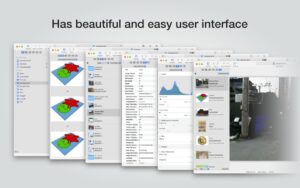
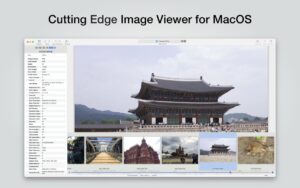
EdgeView 5.9.0 for Mac: fast image and comic EdgeView 5.9.0 — Image Viewer for Mac

Pros & Cons Show details

✅ PROS

  • Opens ZIP, RAR, CBZ, CBR, and 7z archives in place, which saves disk space and time compared with extracting comics or photo sets first.
  • Two-page spread, continuous scroll, and RTL modes suit manga and long image folders better than Preview or Quick Look alone.
  • Built-in AFP, SMB, and FTP browsing lets you read libraries on NAS shares without copying them locally first.
  • Swift rewrite with image caching delivers smooth paging through large folders on Apple Silicon and Intel Macs.
  • Version 5.9.0 fixes JPEG-XL metadata handling, improving reliability for libraries that use JXL alongside older formats.
  • One-time App Store pricing with Family Sharing avoids subscription costs common in cloud gallery services.

❌ CONS

  • Version 5.9.0 is a small bugfix release with no new features beyond JXL metadata and progress-indicator crash fixes.
  • EPS files are not supported on macOS 14 Sonoma and later, which limits some design and print workflows.
  • The interface packs many sidebar tabs and options, so casual users may prefer simpler viewers like Preview.
  • Heavy thumbnail and cache use can consume significant memory on very large libraries, based on user reports on older builds.
  • There is no documented free trial on the current Mac App Store listing, so you buy before extended testing.
  • macOS-only distribution through the App Store may not suit teams that need Windows or Linux clients with the same tool.
✅ What's New in 5.9.0 Show details
  1. [JXL metadata fix] — Image Viewer now reads JPEG-XL (JXL) file metadata correctly when earlier builds failed to parse it properly.
  2. [Loading progress crash] — Fixed a crash related to the loading progress indicator during file open and browse operations.
  3. [5.9.0 maintenance build] — App Store build 5.9.0 ships as a stability update with the two fixes above and no other listed feature changes.
  4. [EdgeView 3 branding] — The Mac App Store product remains EdgeView 3 while the user-facing version string is 5.9.0 in the 5.x release line.
  5. [macOS 11.5 requirement] — Minimum system version stays macOS 11.5 or later for Intel and Apple Silicon Macs per the current store listing.

Older Versions

Version Publication date
EdgeView v5.9.0 Latest Current
EdgeView v5.7.9
EdgeView v5.7.8
EdgeView v5.7.6
EdgeView v5.7.5
EdgeView v5.7.4
EdgeView v5.7.3
EdgeView v5.7.2
EdgeView v5.6.7
EdgeView v5.6.6
EdgeView v5.6.5
EdgeView v5.6.3
EdgeView v5.6.2
EdgeView v5.6.0
EdgeView v5.4.2
EdgeView v5.4.0
EdgeView v5.2.0
EdgeView v5.1.9
EdgeView v5.1.8
EdgeView v5.1.7
EdgeView v5.1.6
EdgeView v5.1.5
EdgeView v5.1.3
EdgeView v5.1.2
EdgeView v5.1.1
EdgeView v5.1.0
EdgeView v5.0.9
EdgeView v5.0.8
EdgeView v5.0.7
EdgeView v5.0.6
EdgeView v5.0.5
EdgeView v5.0.4
EdgeView v5.0.3
EdgeView v5.0.2
EdgeView v5.0.0
EdgeView v4.9.9
EdgeView v4.9.8
EdgeView v4.9.6
EdgeView v4.9.5
EdgeView v4.9.4
EdgeView v4.8.7
EdgeView v4.8.5
EdgeView v4.8.2
EdgeView v4.8.1
EdgeView v4.7.8
EdgeView v4.7.5
EdgeView v4.7.4
EdgeView v4.7.1
EdgeView v4.7.0
EdgeView v4.6.9
EdgeView v4.6.8
EdgeView v4.6.7
EdgeView v4.6.4
EdgeView v4.6.2
EdgeView v4.6.1
EdgeView v4.6.0
EdgeView v4.5.0
EdgeView v4.4.9
EdgeView v4.4.8
EdgeView v4.4.7
EdgeView v4.4.6
EdgeView v4.4.5
EdgeView v4.4.2
EdgeView v4.4.1

Installation & Troubleshooting FAQ

8 questions

Common issues when installing macOS apps

Alternatives

Important

Mount the image and launch Open Gatekeeper Friendly.

Press Enter to bypass Gatekeeper in the Terminal window.

Drag the application to the Applications folder.

The application is ready to use.

Compatibility
macOS 11.5 and later

Architecture
ARM, x86 (64-bit)

Join the Conversation

Your email address will not be published. Required fields are marked *