
PhotoScape X Pro 4.3 fix for Mac

PhotoScape X 2
Name:PhotoScapeX 4.3 [Dokdo].dmg.torrent (452.49MB)
Hash:62a8f0365fc0b18dc6bc53a69d02e65606acd449
Review by:
Downloads 243
Rating
4.6 35 Click to rate
Checked
   Download Torrent Download Now

PhotoScape X Pro

An all-in-one photo toolkit for macOS that combines editing, batch processing, viewing, collages, GIF creation, and printing in one interface aimed at everyday users rather than pro retouchers.

How it fits a Mac workflow

Most work happens in tabbed modules: open the Editor for single-image fixes, switch to Batch when dozens of exports need the same crop or color pass, and use Viewer when you need quick browsing, renaming, or format conversion. Collage and Combine tabs handle layout jobs; Cut Out removes backgrounds; GIF Creator builds short animations. The layout favors discoverability over deep menus, so many tasks start with a filter or object tool rather than a complex layer stack—though the Editor does support object layers, masks, and non-destructive-style workflows when you need them.

Free vs Pro on Mac

The base app is free on the Mac App Store; Pro is a one-time in-app unlock (currently listed at $39.99) that lifts limits on advanced Editor tools such as Clone Stamp and Macro recording, removes batch watermarks, and opens the full filter and sticker library. Optional sticker packs remain separate purchases. For households or small teams that edit often but do not need Adobe-level color science, that model keeps the entry cost low while Pro covers heavier batch and retouching work.

Hardware and file support

Version 4.3 raises the floor to macOS 13.0 and adds native Apple Silicon support; Intel Macs on Ventura or later can still run the app, but AI-powered Healing Brush and Cut Out enhancements are documented as Apple Silicon–only. The suite handles common formats plus RAW through its built-in engine, with vendor notes citing improved RAW handling in this line. HEIC/HEVC, WebP, and Photos extension integration remain part of the broader product, so edits can flow from Apple Photos when you prefer that entry point.

Version 4.3 in context

Although catalog tags may mark a build as a maintenance “fix,” Mooii Tech’s public changelog for 4.3 (June 11, 2026) describes a substantive update: native ARM performance, AI-assisted retouching and masking on supported Macs, a large sticker and pattern refresh, RAW improvements, and general bug fixes—not a silent patch-only release. If you are upgrading from 4.2.x, expect new assets and AI tools alongside stability work rather than fixes alone.
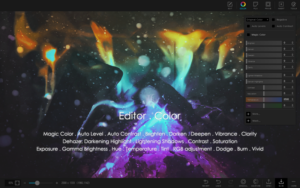
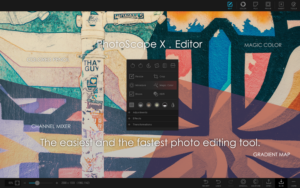
PhotoScape X Pro 4.3 on Mac adds native Apple Silicon, AI healing and cut-out tools, new stickers, and improved RAW support. PhotoScape X Pro 4.3 for Mac — Photo Editor & Batch Tools

Pros & Cons Show details

✅ PROS

  • The tabbed design keeps batch edits, collages, GIFs, and single-image work in one app instead of juggling several utilities on macOS.
  • Version 4.3 adds native Apple Silicon support, which should improve responsiveness on M-series Macs compared with running the app under Rosetta.
  • AI Healing Brush and Cut Out enhancements on Apple Silicon Macs speed up blemish removal and background isolation for users who do not want a separate masking app.
  • Pro’s one-time unlock avoids a subscription while unlocking Clone Stamp, Macro playback, and watermark-free batch processing for frequent editors.
  • The developer states the app does not collect user data, which may matter if you edit client or personal photos locally without cloud upload.

❌ CONS

  • macOS 13.0 is now required, so older Macs stuck on Monterey or earlier cannot install version 4.3 even if they ran 4.2.x before.
  • Key AI features in 4.3 are limited to Apple Silicon, so Intel Mac users do not get the same healing and cut-out assistance despite meeting the OS requirement.
  • Pro features sit behind a paid unlock on top of the free base, and additional sticker packs are microtransactions, which adds cost beyond the main Pro fee.
  • Help and tutorial coverage is thinner than in professional suites, so advanced masking, color grading, and layer workflows can feel under-documented for new users.
  • The interface packs many tools into one window, which can feel crowded on smaller MacBook screens compared with dedicated single-purpose editors.
✅ What's New in 4.3 fix Show details
  1. Native Apple Silicon support — the Mac build runs natively on M-series chips under macOS 13+, improving speed and efficiency versus Rosetta translation.
  2. Healing Brush AI — Apple Silicon Macs gain an AI-assisted healing tool for faster spot and object cleanup in the Editor.
  3. AI Cut Out tools — background removal in the Cut Out tab adds AI features on Apple Silicon, reducing manual brushing for simple extractions.
  4. Sticker and pattern packs — 4.3 adds pearl patterns, traditional figures, seal, grocery, beauty, art supply, and food-themed sticker sets for collages and overlays.
  5. Improved RAW support — the vendor reports better RAW engine handling in this release, which may broaden reliable editing for camera files beyond JPEG workflows.
  6. Bug fixes — general stability and defect repairs close the 4.3 changelog alongside the feature additions.

Older Versions

Version Publication date
PhotoScape X Pro v4.3 fix Latest Current
PhotoScape X Pro v4.2.1
PhotoScape X Pro v4.2.0
PhotoScape X Pro v4.1.1
PhotoScape X Pro v4.1.0
PhotoScape X Pro v4.0.1
PhotoScape X Pro v3.0.3
PhotoScape X Pro v3.0.2
PhotoScape X Pro v2.5

Installation & Troubleshooting FAQ

8 questions

Common issues when installing macOS apps

Alternatives

Join the Conversation

Your email address will not be published. Required fields are marked *