Disk Graph 3.2.1 for Mac

Disk Graph
Name:Disk Graph 3.2.1 MAS [TNT].dmg.torrent (9.53MB)
Hash:1020a943477ed5427bcb9b2abead9629688d0edb
Review by:
Downloads 198
Rating
4.3 35 Click to rate
Checked
   Download Torrent Download Now

Disk Graph

A macOS disk inspector from Nicolas Kick (Desairem) that scans any Finder-accessible folder or volume and shows where space goes in an animated pie-style graph you can drill into file by file.

How you use it on Mac

Pick Macintosh HD, an external drive, or a network path, and Disk Graph builds a segmented view sized by file weight, allocated size, or child count. Hover segments to see names and sizes, click to descend into subfolders, and search filenames without leaving the chart. The full app lets you reveal items in Finder, move files to the Trash, save favorite locations, and compare two directory snapshots with animated diffs or exported TSV/JSON records.

Disk Graph Lite on the Mac App Store offers the same scanning and navigation for free but disables favorites persistence, Finder reveal, and Trash actions—useful for trying the workflow before buying. The paid Mac build is a one-time lifetime license from the developer site with free updates, no activation key, and support for all your personal Macs on Intel and Apple Silicon.

Licensing and version 3.2.1

The app requires macOS 10.13 or later and ships in more than thirty languages. Version 3.2.1 (June 30, 2026) is a small fix release: it corrects wrong creation and modification dates for Macintosh HD in the file list and addresses an occasional crash. Version 3.2.0 added macOS 26 compatibility, System Settings accessibility rendering, and fixes for Show Available Space and search-result folder collapsing.
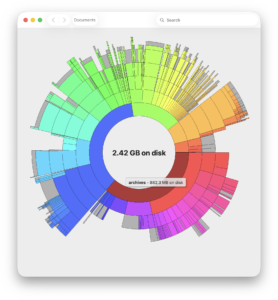
Disk Graph 3.2.1 — Disk Space Visualizer for Mac

Pros & Cons Show details

✅ PROS

  • Interactive pie graph makes large folders and forgotten files obvious faster than flat Finder size sorting.
  • Scans local disks, external volumes, and reachable network paths from a single utility window.
  • Multiple sort modes (file size, allocated size, child count) help whether you care about real disk use or folder clutter.
  • Snapshot comparison and plain JSON/TSV exports suit before-and-after cleanup audits without proprietary formats.
  • One-time lifetime purchase with a free Lite trial and no subscription for basic disk inspection on Mac.

❌ CONS

  • Full cleanup actions (Trash, Finder reveal, saved favorites) require the paid build; Lite is browse-only for those features.
  • Version 3.2.1 changes only two documented fixes, so it is maintenance rather than a feature release.
  • Paid Mac version is sold on the developer site separately from the universal iOS/iPad App Store listing (different version numbering).
  • Pie charts can feel cramped on very deep directory trees compared with column-based tools like GrandPerspective.
  • Cloud-only or encrypted vault paths may scan poorly or show misleading sizes per the developer’s own FAQ notes.
✅ What's New in 3.2.1 Show details
  1. Macintosh HD date fix — Corrects wrong creation and modification dates shown in the file list when scanning Macintosh HD.
  2. Crash fix — Addresses an occasional crash reported in the 3.2.1 build.
  3. June 2026 maintenance — Developer site lists 3.2.1 as the current Mac version (June 30, 2026).
  4. Prior 3.2.0 macOS 26 support — Improved compatibility with macOS 26 shipped in 3.2.0, not reintroduced as new in 3.2.1.
  5. Prior accessibility pass — 3.2.0 added increased contrast, reduced transparency, and reduced-motion fade transitions from System Settings; unchanged in 3.2.1.
  6. Prior scan UI fixes — 3.2.0 fixed Show Available Space rendering glitches and folders collapsing during search; still included in the 3.2.1 codebase.

Older Versions

Version Publication date
Disk Graph v3.2.1 Latest Current
Disk Graph v3.2.0
Disk Graph v3.1.1
Disk Graph v3.0.3
Disk Graph v3.0.2
Disk Graph v2.4.3
Disk Graph v2.4.2
Disk Graph v2.4.1
Disk Graph v2.4
Disk Graph v2.3
Disk Graph v2.2.2
Disk Graph v2.2.1
Disk Graph v2.2
Disk Graph v2.1.21
Disk Graph v2.1.20
Disk Graph v2.1.19
Disk Graph v2.1.18
Disk Graph v2.1.17

Installation & Troubleshooting FAQ

8 questions

Common issues when installing macOS apps

Alternatives

Join the Conversation

Your email address will not be published. Required fields are marked *