
OmniPlan Pro 4.10.3 for Mac

OmniPlan Pro
Name:OmniPlan 4.10.3 [TNT].dmg.torrent (99.71MB)
Hash:16f8bdc790cc22a531787726c69147c742ab1d84
Review by:
Downloads 184
Rating
4.7 13 Click to rate
Checked
   Download Torrent Download Now

What OmniPlan Pro does on Mac

OmniPlan Pro is a native macOS project management app for building schedules, assigning resources, tracking baselines, and visualizing work through Gantt timelines, outlines, and network diagrams.

Developed by The Omni Group, OmniPlan targets professional planners who need more depth than a spreadsheet but want a Mac-native alternative to Microsoft Project. You define tasks, dependencies, calendars, and resources, then let automatic scheduling, leveling, and violation detection keep the plan realistic. Pro adds Monte Carlo simulation, multi-project dashboards, earned value analysis, Microsoft Project import and export, reporting, and Omni Automation scripting.

Typical Mac workflow

Most teams start from a template such as Standard Project, add milestones and dependencies, assign people or equipment, and review the Gantt view for bottlenecks. Baselines capture the original plan so you can compare actual progress later. Critical path highlighting shows which tasks drive the finish date, while resource calendars help avoid double-booking. Pro users can publish projects for collaboration and run simulations to estimate deadline confidence.

Version 4.10.3

Released as part of the OmniPlan 4.10 line, build 4.10.3 is a focused maintenance update. Official Mac release notes document expanded Omni Automation API properties and functions with corrected naming inconsistencies, plus a fix for a hang that could occur when leveling tried to schedule a split task with no available resources inside the defined time window.

Licensing and requirements

OmniPlan Pro requires macOS 12 or later and is available through The Omni Group store or the Mac App Store with a 14-day trial. A Pro perpetual license is $399.99, or you can subscribe annually for $199.99 with Pro access across Mac, iPad, iPhone, and Apple Vision Pro. Standard omits Pro-only tools such as Monte Carlo, multi-project dashboards, and advanced reporting.
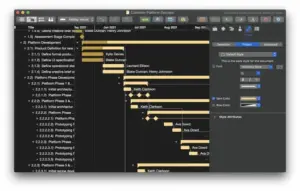
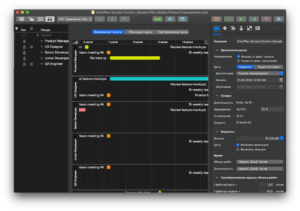
OmniPlan Pro 4.10.3 plans and tracks projects OmniPlan Pro 4.10.3 for Mac — Project Management

Pros & Cons Show details

✅ PROS

  • Gantt, outline, and network views plus automatic scheduling and resource leveling give Mac users a full planning toolkit without leaving the Apple ecosystem.
  • Pro-only Monte Carlo simulation and earned value analysis help quantify deadline risk and budget health on complex projects.
  • Multi-project dashboards let managers compare portfolio status and resource load across several plans in one place.
  • One purchase or subscription can cover Mac, iPad, iPhone, and Apple Vision Pro, which suits hybrid planning workflows.
  • Version 4.10.3 improves Omni Automation API consistency and fixes a leveling hang that could block scheduling on constrained split tasks.

❌ CONS

  • OmniPlan Pro is expensive compared with many Mac task apps, with a $399.99 perpetual Pro license or a $199.99 annual subscription.
  • Version 4.10.3 only documents automation API updates and a leveling fix, so users expecting major new planning features will not see them in this build.
  • Collaboration and Microsoft Project interchange work for many teams but can still require cleanup when exchanging files with Windows-centric organizations.
  • The learning curve is steeper than lightweight to-do or kanban tools because scheduling, baselines, and resource rules take time to master.
  • Pro features such as Monte Carlo, reporting, and multi-project dashboards are unavailable in the cheaper Standard edition.
✅ What's New in 4.10.3 Show details
  1. [Maintenance release scope] — OmniPlan 4.10.3 for Mac is a targeted update with two documented changes in the official release notes.
  2. [Omni Automation API expansion] — New API properties and functions were added, with previous misspellings and naming inconsistencies corrected in the automation surface.
  3. [Automation documentation pointer] — API changes are detailed under OmniPlan: Release Notes in Automation > API Reference inside the app.
  4. [Leveling hang fix] — Fixed a hang that could occur when attempting to schedule a split task with no available resources within the defined time constraints.
  5. [Cross-platform 4.10.3 line] — The same 4.10.3 automation and leveling fixes also shipped for iPad, iPhone, and Apple Vision Pro according to The Omni Group.

Older Versions

Version Publication date
OmniPlan Pro v4.10.3 Latest Current
OmniPlan Pro v4.10.2
OmniPlan Pro v4.10
OmniPlan Pro v4.9.6
OmniPlan Pro v4.9.5
OmniPlan Pro v4.9.3
OmniPlan Pro v4.9.2
OmniPlan Pro v4.9
OmniPlan Pro v4.8.3
OmniPlan Pro v4.8.1
OmniPlan Pro v4.8.0
OmniPlan Pro v4.3.2
OmniPlan Pro v3.14.4
OmniPlan Pro v3.11.1
OmniPlan Pro v3.11
OmniPlan Pro v3.10.4
OmniPlan Pro v3.9
OmniPlan Pro v3.6.1

Installation & Troubleshooting FAQ

8 questions

Common issues when installing macOS apps

Alternatives

Join the Conversation

Your email address will not be published. Required fields are marked *