DaVinci Resolve Studio 21.0.2 for Mac

Blackmagic Design DaVinci Resolve Studio
Name:PatchScripts.zip
Review by:
Downloads 1,966
Rating
4.5 11 Click to rate
Checked
Download Now    Download Link

DaVinci Resolve Studio

Blackmagic Design’s all-in-one post suite for Mac that combines non-linear editing, Hollywood color grading, Fusion compositing, Fairlight audio, and—since version 21—a Photo page for stills inside the same project timeline.

Typical Mac workflow

Import camera originals into the Media page, cut on Edit or Cut, grade on Color with nodes, power windows, and HDR tools, then add titles and effects on Fusion before mixing in Fairlight and delivering from the Deliver page. Resolve 21 added IntelliSearch for content-aware media search, AI-assisted audio tools, Krokodove motion graphics, Fairlight folders, and vertical-timeline Fusion transitions aimed at social deliverables. Blackmagic Cloud collaboration lets distributed teams share bins and timelines when your workflow requires it.

DaVinci Resolve is free to download; the Studio edition ($295 one-time from Blackmagic, also on the Mac App Store) adds the Neural Engine, extra Resolve FX and Fairlight plugins, stereoscopic 3D, advanced HDR grading, and additional GPU features. On Mac, Resolve 21 requires Apple Silicon and macOS 15 Sequoia or later; Intel Macs are not supported in this major version line. App Store Studio builds may limit some external panels and third-party OFX or VST plugins compared with the direct download.

Licensing and version 21.0.2

Version 21.0.2 (July 2026) is a maintenance patch—the second 21.x fix within about a week—focused on stability rather than new features. Blackmagic’s published notes address bypass thumbnails, retime curves, keyframe pasting, IntelliSearch speed, TIFF still export bit depth, and related inspector issues; Studio adds a fix for H.264 and H.265 NVIDIA decode performance, which primarily benefits Windows and Linux systems with NVIDIA GPUs. Projects opened in 21.0.2 cannot return to Resolve 20.3.2, so backup libraries before upgrading.

DaVinci Resolve Studio 21.0.2 — Video Post for Mac

Pros & Cons Show details

✅ PROS

  • One application covers edit, color, VFX, audio, and stills, which reduces round-tripping between separate tools on a Mac post workstation.
  • Studio unlocks the Neural Engine, expanded Resolve FX and Fairlight plugins, stereoscopic tools, and advanced HDR grading beyond the free edition.
  • Version 21’s Photo page and IntelliSearch extend Resolve into photography and faster content search without leaving the ecosystem.
  • Native Apple Silicon builds target modern Mac hardware with unified memory for grading and Fusion work.
  • The 21.0.2 update is a free download for licensed Studio users and tightens everyday editing pain points such as keyframes, retime curves, and media search.

❌ CONS

  • Version 21.0.2 is a bug-fix release with no major new creative features beyond what shipped in Resolve 21.0.
  • macOS 15 on Apple Silicon only for Resolve 21 excludes Intel Macs and older macOS versions still running Resolve 20.
  • Studio costs $295, and hardware control surfaces add substantially more if you want panel-driven grading or Fairlight mixing.
  • The Mac App Store Studio build may not support all external panels or third-party OFX and VST plugins per Blackmagic’s own disclaimer.
  • The Studio-only NVIDIA H.264/H.265 decode fix in 21.0.2 offers little benefit on typical Apple Silicon Macs without NVIDIA GPUs.
✅ What's New in 21.0 Beta 5 Show details
  1. Bypass thumbnails — Addressed thumbnail preview when bypassing Color or Fusion so review matches expected unprocessed frames.
  2. Retime curves — Improved display of the retime speed curve for clearer speed-ramp feedback while editing.
  3. Keyframe paste — Fixed an issue where copied keyframes did not always paste correctly between clips.
  4. IntelliSearch speed — Addressed slower IntelliSearch performance introduced after the Resolve 21 launch.
  5. TIFF still export — Fixed bit depth when exporting the current frame as a TIFF still from the viewer.
  6. Inspector and media fixes — Corrected video inspector zoom minimums, Source Tape selection consistency, Unicode spell-check display, Fusion vertical transition defaults, and Media Pool custom sort persistence.
  7. Studio NVIDIA decode — DaVinci Resolve Studio 21.0.2 additionally addresses H.264 and H.265 NVIDIA decode performance on systems with NVIDIA GPUs.
  8. Stability pass — General performance and stability improvements across the 21.0.2 build with no new pages or tools advertised.

Older Versions

Version Publication date
DaVinci Resolve Studio v21.0 Beta 5 Latest Current
DaVinci Resolve Studio v21.0 Beta 4
DaVinci Resolve Studio v21.0 Beta 3
DaVinci Resolve Studio v21.0 Beta 2
Davinci Resolve Studio v20.3.1
DaVinci Resolve Studio v20.3
DaVinci Resolve Studio v20.2.3
DaVinci Resolve Studio v18.1
Davinci Resolve Studio v17b3
DaVinci Resolve Studio v17.3.0
DaVinci Resolve Studio v16.2.5
DaVinci Resolve Studio v16.2.4.16
DaVinci Resolve Studio v16.0.0
DaVinci Resolve Studio v15.3.0.8

Installation & Troubleshooting FAQ

7 questions

Common issues when installing macOS apps

Alternatives

Important

DaVinci Resolve Studio — clean install & patch (Mac)


1. Remove the broken DRS install

Use the official Uninstall Resolve tool, or delete these two folders manually:

  • /Library/Application Support/Blackmagic Design
  • /Applications/DaVinci Resolve

Important: To keep your settings, presets, and project database, do not remove the user folder below with AppCleaner or similar uninstallers:

  • ~/Library/Application Support/Blackmagic Design

2. System permissions & tools

In System Settings → Privacy & Security, grant Terminal Full Disk Access.

Install Xcode Command Line Tools (required for Patch Scripts to run correctly). In Terminal:

xcode-select –install

2.1. Restart your Mac.


3. Download from Blackmagic Design

From Latest Downloadshttps://www.blackmagicdesign.com/support/

  • Any DaVinci Resolve Studio version (19.x20.x, or 21.x)   !!!!!!!!!!!!!! Studio version !!!!!!!!!!!!!!!!
  • Patch Scripts.zip


4. Unpack the archives

  • DaVinci_Resolve_Studio_xxxx_Mac.zip
  • Patch Scripts.zip

4.1. In Terminal, clear quarantine attributes on the DMG:

/usr/bin/xattr -cr $HOME/Downloads/DaVinci_Resolve_Studio*.dmg

5. Install & patch

  1. Install Resolve Studio
  2. Run Patch Scripts (the black EXEC file) and enter your password when prompted
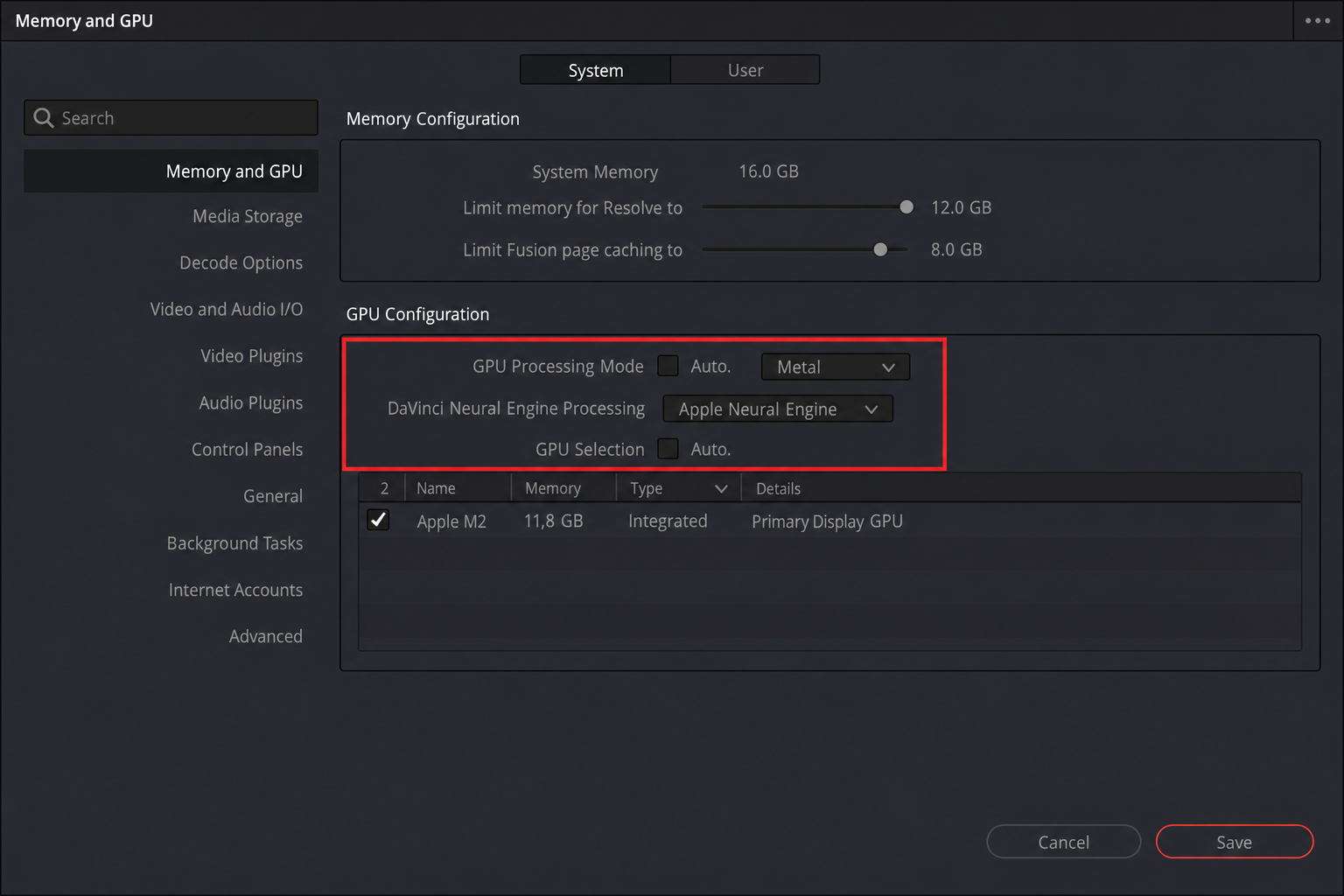
  3. Configure GPU settings — and you’re done


Note: The patch script works only with Studio. It checks for a license file and creates one if it’s missing. You don’t need to install a license file separately.

4 Comments

  1. Worked perfectly, thanks.

    One minor thing. In “3. Download from Blackmagic Design” it might be better to do the red arrow highlights on the Studio version and not the base version..perhaps revise that one image? That glitched me for a second but the note that the “patch script works only with Studio” was my reminder to DL the Studio version to make it all work as desired.

  2. Work,
    only download STUDIO version (8GB)- on picture is arrow to standard version – this is wrong version that is free – patch work

  3. Downloaded the Update thru DaVinci directly an d insttalled it, after installation tun the patch, done. It works perfectly fine.
    M1 Tahoe

Join the Conversation

Your email address will not be published. Required fields are marked *