
Cap Pro 0.4.84 for Mac

Cap Pro
Name:Cap 0.4.84 [EDiSO].dmg.torrent (107.3MB)
Hash:781cec77a002e45c02a814224fbb0395f4bd5474
Review by:
Downloads 80
Rating
4.5 13 Click to rate
Checked
   Download Torrent Download Now

Cap Pro on Mac

Cap is an open-source screen recorder for macOS that combines quick shareable captures with a full Studio editor, positioned as a Loom-style alternative you can run locally or host on your own storage.

Two recording modes

Instant Mode records and uploads in the background so you get a shareable link fast—useful for async updates and bug reports. Studio Mode records to disk with a built-in editor for trimming, layout tweaks, and export to common formats. Both modes support screen, window, or camera-only capture with optional webcam overlay. The desktop app is built with Tauri and Rust for native capture on Apple Silicon and Intel Macs.

What Cap Pro adds

Cap is free for personal use with local Studio recording, but commercial work requires a paid license. Cap Pro is a monthly or annual subscription that includes everything in the Desktop License plus unlimited cloud sharing, AI-generated titles, summaries, chapters, transcriptions, custom domains, password-protected links, team workspaces, and optional custom S3 bucket storage. The Desktop License alone covers commercial local recording with a small monthly cloud link allowance.

Version 0.4.84

Build 0.4.84 (April 2026) focuses on recording reliability and sharing speed: Ultra quality for Studio captures, segmented HLS uploads in Instant Mode, macOS screen-capture auto-restart, and smoother camera preview. macOS 13 (Ventura) or later is required; the vendor recommends 13.1+. You need screen-recording and microphone permissions in System Settings, plus a Cap account for cloud features.
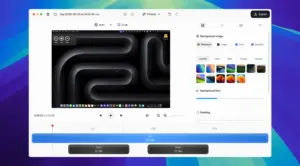
Cap Pro 0.4.84 — Screen Recorder for Mac

Pros & Cons Show details

✅ PROS

  • Instant Mode can share a live preview link while you are still recording, which speeds up async feedback loops for remote teams.
  • Studio Mode provides local recording and a built-in editor with 4K/60fps export on paid plans, so you are not locked into a web-only workflow.
  • Open-source codebase and optional custom S3 storage give teams more control over where recordings live than typical closed SaaS recorders.
  • Version 0.4.84 adds Ultra quality mode and macOS screen-capture auto-restart, improving fidelity and resilience during long demos.
  • Native builds for Apple Silicon and Intel avoid browser-extension quirks and support system audio capture with standard macOS permissions.
  • Cap Pro bundles unlimited cloud links, AI metadata, transcriptions, and team workspaces in one subscription instead of separate hosting and caption tools.

❌ CONS

  • Cap Pro is a recurring subscription, so ongoing cloud and AI features cost more over time than a one-time Desktop License if you mainly record locally.
  • The free tier limits recordings to five minutes and personal use only, which blocks longer client demos without upgrading.
  • Cloud sharing, AI captions, and team features require a Cap account and network access, which may not suit air-gapped or strict privacy environments.
  • Some users on recent macOS builds have reported exit crashes during shutdown cleanup in 0.4.84, so verify stability on your hardware before relying on it in production.
  • Transcription model downloads can fail on certain macOS versions until local cache state is cleared, adding friction to offline caption setup.
  • The app is not distributed through the Mac App Store, so managed Mac deployments must allow installs from the vendor or GitHub releases.
✅ What's New in 0.4.84 Show details
  1. [Ultra quality mode] — New Balanced vs Ultra selector in settings raises bitrates for sharper UI walkthroughs and code demos in Studio recordings.
  2. [Segmented Instant Mode] — HLS segments upload during recording so share links go live sooner and viewers can watch a live preview while you record.
  3. [Screen capture auto-restart] — On macOS, a dropped ScreenCaptureKit pipeline restarts automatically without stopping the session.
  4. [Camera reliability] — Preview detects stalls and auto-refreshes, recovers after sleep or reopening Cap, and cleans up feeds when recording ends.
  5. [Camera performance] — Batched rendering, decoder caching, and frame reuse make webcam preview noticeably smoother on macOS and Windows.
  6. [Click-to-lock window selection] — Click a window in the target picker to lock capture; the camera bubble and controls reposition around that target.
  7. [Recording stop reliability] — Stop pipeline timeouts and concurrent audio/video shutdown reduce hangs when ending a session.
  8. [Exit shutdown guards] — Uploads finish and resources release before quit, lowering the risk of losing a recording on app exit.
  9. [Camera-only recording fixes] — Thumbnails and cloud uploads now work correctly when you record webcam-only without screen capture.

Installation & Troubleshooting FAQ

8 questions

Common issues when installing macOS apps

Alternatives

Join the Conversation

Your email address will not be published. Required fields are marked *