
SideNotes 1.6.2 for Mac

SideNotes
Name:SideNotes 1.6.2 [TNT].dmg.torrent (22MB)
Hash:f8e2e7339fbd3781a850697fac588922e2b7630a
Review by:
Downloads 227
Rating
4.7 35 Click to rate
Checked
   Download Torrent Download Now

Quick notes on the edge of your Mac screen

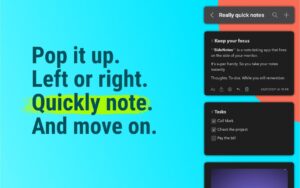
SideNotes is a native macOS notes app that slides in from the screen edge so you can capture tasks, links, and snippets without switching away from your current window.

How it fits daily work

Open SideNotes from the Open Bar, Hot Side cursor trigger, menu bar icon, or a keyboard shortcut. It stays on top in full-screen apps and Stage Manager, then hides again when you are done. Folders, note colors, pinning, and folding keep long note lists organized without cluttering the desktop like traditional sticky notes.

  • Developers and designers: store code snippets, hex colors, and file shortcuts with drag-and-drop.
  • Students and professionals: capture meeting notes and to-dos during lectures or calls.
  • Power users: automate with Apple Shortcuts, AppleScript, and integrations such as Raycast and Alfred.

Writing and organization

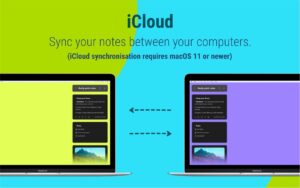
SideNotes supports hidden Markdown formatting, a quick formatting toolbar, checklists, images, and search across folders. iCloud sync keeps notes aligned across Macs when enabled, and automatic local backups add a safety net. Themes and fonts let you match the panel to your workspace.

Licensing and privacy

SideNotes sells as a one-time purchase for the 1.x line with a 30-day trial on the vendor site; SideNotes Mobile for iPhone and iPad is a separate app. The developer states notes stay on your device and private iCloud, with no app telemetry collected.

SideNotes 1.6.2

Version 1.6.2 requires macOS 13 or later on Intel and Apple Silicon Macs and improves code pasting, task-list behavior, line reordering, and drag-and-drop feedback, with fixes for note selection and Settings on older macOS versions.
SideNotes 1.6.2 is a Mac sidebar notes app SideNotes 1.6.2 for Mac — Edge Quick Notes

Pros & Cons Show details

✅ PROS

  • Edge-panel access lets you capture notes in seconds without alt-tabbing, which suits full-screen and multi-monitor Mac workflows.
  • Folders, colors, pinning, folding, and built-in search make SideNotes more organized than basic sticky notes or a single TextEdit scratch file.
  • Hidden Markdown, tasks, images, file shortcuts, and a quick formatting toolbar cover everyday note types from checklists to code snippets.
  • iCloud sync, automatic backups, and Apple Shortcuts or AppleScript support fit users who want sync and automation without a subscription.
  • One-time purchase for SideNotes 1.x with free minor updates is straightforward compared with recurring note-app subscriptions.
  • Version 1.6.2 improves code paste detection and completed-task sorting, making developer and checklist workflows smoother.

❌ CONS

  • SideNotes is Mac-only for the desktop app; full mobile parity requires a separate SideNotes Mobile purchase on iPhone and iPad.
  • macOS 13 or later is required, so users on older Macs cannot run current SideNotes releases.
  • Some 1.6 features, such as Control Center controls, need macOS 26 according to vendor system requirements.
  • The sidebar model may feel redundant if you already rely heavily on Apple Notes, Obsidian, or another primary notes system.
  • Major-version upgrades beyond 1.x will be paid separately, so long-term cost depends on how often Apptorium ships new major releases.
  • Version 1.6.2 is a focused maintenance update rather than a release with large new features beyond editing and bug-fix improvements.
✅ What's New in 1.6.2 Show details
  1. Code paste detection — SideNotes detects text pasted from a code editor and inserts it as a code block, with Settings to choose code block or Code note behavior.
  2. Completed tasks at bottom — Finished checklist items now move automatically to the bottom of the task list for clearer active work.
  3. Move lines shortcut — Command-Option-[ and Command-Option-] move the current line or selected lines up and down inside a note.
  4. Drag-and-drop feedback — A background overlay appears when dropping content into SideNotes, making drops easier to see over transparent areas.
  5. Last-line selection fix — Double-clicking the last line no longer folds the note when you intend to select text.
  6. Appearance and Settings fixes — Folder labels read correctly when app appearance differs from system appearance, and Settings pages work on macOS versions before macOS 26.

Older Versions

Version Publication date
SideNotes v1.6.2 Latest Current
SideNotes v1.5.3
SideNotes v1.5.2
SideNotes v1.5.1
SideNotes v1.5.0
SideNotes v1.4.19
SideNotes v1.4.18
SideNotes v1.4.15
SideNotes v1.4.14
SideNotes v1.4.13
SideNotes v1.4.10
SideNotes v1.4.8
SideNotes v1.4.6
SideNotes v1.4.5
SideNotes v1.4.4
SideNotes v1.4.1
SideNotes v1.4
SideNotes v1.3.3
SideNotes v1.3.2
SideNotes v1.3.1
SideNotes v1.2.7
SideNotes v1.2.5
SideNotes v1.2.3
SideNotes v1.2.1

Installation & Troubleshooting FAQ

8 questions

Common issues when installing macOS apps

Alternatives

Important

Mount the image and launch Open Gatekeeper Friendly.

Press Enter to bypass Gatekeeper in the Terminal window.

Drag the application to the Applications folder.

The application is ready to use.

WARNING! SIP must be disabled. Learn more >

Compatibility
macOS 13 and later

Architecture
ARM, x86 (64-bit)

Join the Conversation

Your email address will not be published. Required fields are marked *