
HoudahSpot 6.8.2 for Mac

houdahspot
Name:HoudahSpot 6.8.2.dmg.torrent (14.26MB)
Hash:607ac91492a467dac9bef389d76024987a921acc
Review by:
Downloads 147
Rating
4.2 29 Click to rate
Checked
   Download Torrent Download Now

HoudahSpot

An advanced file search app for macOS from Houdah Software that builds on Spotlight indexing with multi-criteria queries, rich result columns, in-app preview, and reusable search templates.

When Finder search is not enough

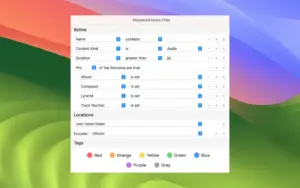
HoudahSpot targets power users who need to narrow thousands of files by name, text content, extension, tags, dates, authors, image resolution, and other metadata. You start with a quick search field, then stack criteria with boolean groups, include or exclude folder trees, and sort results by hundreds of available columns. Templates save recurring setups—recent files, applications, music libraries, or custom client folders—so you do not rebuild the same query every week.

The results pane supports list, icon, and thumbnail views with grouping by kind, date, size, or application. Text Preview can fold around highlighted matches so you see context without opening each document; Quick Look and the Info pane expose Spotlight metadata you can turn into new filters. Integrations include Alfred, LaunchBar, AppleScript automation, a Finder extension, and reveal actions for tools such as ForkLift.

Platform and licensing

HoudahSpot requires macOS 10.14 Mojave or later with Spotlight indexing enabled and runs on Intel and Apple Silicon Macs according to the vendor. It is sold directly from Houdah Software for about $34 with a free trial; Apple Mail message search is no longer available on macOS Sonoma and later. Version 6.8 added DEVONthink 4 preview support and a Spotlight workaround for names with punctuation; 6.8.2 (June 2026) focuses on crash fixes and clearer conflict prompts when copying or moving duplicate filenames.

HoudahSpot 6.8.2 — Advanced File Search for Mac

Pros & Cons Show details

✅ PROS

  • Combines many Spotlight criteria with boolean groups so you can narrow large result sets far beyond basic Finder search.
  • Text Preview with match folding lets you verify content hits before opening files, saving time on ambiguous filenames.
  • Search templates and recent searches make frequently used queries and folder scopes one click away.
  • Flexible location rules search multiple folders at once while excluding nested paths such as Music libraries.
  • DEVONthink 4 preview support in the 6.8 line helps researchers who store documents outside normal Finder trees.

❌ CONS

  • One-time purchase around $34 from Houdah Software with no Mac App Store distribution for users who prefer App Store licensing.
  • Depends entirely on Spotlight indexing, so missing or stale indexes produce incomplete results until macOS reindexes.
  • Apple Mail search featured in older HoudahSpot versions is unavailable on macOS Sonoma and later per the developer.
  • Interface depth and hundreds of columns can overwhelm casual users who only need occasional filename lookups.
  • Version 6.8.2 is primarily a stability release, so it does not add major new search capabilities beyond prior 6.8.x builds.
✅ What's New in 6.8.2 Show details
  1. File conflict prompts — Copying or moving multiple files with the same name now shows clearer conflict dialogs when batches collide.
  2. Tahoe text preview fix — Resolves a crash when previewing certain text files on macOS 26 Tahoe during in-app Text Preview.
  3. Keyboard shortcut crash — Fixes a crash when pressing shortcuts that map to unmappable key combinations on some keyboards.
  4. Sidebar drag fix — Dragging a saved search to the bottom of the sidebar no longer triggers a crash.
  5. Trash context-menu fix — Right-clicking a search result while the file is being moved to the Trash no longer crashes the app.
  6. Criteria reorder fix — Reordering search criteria while a text field is active no longer causes a crash during inline editing.

Older Versions

Version Publication date
HoudahSpot v6.8.2 Latest Current
HoudahSpot v5.0.11

Installation & Troubleshooting FAQ

8 questions

Common issues when installing macOS apps

Alternatives

Join the Conversation

Your email address will not be published. Required fields are marked *