DaisyDisk 4.34 for Mac

DaisyDisk
Name:DaisyDisk 4.34 [TNT].dmg.torrent (8.94MB)
Hash:6bd8050074c954b869864a65f64c1ec440ecb321
Review by:
Downloads 416
Rating
4.5 28 Click to rate
Checked
   Download Torrent Download Now

DaisyDisk

A macOS disk analyzer from Software Ambience Corp. that turns folder sizes into a colorful sunburst map so you can spot what actually consumes space instead of guessing from Finder’s vague “System Data” bar.

Typical Mac workflow

Launch DaisyDisk, pick your startup disk or an external volume, and the app scans in seconds—often far faster than waiting on Finder’s size calculations. The interactive rings let you click inward through folders until a few huge files or abandoned project directories stand out. Press Space for QuickLook previews, then drag unwanted items to the collector at the bottom to delete them. System paths that should not be touched are blocked automatically, so cleanup stays deliberate rather than one-click “optimizer” roulette.

When regular scans miss space, Scan as Administrator exposes restricted areas and helps break down macOS “Other” and “System Data,” including APFS snapshots and purgeable space that can quietly eat tens of gigabytes. DaisyDisk also mounts cloud accounts—Dropbox, Google Drive, Microsoft OneDrive, and Box—for remote scanning alongside local, network, and external drives. Parallel scanning, real-time free-space readouts, and keyboard navigation through results suit power users who manage multiple disks or developer machines with simulator caches and old iOS backups.

Licensing and version 4.34

DaisyDisk sells as a one-time $9.99 lifetime license (direct site or Mac App Store) with minor updates included, use on up to five personal Macs, and no subscription. It requires macOS 10.13 High Sierra or later on Intel or Apple Silicon (M1 through M5 per the vendor). Version 4.34 (July 1, 2026) focuses on measurement accuracy: it detects APFS file clones and counts only the first physical occurrence, assigning duplicate clone entries a virtual size of zero so folder totals match real disk use—similar to how the app already treats hard links.
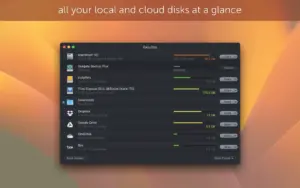
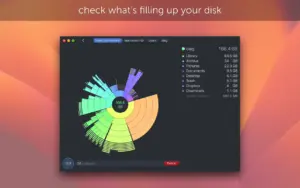
 DaisyDisk 4.34 maps Mac storage in a sunburst chart DaisyDisk 4.34 — Disk Space Analyzer for Mac

Pros & Cons Show details

✅ PROS

  • The sunburst interface makes it faster to spot a few multi-gigabyte culprits than scrolling flat size-sorted lists in Finder.
  • Scans complete in seconds on many SSDs and supports parallel scans across multiple mounted disks and cloud accounts.
  • Scan as Administrator and hidden-space tools help explain macOS “System Data” and APFS snapshots that built-in storage views obscure.
  • One-time purchase around $10 with lifetime minor updates and no subscription is strong value for occasional deep cleanups.
  • Safety stoppers block critical system paths, and the vendor does not collect user data according to the Mac App Store privacy label.

❌ CONS

  • Version 4.34 changes only APFS clone accounting, so it is an accuracy patch rather than a feature release.
  • In-app deletion still requires judgment; deleting the wrong large folder can break apps even with safety blocks in place.
  • Cloud scanning depends on third-party APIs and account auth, so very large Google Drive trees may still time out as noted in past release notes.
  • The Mac App Store listing does not declare accessibility support at the time of writing.
  • Major macOS upgrades are not included in the base license price beyond minor updates, per the vendor’s lifetime licensing terms.
✅ What's New in 4.34 Show details
  1. APFS clone detection — Version 4.34 adds support for APFS clones so space calculation reflects how macOS references the same file from multiple folders without duplicating bytes on disk.
  2. Virtual zero sizing — Duplicate clone entries are assigned a virtual size of 0 bytes after the first occurrence, preventing inflated folder totals in the sunburst map.
  3. Hard-link parity — Clone handling mirrors existing hard-link logic where only the first physical instance counts toward used space.
  4. Physically used space accuracy — Overall used-space math stays aligned with real disk consumption when clone-heavy directories are scanned.
  5. July 2026 release — Version 4.34 shipped July 1, 2026 per official release notes and the developer homepage.
  6. Free 4.x update — Minor releases in the 4.x line remain free for existing license holders, consistent with the vendor’s stated update policy.

Older Versions

Version Publication date
DaisyDisk v4.34 Latest Current
DaisyDisk 4.33 (4.33) v4.33.4.33
DaisyDisk 4.33.3 (4.33.3) admin v4.33.3.4.33.3
DaisyDisk 4.33.2 (4.33.2) admin v4.33.2.4.33.2
DaisyDisk v4.33.1
DaisyDisk 4.32 (4.32) v4.32.4.32
DaisyDisk v4.30
DaisyDisk v4.26.1
DaisyDisk v4.25
DaisyDisk v4.24
DaisyDisk v4.22.2
DaisyDisk v4.21.3
DaisyDisk v4.21.2
DaisyDisk v4.21.1
DaisyDisk v4.20.5
DaisyDisk v4.20.3
DaisyDisk v4.20.2
DaisyDisk v4.20.1
DaisyDisk v4.20
DaisyDisk v4.12.1
DaisyDisk v4.12
DaisyDisk v4.11
DaisyDisk v4.10
DaisyDisk v4.9
DaisyDisk v4.7.2.2
DaisyDisk v4.7.2
DaisyDisk v4.7.1

Installation & Troubleshooting FAQ

8 questions

Common issues when installing macOS apps

Alternatives

Join the Conversation

Your email address will not be published. Required fields are marked *