
Soulver 3.16.3 for Mac

Soulver
Name:Soulver 3 3.16.3 [TNT].dmg.torrent (23.69MB)
Hash:b0615f08af78858218fd1826f2b84cfc70f01599
Review by:
Downloads 112
Rating
4.5 34 Click to rate
Checked
   Download Torrent Download Now

Soulver 3

A native macOS notepad calculator from Acqualia that evaluates natural-language math beside your text so multi-step problems stay on one page instead of a calculator display.

How you use it on Mac

You type mixed words and numbers in a sheet; Soulver’s answer column shows results on the right as you go. Line references and subtotals let you build on earlier answers without retyping values, and variables hold names like monthly rent or hourly rate across a budget block. The SoulverCore engine runs on device—no cloud AI—and understands percentages, unit conversions, calendar math, time zones, and live currency rates for everyday planning.

Sheets autosave like notes and can live in iCloud so the same calculations sync to iPad and iPhone. Export to PDF or plain text, automate via Shortcuts and URL schemes, or use the bundled CLI for scripting. A 30-day Mac trial does not auto-charge; the Mac App Store and direct download license is a one-time purchase around $39.

Soulver 4 context and version 3.16.3

Acqualia released Soulver 4 in 2026 as a separate universal purchase with major new workflows; Soulver 3 remains supported for bug fixes and compatibility. Existing Soulver 3 owners can upgrade to Soulver 4 at a 50% App Store discount where eligible. Version 3.16.3 (June 2026) adds iCloud sync compatibility with Soulver 4 sheetbooks and minor calculation-engine improvements; it requires macOS 14.6 or later per the official Sparkle feed.
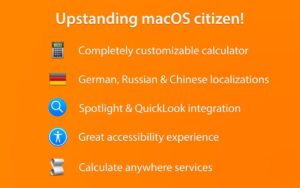
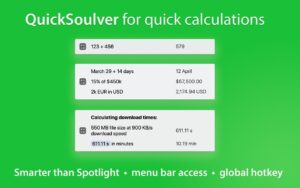
Soulver 3.16.3 is a natural-language notepad calculator for Mac Soulver 3.16.3 — Notepad Calculator for Mac

Pros & Cons Show details

✅ PROS

  • Natural-language lines with a live answer column suit budgets, quotes, and trip math better than a traditional calculator display.
  • Line references, subtotals, and variables keep multi-step work readable without spreadsheet formulas.
  • On-device SoulverCore handles currencies, units, dates, and percentages without sending your sheet text to AI services.
  • iCloud sheet sync and plain-text sheets make calculations portable across Mac, iPad, and iPhone.
  • Soulver 3 remains a one-time purchase with continued maintenance while Soulver 4 targets users who want the new feature set.

❌ CONS

  • One-time Mac license around $39, with optional paid data subscriptions for extended stock tickers and Wolfram queries.
  • Version 3.16.3 raises the floor to macOS 14.6, excluding Macs that cannot upgrade past older Sonoma builds.
  • New major features such as trip planning, tags, and dividers ship in Soulver 4, not the Soulver 3 line.
  • Not a full spreadsheet—wide tabular data and heavy modeling still belong in Excel or Numbers.
  • Build 3.16.3 documents only sync compatibility and minor engine tweaks, not a large feature drop.
✅ What's New in 3.16.3 Show details
  1. Soulver 4 sync compatibility — Sheetbooks stored in iCloud can sync between Soulver 3 and Soulver 4 without breaking shared libraries.
  2. Calculation engine polish — Official release notes cite minor improvements to the on-device SoulverCore evaluator.
  3. macOS 14.6 requirement — Sparkle lists macOS 14.6 as the minimum version for build 541 (3.16.3).
  4. Continued Soulver 3 support — Developer states Soulver 3 will keep receiving bug fixes and system compatibility updates after Soulver 4 ships.
  5. Upgrade path to Soulver 4 — Registered Soulver 3 owners can move to Soulver 4 at a 50% App Store discount; migration imports via iCloud or File → Import from a Previous Version.
  6. Prior 3.16.2 features unchanged — Sunrise/sunset queries, quarter math, and superscript exponents arrived in 3.16.2 and are not new in 3.16.3.

Older Versions

Version Publication date
Soulver v3.16.3 Latest Current
Soulver v3.16.2
Soulver v3.15.2
Soulver v3.15.1
Soulver v3.15.0.1
Soulver v3.14.4
Soulver v3.14.3
Soulver v3.14.2
Soulver v3.14.1
Soulver v3.13.1
Soulver v3.13.0
Soulver v3.12.0
Soulver v3.10.425
Soulver v3.10.2
Soulver v3.10.1
Soulver v3.9.2
Soulver v3.9.1
Soulver v3.8.0
Soulver v3.7.3
Soulver v3.7.2
Soulver v3.7.0
Soulver v3.6.2
Soulver v3.6.1
Soulver v3.6
Soulver v3.5.9.1
Soulver v3.5.9
Soulver v3.5.8
Soulver v3.5.7
Soulver v3.5.5
Soulver v3.5.4
Soulver v3.5.2
Soulver v3.5.1
Soulver v3.5
Soulver v3.4.18
Soulver v3.4.17
Soulver v3.4.16
Soulver v3.4.15
Soulver v3.4.14
Soulver v3.4.13
Soulver v3.4.12
Soulver v3.4.11
Soulver v3.4.10.1
Soulver v3.4.10
Soulver v3.4.9
Soulver v3.4.8
Soulver v3.4.6
Soulver v3.4.5
Soulver v3.4.4
Soulver v3.4.3
Soulver v3.4.1
Soulver v3.4.0.1
Soulver 3.3 (90) v3.3.90
Soulver v3.2.2
Soulver v3.1.1.1
Soulver v3.1.1
Soulver v3.0.4
Soulver v3.0.2
Soulver v2.9.0
Soulver v2.7.1
Soulver v2.7.0

Installation & Troubleshooting FAQ

8 questions

Common issues when installing macOS apps

Alternatives

Join the Conversation

Your email address will not be published. Required fields are marked *