What Dropshare does on Mac
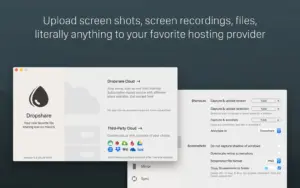
Dropshare is a menu bar app for macOS that uploads files, screenshots, and screen recordings to storage you control, then copies a share link to the clipboard.
Developed by Timo Josten, Dropshare targets Mac users who share assets daily with clients, teammates, or support channels. Instead of attaching large files to email or using a generic file host, you send content directly to S3-compatible buckets, SCP or SFTP servers, Dropbox, Google Drive, OneDrive, and dozens of other providers. Uploads go straight to the destination you pick; the app does not keep your files on a middleman server unless you choose Dropshare Cloud.
Core workflow on macOS
After setup, most sharing takes seconds:
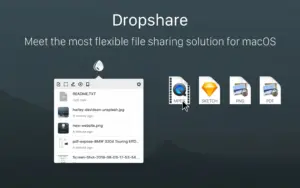
- Drag a file, folder, or text snippet onto the menu bar icon
- Capture a screenshot or screen recording with a global shortcut
- Annotate the capture in the built-in editor if needed
- Receive a short or long URL in the clipboard for immediate paste into chat or email
Multiple connections let you route personal uploads to one bucket and client work to another. Hold Command while dropping to pick a destination, or assign separate keyboard shortcuts per connection.
What you can upload and capture
- Files and folders from Finder or other apps via drag and drop or Share extension
- Full-screen or selection screenshots with optional watermarking
- Screen recordings at 24 or 60 fps, including window-targeted capture
- Clipboard text and Safari content without saving a local file first
- Markdown files rendered as HTML landing pages when configured
Security and link control
Dropshare supports password-protected links, automatic link expiry, and optional deletion of expired files from remote storage. Landing pages can brand downloads with custom HTML or preset designs. URL shorteners include the built-in dsh.re service or your own bit.ly or YOURLS instance.
Version 6.13
Version 6.13 focuses on the annotation editor and screen recording stability. New tools include a Highlight mode that dims the canvas outside a rectangular or circular focus area, curved arrows with per-end arrowhead styles, richer text formatting, and smarter snapping while drawing. Blur, pixelate, and magnify effects now stack correctly, and cropping preserves existing annotations. A fix addresses distorted audio on back-to-back screen recordings, and arrow editing on macOS versions before 26.0 is restored.
Requirements and licensing
Dropshare 6.x requires macOS 12.3 or later on Intel and Apple silicon Macs. The app sells for about $39 as a one-time purchase with a 7-day trial and free updates within the 6.x line; Setapp subscribers can install it through that subscription separately. Screen capture features need the standard macOS Screen Recording permission granted in System Settings.