Lungo 2.8.1 for Mac

Lungo
Name:Lungo 2.8.1 MAS [TNT].iso.torrent (8.64MB)
Hash:4ca8288d6c58c631ad974b62f5bda1c8ef171727
Review by:
Downloads 153
Rating
4.6 29 Click to rate
Checked
   Download Torrent Download Now

Lungo on Mac

Lungo is a lightweight menu bar utility that temporarily stops your Mac from sleeping and your display from dimming, without permanently changing Energy Saver settings.

When it helps

  • Presentations where the screen must stay lit between slides.
  • Long reads, recipes, or video tabs that do not count as fullscreen activity.
  • Downloads, builds, or backups you want to finish without the Mac nodding off.
  • Dashboards and live stats that should remain visible on a desk Mac.

Quick start

  1. Install Lungo from the Mac App Store and grant menu bar access if macOS asks.
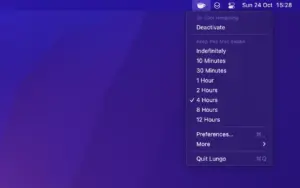
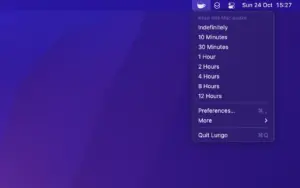
  2. Right-click the cup icon to pick a duration, or enable left-click toggle in settings.
  3. Watch the icon state to confirm Lungo is active; it turns off automatically when time expires.
  4. Optional: set a keyboard shortcut, activate at launch, or allow only the display to sleep while the system stays awake.

Controls and automation

Beyond the menu bar, Lungo fits into larger workflows:

  • Apple Shortcuts action “Set Enabled State” for custom durations and automations on macOS 26.
  • URL scheme commands such as lungo:activate?minutes=10 from Terminal or scripts.
  • Community lungo-cli npm tool for on/off/toggle from the command line.
  • Optional auto-off when unplugging the power adapter to spare laptop battery.

What Lungo cannot do

Because it is a Mac App Store app, Lungo cannot keep a closed MacBook awake in a bag—that would risk overheating. Scheduled sleep in Battery settings, automatic logout timers, and full system restarts also override Lungo. The developer documents archived builds for older macOS versions if you cannot run the current branch.

Version 2.8.1

Build 2.8.1 (May 2026) is a bug-fix release on the 2.8 line. The current App Store build requires macOS 26.0 or later; users on macOS 15 can download Lungo 2.7.2 free from the developer’s older-versions page. Lungo costs about $4 as a one-time purchase with Family Sharing and collects no usage data according to the store privacy label.
Lungo 2.8.1 for Mac: menu bar app that stops sleep Lungo 2.8.1 — Keep Mac Awake Utility

Pros & Cons Show details

✅ PROS

  • One menu bar click keeps the Mac awake for a preset duration without digging through System Settings every time.
  • Simpler and lighter than feature-heavy alternatives like Amphetamine, with sensible defaults for occasional use.
  • Optional display-only sleep lets background tasks continue while the screen can still turn off to save power.
  • Shortcuts, URL schemes, and lungo-cli support make Lungo easy to wire into presentations, scripts, and automation tools.
  • One-time App Store purchase with Family Sharing beats subscription utilities for a single-purpose sleep blocker.
  • The developer publishes free archived builds per macOS generation so you are not locked out after a major OS upgrade if you need an older compatible version.

❌ CONS

  • Version 2.8.1 lists only unspecified bug fixes, so you cannot tell from release notes whether it fixes your specific issue before updating.
  • The current 2.8 branch requires macOS 26, which blocks Macs that still run macOS 15 unless you sideload archived 2.7.2 manually.
  • Closing the laptop lid disables protection on battery, per App Store safety rules, which limits travel use without external power and display.
  • Battery schedule sleep and automatic logout in System Settings override Lungo, so it is not a universal override for all sleep policies.
  • No built-in per-app auto-activation; you need Shortcuts automations or third-party tools like Shortery or Keyboard Maestro.
  • English-only interface and no custom duration picker in the main UI may frustrate users who want localized or minute-precise timers without Shortcuts.
✅ What's New in 2.8.1 Show details
  1. [Bug fixes] — Version 2.8.1 addresses unspecified stability and compatibility issues per the Mac App Store What’s New text.
  2. [2.8.1 maintenance release] — This build continues the 2.8 line as a small patch rather than a feature release.
  3. [macOS 26 requirement] — The current Lungo branch on the App Store requires macOS 26.0 or later, up from 2.7.2’s macOS 15.2 floor.
  4. [Older macOS support] — Users on macOS 15 or earlier can still use Lungo 2.7.2 from the developer’s archived versions page instead of 2.8.1.
  5. [Automation unchanged] — Shortcuts, URL scheme control, and menu bar durations remain the primary integration paths in this update.

Older Versions

Version Publication date
Lungo v2.8.1 Latest Current
Lungo v2.7.2
Lungo v2.7.1
Lungo v2.7.0
Lungo v2.5.0
Lungo v2.4.0
Lungo v2.3.2
Lungo v2.2.2
Lungo v2.2.1
Lungo v2.2.0
Lungo v2.1.0
Lungo v2.0.5
Lungo v2.0.4
Lungo v2.0.2
Lungo v2.0.1
Lungo v2.0.0
Lungo v1.9.0
Lungo v1.8.0
Lungo v1.7.0
Lungo v1.6.0

Installation & Troubleshooting FAQ

8 questions

Common issues when installing macOS apps

Alternatives

Important

Mount the image and launch Open Gatekeeper Friendly.

Press Enter to bypass Gatekeeper in the Terminal window.

Drag the application to the Applications folder.

The application is ready to use.

Compatibility
macOS 26 and later

Architecture
ARM, x86 (64-bit)

Join the Conversation

Your email address will not be published. Required fields are marked *