
Glow 2.0.3 for Mac

Glow
Name:Glow 2.0.3 [EDiSO].dmg.torrent (8.53MB)
Hash:1638b0b068100c7e0688c97bbbfa82cdb784f6ad
Review by:
Downloads 101
Rating
4.8 9 Click to rate
Checked
   Download Torrent Download Now

What Glow does on Mac

Glow is a macOS menu bar manager that hides overflow icons behind smooth reveal gestures while adding liquid-glass styling, wallpaper-aware tones, and real-time layout customization.

Developed by Anderson Grefa, Glow targets macOS 26 users who want a cleaner status bar without losing quick access to utilities. You organize items into Always Visible, Collapsible, and Floating sections, reveal hidden icons with hover or click, and search across all menu bar items by typing. Spacing, borders, and appearance settings update with instant visual feedback, and the bar can blend with dynamic wallpapers as they change through the day.

Typical Mac workflow

After setup, you keep only essential icons visible in the system menu bar and tuck the rest into Glow’s collapsible area. A hover or shortcut reveals hidden apps when needed, and instant search helps if you run many menu bar utilities. You fine-tune spacing and borders until the bar matches your desktop, then leave Glow running as a lightweight organizer that feels closer to a native macOS extension than a traditional utility panel.

Version 2.0.3

Build 2.0.3 is the current stable release listed on macglow.app. The developer does not publish a separate changelog entry for 2.0.3 versus 2.0.0; public notes describe the broader 2.0 line, including item search, a redesigned settings panel, performance tuning, and stability fixes. Patch builds 2.0.1 through 2.0.3 appear to be refinements on that 2.0 foundation.

Licensing and requirements

Glow requires macOS 26 or later for the stable build and costs $19.99 as a one-time purchase with a free trial, free future updates, three Mac activations, and a 14-day refund policy. It is distributed directly from the developer website rather than the Mac App Store. Glow processes data locally and states it collects no personal usage data. The developer notes reliance on private macOS APIs that Apple could change, so long-term compatibility is not guaranteed.
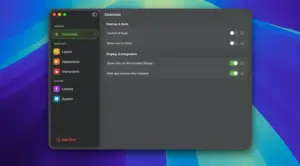
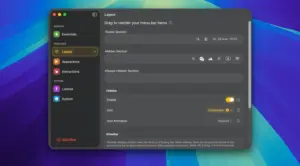
Glow 2.0.3 organizes your Mac menu bar Glow 2.0.3 for Mac — Menu Bar Manager

Pros & Cons Show details

✅ PROS

  • Glow combines menu bar hiding, instant search, and liquid-glass styling in one native Mac utility tuned for macOS 26 aesthetics.
  • Flexible Always Visible, Collapsible, and Floating sections let you keep critical icons exposed while tucking rarely used utilities away.
  • Wallpaper-aware appearance and real-time spacing or border controls help the menu bar blend with dynamic desktop themes.
  • The one-time $19.99 license includes future updates for three personally owned Macs with no subscription fees.
  • Version 2.0.3 is the developer’s current stable build, indicating ongoing maintenance after the 2.0 redesign.

❌ CONS

  • Glow requires macOS 26 for the stable release, so it cannot run on Macs stuck on older macOS versions.
  • The developer discloses use of private macOS APIs, which may break if Apple changes menu bar internals in a future update.
  • Version 2.0.3 has no dedicated public changelog, so fixes since 2.0.0 are not documented item by item.
  • Glow replaces other menu bar managers, and running multiple hiding utilities together can cause conflicts.
  • The app is sold only through the developer site, not the Mac App Store, so purchase and updates happen outside Apple’s storefront.
✅ What's New in 2.0.3 Show details
  1. [Changelog scope] — macglow.app lists 2.0.3 as the current stable build but does not publish separate release notes for 2.0.1 through 2.0.3.
  2. [Stable 2.0.3 release] — Build 2.0.3 is the recommended stable download for macOS 26, superseding 2.0.0 on the developer site.
  3. [Item search (2.0 line)] — The documented 2.0 release adds instant search so you can type to find and open any menu bar item quickly.
  4. [Redesigned settings (2.0 line)] — The 2.0 line introduces a cleaner configuration panel with unified option cards and more responsive preview editing.
  5. [Performance tuning (2.0 line)] — Official 2.0 notes cite lower CPU use, improved battery life, smoother animations, and reduced memory leaks during long sessions.
  6. [Stability fixes (2.0 line)] — Documented 2.0 fixes include smarter screen alignment below the system menu bar, less icon jumping, and automatic recovery from brief gesture-detection glitches.

Installation & Troubleshooting FAQ

8 questions

Common issues when installing macOS apps

Alternatives

Join the Conversation

Your email address will not be published. Required fields are marked *