

WhyFi on Mac
WhyFi is a macOS menu bar utility that continuously watches your Wi-Fi connection and breaks problems into layers—signal to the router, router latency on your LAN, and internet or DNS issues beyond it.
What you see day to day
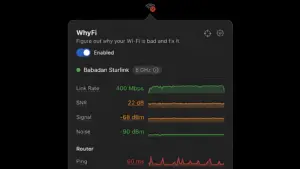
Click the menu bar icon for signal strength, noise floor, SNR, transmit rate, router ping, internet ping, jitter, and DNS lookup time. A color-coded face and WhyFi Score (0–100, from the 1.4 line) summarize health at a glance. When something degrades, the app suggests practical fixes: move closer for weak signal, restart the router for LAN latency, or contact your ISP when WAN latency spikes.
Extra tools
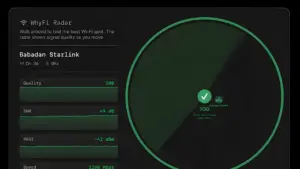
WhyFi Radar updates several times per second so you can walk around and find the strongest spot, with nearby networks shown for congestion context. Built-in speed tests use Cloudflare and include latency-under-load checks for bufferbloat that ruins video calls. You can export a diagnostic report for pasting into ChatGPT or Claude when you want a second opinion.
Version 1.4.2
Build 1.4.2 (22), released April 24, 2026, adds Intel Mac support alongside existing Apple Silicon builds. The app requires macOS 13.0 or later. WhyFi is a one-time $10 purchase from the developer site with no subscription; according to the vendor, sales support the Jet Set Petz animal charity in Bali.






sei crande