Cap Pro on Mac
Cap is an open-source screen recorder for macOS that combines quick shareable captures with a full Studio editor, positioned as a Loom-style alternative you can run locally or host on your own storage.
Two recording modes
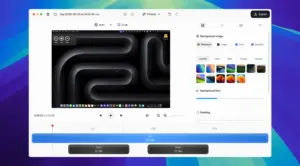
Instant Mode records and uploads in the background so you get a shareable link fast—useful for async updates and bug reports. Studio Mode records to disk with a built-in editor for trimming, layout tweaks, and export to common formats. Both modes support screen, window, or camera-only capture with optional webcam overlay. The desktop app is built with Tauri and Rust for native capture on Apple Silicon and Intel Macs.
What Cap Pro adds
Cap is free for personal use with local Studio recording, but commercial work requires a paid license. Cap Pro is a monthly or annual subscription that includes everything in the Desktop License plus unlimited cloud sharing, AI-generated titles, summaries, chapters, transcriptions, custom domains, password-protected links, team workspaces, and optional custom S3 bucket storage. The Desktop License alone covers commercial local recording with a small monthly cloud link allowance.
Version 0.4.84
Build 0.4.84 (April 2026) focuses on recording reliability and sharing speed: Ultra quality for Studio captures, segmented HLS uploads in Instant Mode, macOS screen-capture auto-restart, and smoother camera preview. macOS 13 (Ventura) or later is required; the vendor recommends 13.1+. You need screen-recording and microphone permissions in System Settings, plus a Cap account for cloud features.