
Mimestream 1.10.1 for Mac

Mimestream
Name:Mimestream 1.10.1 [EDiSO].dmg.torrent (11.6MB)
Hash:7f859f83cf6faae8363441b4cc6b1a9ff6835292
Review by:
Downloads 127
Rating
4.5 33 Click to rate
Checked
   Download Torrent Download Now

Mimestream is a native macOS email client built exclusively for Gmail: it talks to the Gmail API directly instead of generic IMAP, so inbox triage, labels, search, and compose feel closer to Gmail in the browser—but with Mac notifications, keyboard shortcuts, and system integration.

How Mac users work with it

You add one or more Google accounts, then triage with Gmail categories, labels, filters, snooze, and full Gmail-backed search. Profiles separate work and personal accounts; a Unified Inbox can merge them or keep views split. Compose supports aliases, templates with variables, markdown, undo send, and Send-and-Archive. Tracking prevention blocks pixels from common services, and multiple windows, swipe actions, Focus Filters, and menu-bar access fit a desktop workflow. Data stays on your device with direct Gmail API connections—no intermediary sync server.

Licensing and distribution

Mimestream is not on the Mac App Store; you download a notarized build from mimestream.com. A 14-day trial needs no credit card. After that, an active subscription is required ($49.99/year or $4.99/month in USD, up to five devices, family sharing for household members). Gmail-only scope is the main constraint: Outlook, iCloud, or IMAP accounts need a different client.

Version 1.10.1

Released shortly after 1.10.0, build 1.10.1 is a maintenance update that fixes regressions from the 1.10 line—Unified Inbox content depth, unread counts without categories, notification and unread-filter selection bugs, redundant search queries, and a feedback crash with no enabled accounts. It sits on 1.10.0 features such as Private Push default on macOS 26+, the new “All” profile, notification actions, and per-label sync windows. Requires macOS 12 Monterey or later.
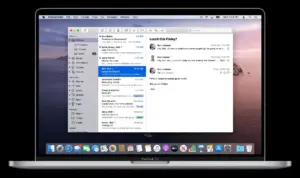

Mimestream 1.10.1 for Mac — Gmail Email Client

Pros & Cons Show details

✅ PROS

  • Mimestream uses the Gmail API natively, which delivers faster search, label handling, and category support than many generic IMAP Mac mail apps.
  • The app is built for macOS with Apple Silicon support, system notifications, Focus Filters, keyboard shortcuts, and dark-mode reformatting that browser Gmail lacks.
  • Direct Gmail API connections without a third-party sync service keep tokens and mail data on your Mac, which suits privacy-conscious Gmail power users.
  • Version 1.10.0 added profiles, Private Push on macOS 26+, per-label sync windows, and stronger tracking prevention—1.10.1 stabilizes those changes.
  • Family sharing on one subscription (up to five devices) offers better value than per-seat pricing for households with multiple Gmail accounts.

❌ CONS

  • Mimestream supports Gmail only; you cannot use it as a unified client for iCloud Mail, Outlook, or standard IMAP accounts.
  • There is no one-time purchase—only a subscription ($49.99/year or $4.99/month) after the 14-day trial, which may deter buyers who prefer perpetual licenses.
  • The app is not distributed through the Mac App Store; teams that mandate MAS-only installs cannot deploy it without an exception.
  • Version 1.10.1 exists mainly to fix 1.10.0 bugs (Unified Inbox, unread counts, notification selection), so upgrading from 1.9.x is less about new features than stability.
  • Advanced Gmail-only workflows still depend on Google’s API and account policies; outages or API changes can affect features outside Mimestream’s control.
✅ What's New in 1.10.1 Show details
  1. [Unified Inbox content fix] — The Unified Inbox again shows enough messages after upgrading to 1.10, restoring usable triage across combined accounts.
  2. [Inbox unread count fix] — Unread counts stay accurate when Gmail categories are disabled, so badge and list totals match what you expect.
  3. [Notification selection fix] — Clicking a new-message notification no longer auto-deselects the opened message in the reading pane.
  4. [Unread filter selection fix] — Selected messages stay selected in the Inbox when the Unread filter is active, avoiding lost context during review.
  5. [Search query fix] — Starting a search no longer fires redundant queries, which reduces lag and unnecessary Gmail API traffic.
  6. [Feedback crash fix] — Sending in-app feedback no longer crashes when no accounts are enabled on the Mac.
  7. [Notifications settings cleanup] — Some settings moved to the dedicated Notifications tab for clearer configuration after the 1.10.0 settings redesign.
  8. [macOS 26 context menu icons] — Conversation view context menus on macOS 26 now show icons, matching Tahoe’s updated system UI patterns.

Older Versions

Version Publication date
Mimestream v1.10.1 Latest Current
Mimestream v1.10.0
Mimestream v1.9.14
Mimestream v1.9.11
Mimestream v1.9.8
Mimestream v1.9.5
Mimestream v1.9.3

Installation & Troubleshooting FAQ

8 questions

Common issues when installing macOS apps

Alternatives

Join the Conversation

Your email address will not be published. Required fields are marked *