Zenteek 1.6.2 for Mac

Name:Zenteek 1.6.2 [EDiSO].dmg.torrent (29.14MB)
Hash:baf21118b0e8ba8efa61d32cc4e6616a6a578c75
Review by:
Downloads 149
Rating
4.5 30 Click to rate
Checked
   Download Torrent Download Now

Zenteek

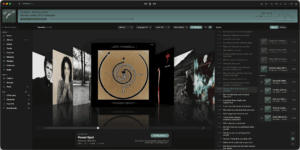
A native macOS music platform from Kjell Bublitz built for local and self-hosted libraries, aiming at bit-perfect playback, rich metadata, and audiophile DSP without a streaming subscription.

Typical Mac workflow

You point Zenteek at folders on disk or connect Plex, Jellyfin, Navidrome, or Subsonic servers, then browse albums, crates, playlists, and mixtapes with gapless playback, LUFS normalization, and optional surround output. The Enhancements panel hosts a visual DSP chain with presets, AutoEQ headphone correction, and third-party Audio Unit support on recent builds. AirPlay, DLNA, Last.fm scrobbling, and MusicBrainz enrichment sit alongside a browser-based remote on your LAN.

Version 1.6.2 adds a native Track Analysis Framework that measures loudness, tempo, musical key, dynamics, and energy directly in the app, with batch and automated analysis options. VariSpeed pitch control gains a turntable-style strip with vinyl start/stop effects, while playlist handling improves for missing or deleted tracks. A free demo DMG is available; a lifetime license includes the Mac app and iPhone companion for up to two devices with no account required.

Licensing and version 1.6.2

Zenteek sells for about $79 (launch pricing from $99) as a one-time Mac plus iPhone license via Stripe, with free updates and no subscription per the vendor site. It requires macOS 14 Sonoma or later and targets Apple Silicon Macs with a universal binary. Version 1.6.2 is the current build on zenteek.app; the changelog is a rolling feed rather than version-tagged release notes, but the newest entries describe the analysis framework, VariSpeed UI, AutoEQ safety tweaks, Traditional Chinese localization, and a hotfix for playlist indexing.
Zenteek 1.6.2 — Audiophile Music Player for Mac

Pros & Cons Show details

✅ PROS

  • Bit-perfect hi-res playback with FLAC, ALAC, WAV, DSD, gapless audio, LUFS normalization, and optional 5.1/7.1 surround suits serious local libraries.
  • Native integrations for Plex, Jellyfin, Navidrome, and Subsonic keep self-hosted collections in one player without a cloud account.
  • Version 1.6.2’s built-in analysis engine replaces a third-party loudness tool and adds BPM, key, dynamics, and energy metrics with batch automation.
  • Lifetime licensing around $79 includes Mac and iPhone companion apps with free updates, avoiding monthly streaming fees.
  • Local-first design with no telemetry by default aligns with privacy-focused audiophiles who own their files.

❌ CONS

  • Lifetime price is high compared with free players such as Foobar2000 wrappers or server apps’ built-in clients.
  • The iPhone app is only a Mac-tethered companion and cannot function as a standalone library player.
  • Changelog entries are not formally version-tagged, so separating every 1.6.2 change from earlier 1.6.x patches requires reading the rolling feed.
  • macOS 14 minimum and an Apple Silicon–oriented marketing focus may disappoint users on older Intel-only workflows.
  • Large libraries with automated analysis enabled can consume significant CPU time during background scanning.
✅ What's New in 1.6.2 Show details
  1. Track Analysis Framework — Native engine replaces the third-party loudness tool and adds up to 2× faster LUFS analysis plus BPM, key, dynamics, and energy scoring.
  2. Analysis columns and UI — Tracks table gains Loudness, Tempo, Energy, Dynamics, and Key columns; Edit Details adds an Analysis tab; context menu offers full or selective Analyze Audio runs.
  3. Key display settings — New notation options (Camelot, Open Key, flat/sharp), optional key color coding, ordering styles, and configurable CPU core count for batch analysis.
  4. Automated analysis — Optional passive scanning after index or at startup can analyze entire collections without manual context-menu runs.
  5. VariSpeed pitch UI — Turntable-inspired control strip with vinyl start/stop effects and Shift+Space vinyl play/pause shortcut when enabled from the Environment toolbar.
  6. Playlist resilience — Missing tracks show a trash icon and restore on play; deleted tracks stay listed in playlists instead of failing to load.
  7. AutoEQ safety — AutoEQ shows applied preamp reduction in decibels and lowers master volume before removing or resetting a profile to avoid volume jumps.
  8. General polish — Traditional Chinese localization, 10 MB smaller decoder, improved light-mode track filter contrast, DSP chain duplicate-module prevention, and playlist indexing hotfix 2.

Older Versions

Version Publication date
Zenteek v1.6.2 Latest Current
Zenteek v1.4.8

Installation & Troubleshooting FAQ

8 questions

Common issues when installing macOS apps

Alternatives

Join the Conversation

Your email address will not be published. Required fields are marked *