
Zenteek is a native macOS music player for collectors and audiophiles who keep FLAC, ALAC, WAV, DSD, and other local files—not a streaming subscription app.
What it does on Mac
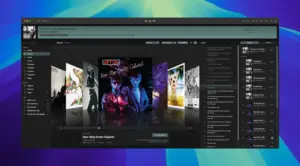
You point Zenteek at folders or remote sources (Plex, Jellyfin, Navidrome, Subsonic, SMB, UPnP/DLNA) and browse a library-first interface with album grids, artist profiles, playlists, and enrichment from MusicBrainz and Last.fm. Playback targets bit-perfect output through CoreAudio, with gapless transitions, LUFS normalization, hi-res DSP at source sample rate, optional surround paths, AirPlay/DLNA routing, and an iPhone companion for remote control. The app does not require an account; licensing is a one-time purchase (launch pricing listed at $79 on the developer site, including Mac and iPhone builds on up to two devices) with free lifetime updates.
Typical use
Most users index an existing folder structure, let Zenteek enrich artwork and credits, then listen with headphones or a DAC—often in exclusive or low-latency modes when fidelity matters. Power features include Album Crates for sidebar grouping, M3U import/export, customizable EQ and character DSP, visualizers, and optional MCP integration for AI-assisted library queries. Apple Silicon is the primary target; the site lists macOS 14 Sonoma or later and distributes a DMG demo outside the Mac App Store.
Version 1.4.8
Build 1.4.8 is the current release on zenteek.app. The developer changelog is a rolling feed without a version-tagged section; the newest entries at the top correspond to this build and focus on M3U import reliability, compilation metadata, core audio buffer fixes, network stream playback, path handling for umlauts on cloud/SMB volumes, library filters for tracks without a source, and UI or metadata polish. Larger features such as Album Crates, multi-language UI, and output routing arrived in earlier 1.4.x notes on the same page.


The description is from another app, by mistake…
Thanks a lot! ❤️❤️❤️
Run the downloaded image and drag the application to the Applications folder shortcut.
Once the copy is complete, you can launch the application from Launchpad.
Compatibility
macOS 14 and later
Architecture
ARM, x86 (64-bit)