
Yoink 3.7.3 for Mac

Yoink
Name:Yoink 3.7.3.dmg.torrent (37.85MB)
Hash:e2b4108a6f51a98c6003b2eacb046a764a2f77ec
Review by:
Downloads 124
Rating
4.6 27 Click to rate
Checked
   Download Torrent Download Now

Yoink is a macOS utility by Eternal Storms Software that acts as a temporary shelf for drag-and-drop: drop files, images, or text snippets onto its edge panel, navigate freely, then drag items out to their final destination.

How Mac users work with it

When you start dragging in Finder, a browser, or many other apps, Yoink appears at the screen edge (or at your cursor, if configured). You stash multiple items—website images, text selections, Finder files—then move to another window, Space, or fullscreen app without keeping the mouse button held. Dragging out behaves like Finder: Option forces copy, Command forces move. A keyboard shortcut hides or shows Yoink, recalls recent shelf items on long-press, and saves clipboard contents on double-press. Quick Look previews, clipboard history (with password-manager exclusions), Continuity Camera, Handoff, Share extensions, and per-app ignore lists round out the workflow.

Licensing and platforms

Yoink for Mac is a one-time purchase ($8.99 USD on the developer site; regional prices may differ) on the Mac App Store, eternalstorms.at, or Setapp. A 28-day trial is available from the website. Requires macOS 10.13 High Sierra or later. A separate iOS/iPadOS Yoink app exists for mobile; Handoff between Mac and iOS needs both purchases.

Version 3.7.3

Build 3.7.3 is a focused maintenance release that improves dragging from web browsers—especially Microsoft Edge—and fixes cases where browser drags produced unfinished files or empty-folder promise-drags failed to show as fully loaded. It follows the 3.7 line that added trash indicators, muteable “file in trash” popovers, and Quick Look pinning in 3.7.0–3.7.2.
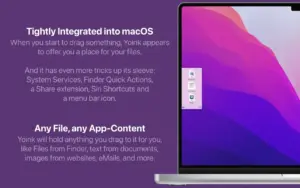
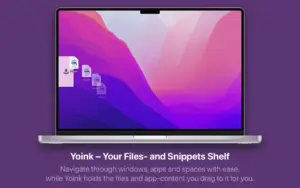
Yoink 3.7.3 on Mac: drag-and-drop shelf Yoink 3.7.3 for Mac — Drag and Drop Shelf

Pros & Cons Show details

✅ PROS

  • Yoink solves a real macOS pain point—awkward long drags across Spaces and fullscreen apps—without replacing Finder or changing how copy/move works.
  • The shelf accepts virtually any draggable content, including browser images and text snippets, not just files from Finder.
  • One-time pricing ($8.99) on Mac App Store or direct download avoids subscription fatigue common among productivity utilities.
  • Clipboard history, Quick Look, keyboard shortcuts, and per-app ignore rules let you tune Yoink to heavy multitasking workflows.
  • Version 3.7.3 directly improves browser drag reliability, which matters for researchers and designers who collect assets from Safari, Firefox, or Edge daily.

❌ CONS

  • Yoink is a niche drag-and-drop helper; users who rarely move files between windows may not justify even a modest one-time purchase.
  • Handoff and full cross-device shelf sync require the separate Yoink iOS/iPad app and additional purchase beyond the Mac license.
  • An always-available shelf at the screen edge can feel intrusive until you configure appearance timing, ignored apps, or manual-only triggering.
  • Version 3.7.3 is a small browser-focused patch, not a feature release—upgrading from 3.7.2 mainly benefits users who drag from web browsers.
  • Setapp, Mac App Store, and direct builds share functionality, but license management differs; family or team deployment needs planning per channel.
✅ What's New in 3.7.3 Show details
  1. [Browser drag responsiveness] — Dragging from browsers feels more responsive, so images and links land on the Yoink shelf faster during research workflows.
  2. [Microsoft Edge support] — Drags from Microsoft Edge are handled more reliably, extending browser coverage beyond Safari and Firefox.
  3. [Unfinished browser file fix] — Browser drags no longer sometimes leave incomplete files on the shelf, preventing broken drops at the destination.
  4. [Empty folder promise-drag fix] — Promise-drags of empty folders now correctly show as finished loading in Yoink instead of appearing stuck.
  5. [File readiness improvements] — Overall file readiness on the shelf is improved so items are ready before you drag them to the target app or folder.

Older Versions

Version Publication date
Yoink v3.7.3 Latest Current
Yoink v3.6.97
Yoink v3.6.94
Yoink v3.6.93
Yoink v3.6.92
Yoink v3.6.91
Yoink v3.6.89
Yoink v3.6.87
Yoink v3.6.86
Yoink v3.6.84
Yoink v3.6.83.2
Yoink v3.6.83
Yoink v3.6.82
Yoink v3.6.8
Yoink v3.6.7
Yoink v3.6.6
Yoink v3.6.1
Yoink v3.5.14
Yoink v3.5.13
Yoink v3.5.11
Yoink v3.5.10
Yoink v3.5.9
Yoink v3.5.7
Yoink v3.5.3
Yoink v3.5.2

Installation & Troubleshooting FAQ

8 questions

Common issues when installing macOS apps

Alternatives

Join the Conversation

Your email address will not be published. Required fields are marked *