
Qbserve 1.91 for Mac

qbserve
Name:Qbserve 1.91 [TNT].dmg.torrent (6.11MB)
Hash:113a5218e02e6782065345903c094e41f2ac48b4
Review by:
Downloads 132
Rating
4.6 21 Click to rate
Checked
   Download Torrent Download Now

Qbserve

An automatic time-and-productivity tracker from QotoQot that watches active apps, documents, and browser tabs on your Mac, scores your focus in real time, and stores everything locally without cloud sync.

Typical Mac workflow

After a 15-day trial you let Qbserve run in the menu bar while it classifies activity against more than 8,100 known apps, sites, and games. The icon color reflects your productivity score; notifications can warn when you drift into distractions. Freelancers set project rules that match document paths or URL fragments, and Qbserve logs billable time automatically while you work in Xcode, Figma, Slack, or Chrome without starting a timer.

Daily, weekly, and monthly reports show where hours went; timesheets combine timelines, notes, and manual adjustments for gaps Qbserve could not classify. Invoices generate in 18 languages from recorded time, and JSON or CSV export supports accounting tools or scheduled backups. Browser extensions cover Firefox, Vivaldi, Opera, and Yandex; Chrome and Safari integrate natively. Private tabs can be ignored, idle detection pauses intelligently during video playback, and AppleScript hooks connect alerts to IFTTT or Zapier.

Licensing and version 1.91

Qbserve sells for about $29 as a one-time perpetual license from qotoqot.com with no subscription; personal licenses cover up to five Macs. The app is not on the Mac App Store and requires macOS 10.15 Catalina or later on Intel or Apple Silicon. Version 1.91 adds tracking for Dia, Sigma, Zen, and Orion browsers, Bilibili video titles, improved menu-bar icon rendering across macOS versions, better name detection for Steam and downloaded games, and fixes blurry tabs and buttons on Retina displays.
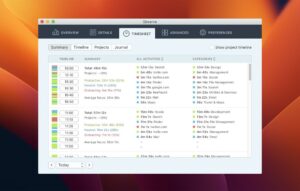
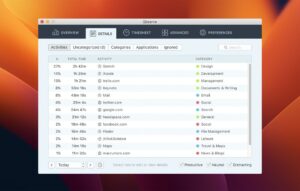
Qbserve 1.91 adds browser and Bilibili tracking plus retina UI Qbserve 1.91 — Automatic Time Tracker for Mac

Pros & Cons Show details

✅ PROS

  • All tracking data stays on your Mac with optional private-tab ignoring, which suits privacy-conscious freelancers.
  • Automatic project rules from document paths and URLs remove manual timer start/stop during client work.
  • Built-in timesheets, productivity scoring, and 18-language invoicing cover reporting and billing in one app.
  • A $29 perpetual license with five personal activations undercuts subscription trackers like RescueTime over several years.
  • Version 1.91 extends browser coverage to Dia, Sigma, Zen, Orion, and Bilibili for more accurate site logging.

❌ CONS

  • Version 1.91 is a modest compatibility update with no major new reporting or invoicing features.
  • No cloud sync or iOS companion; multi-Mac users must manage separate databases on each machine.
  • Sold only from the developer site, not through the Mac App Store, which may matter for managed corporate Macs.
  • Accurate browser tracking still depends on extensions or supported browsers; some apps remain hard to classify automatically.
  • Requires Accessibility and related macOS permissions that security-conscious users must explicitly grant.
✅ What's New in 1.91 Show details
  1. Dia browser tracking — Added automatic activity tracking support for the Dia browser in version 1.91.
  2. Sigma, Zen, and Orion browsers — Extended site and app detection to Sigma, Zen, and Orion alongside existing browser integrations.
  3. Bilibili video tracking — Individual video titles on Bilibili.com are now logged separately like YouTube entries.
  4. Menu bar icon — Improved menu bar icon appearance and consistency across different macOS versions.
  5. Steam and game names — Better tracking-name detection for Steam and locally downloaded games.
  6. Retina UI fix — Fixed blurry tabs and buttons on Retina screens in the Qbserve interface.

Older Versions

Version Publication date
Qbserve v1.91 Latest Current
Qbserve v1.88
Qbserve v1.87
Qbserve v1.84
Qbserve v1.83
Qbserve v1.53
Qbserve v1.45
Qbserve 1.9.0 (8030) v1.9.0.8030
Qbserve 1.9.0 (8022) v1.9.0.8022
Qbserve v1.9.0

Installation & Troubleshooting FAQ

7 questions

Common issues when installing macOS apps

Alternatives

Join the Conversation

Your email address will not be published. Required fields are marked *