Uplock 3.2.5 for Mac

Name:Uplock 3.2.5 [EDiSO](2).dmg.torrent (18.43MB)
Hash:e3dc9e18c511291e08f7f90e51ce1bb5c3e34082
Review by:
Downloads 254
Rating
4.6 14 Click to rate
Checked
   Download Torrent Download Now

Uplock

A native Apple-ecosystem vault for sensitive personal data that does not belong in the Passwords app—passports, payment cards, licenses, insurance, secure notes, and attachments—synced through iCloud without a vendor account or external servers.

Uplock (formerly Access) is built by a small independent team in Montreal as a companion to Apple Passwords: use Passwords for logins and passkeys, and Uplock for everything else you would otherwise scatter across locked Notes, photos, or a heavyweight password manager. Items sync across iPhone, iPad, Mac, Apple Watch, and Vision Pro via iCloud; with Advanced Data Protection enabled, the vendor states data is end-to-end encrypted and keys are not held by the developer. There is no sign-up, email, analytics, or third-party SDKs—only Apple’s platforms and review process.

Typical Mac workflow

On macOS 15 or later, save a driver license scan, credit card details, or software license in structured item types, attach PDFs or photos, and open them from the main app or the menu bar companion. The Safari extension and AutoFill fill saved fields on websites with one click. Shared Groups let families or teams collaborate on selected items with view or edit rights. Reminders nudge you before card or ID expirations; Smart Fill (on supported devices) can turn a screenshot or PDF into an item using on-device Apple Intelligence. Import from CSV or from exports of Bitwarden, 1Password, LastPass, and other managers (expanded in the 3.2 line) eases migration. Export to plain text or CSV remains available anytime.

The free tier allows a limited number of entries; Uplock+ removes the cap (about $14.99/year individual or $24.99/year family via the App Store). If a subscription lapses, you can still view and export existing items but not add or edit new ones. Authentication uses Face ID, Touch ID, Optic ID, or device passcode, with app locking when you step away.

Version 3.2.5

Release 3.2.5 focuses on speed, polish, and reliability across devices. The Mac App Store notes a smoother, faster unlock flow; clearer prompts when device authentication or passcode setup is required; more reliable Apple Watch sync; better shared-group and attachment navigation; refined sidebar, list, and detail layouts; improved menu bar window behavior on Mac; and a fix on macOS 27 Golden Gate where the search bar could appear above the locked screen. This is an experience update rather than a major feature launch.
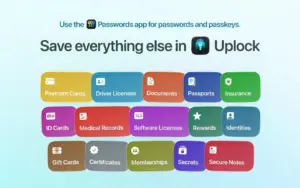
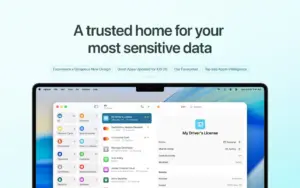
Uplock 3.2.5 for Mac — Secure Personal Vault  Uplock 3.2.5 stores IDs, cards, and documents on Mac

Pros & Cons Show details

✅ PROS

  • iCloud-only sync with no vendor servers, accounts, or analytics aligns with strict privacy expectations.
  • Structured storage for IDs, cards, documents, and attachments complements Apple Passwords instead of replacing it.
  • Native apps on Mac, iOS, iPadOS, watchOS, and visionOS with Safari AutoFill and a Mac menu bar helper.
  • Shared Groups, reminders, favorites, and archive support organized household or team workflows.
  • Broad import paths from major password managers and CSV/plain-text export ease switching and backup.
  • Version 3.2.5 improves unlock speed, Watch sync, attachments, and Mac menu bar usability.

❌ CONS

  • Uplock+ subscription required beyond the free item limit; editing stops if the plan expires.
  • Mac build requires macOS 15.0 or later, excluding Macs still on Sonoma or older.
  • Mac App Store only—no direct license or Windows/Android clients for mixed-platform users.
  • Version 3.2.5 is polish and fixes, not new major features beyond the 3.x line.
  • Smart Fill and some Apple Intelligence features depend on supported OS and device capabilities.
  • Less suited as a full enterprise password manager than 1Password or Bitwarden for teams at scale.
✅ What's New in 3.2.5 Show details
  1. [Unlock flow] — Improved app locking with a smoother, faster unlock experience across devices.
  2. [Authentication guidance] — Clearer prompts when device authentication or passcode setup is required.
  3. [Apple Watch sync] — Improved Watch sync reliability and status handling.
  4. [Shared groups and attachments] — Better navigation for shared groups and faster, smoother attachment browsing.
  5. [UI polish] — Refined sidebar, list, and detail layouts throughout the app.
  6. [Mac menu bar windows] — Refined window behavior when opening Uplock from the menu bar app on Mac.
  7. [macOS 27 Golden Gate fix] — Fixed the search bar appearing above the locked screen on macOS 27 Golden Gate.

Installation & Troubleshooting FAQ

8 questions

Common issues when installing macOS apps

Alternatives

Join the Conversation

Your email address will not be published. Required fields are marked *