UPDF 2 – AI-Powered PDF Editor 2.5.3 for Mac

UPDF 2 - AI-Powered PDF Editor
Name:UPDF 2.5.3 [EDiSO].dmg.torrent (128.1MB)
Hash:5206655579749bf8252443940abbdd5c0ba4e9b8
Review by:
Downloads 440
Rating
4.3 9 Click to rate
Checked
   Download Torrent Download Now

UPDF 2.5.3 for Mac — AI-Powered PDF Editor

UPDF is a cross-platform PDF editor for Mac that combines Word-like editing, annotation, conversion, page management, forms, and e-signatures with an integrated AI assistant and autonomous AI agents for search, summarization, and document automation.

How Mac users work with it

You open PDFs from Finder or the built-in file manager, edit text and images inline, highlight and comment for review, reorder or split pages, and export to Word, Excel, PowerPoint, images, or archival formats. UPDF 2.5 added ten specialized AI agents—semantic search, auto-bookmarking, page organization, watermark and sticker generation, and more—so repetitive document tasks can run inside the app instead of in separate tools. AI chat, translation, and mind-map views sit beside core PDF tools on desktop and sync with mobile and web when you use UPDF Cloud.

Mac App Store vs direct download

The Mac App Store build supports macOS 11.0 or later per UPDF’s version history page. OCR is not offered in the App Store listing; the vendor directs OCR users to download from updf.com instead. Offline PDF editing is available, while AI features rely on cloud processing (GPT-5 and DeepSeek models on US servers, per vendor documentation). UPDF Pro unlocks full editing and conversion; AI Assistant is a separate subscription for unlimited agent access beyond the free tier’s limited file and question quotas.

Version 2.5.3

Released 23 May 2026 on the Mac App Store, build 2.5.3 is a focused maintenance update: toolbar hide and auto-show for a cleaner workspace, optimized PDF compression, and a fix for display problems on permission-protected documents. It sits on the UPDF 2.5 product line that introduced the agent-based document ecosystem earlier in 2026.
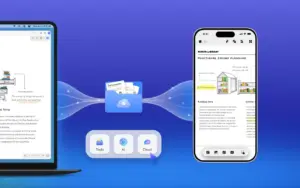
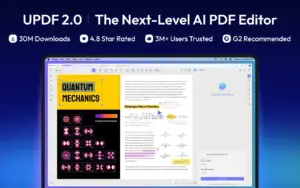
UPDF 2.5.3 on Mac: edit, annotate, convert, and AI-assist PDFs. Toolbar hide/auto-show, better compression UPDF 2.5.3 for Mac — AI PDF Editor

Pros & Cons Show details

✅ PROS

  • UPDF bundles editing, annotation, conversion, organization, forms, and signing in one Mac app, which reduces switching between Acrobat, a converter, and separate AI chat tools.
  • The UPDF 2.5 agent set automates bookmarking, semantic search, page cleanup, and visual asset generation—tasks that usually require manual steps in traditional PDF editors.
  • One license covers up to four devices across Mac, Windows, iOS, and Android, which suits users who move between a MacBook and phone or tablet.
  • Core PDF tools work offline on Mac, so sensitive documents can be edited without uploading files for basic annotate-and-export workflows.
  • Version 2.5.3 improves everyday UX with collapsible toolbar behavior and better compression, while fixing permission-protected PDF rendering that could block legitimate viewing.

❌ CONS

  • Full AI agents and unlimited chat require UPDF Pro plus a paid AI Assistant subscription; the free tier caps AI to five files and 100 questions with trial watermarks on saved edits.
  • OCR is unavailable in the Mac App Store build—you must use the direct website installer, which splits the Mac user base into two feature sets.
  • AI processing sends document content to vendor cloud servers (OpenAI GPT-5 / DeepSeek), which may not meet privacy requirements for confidential legal, medical, or enterprise PDFs.
  • The Mac App Store listing and updf.com changelog are out of sync: 2.5.3 notes appear only on the App Store, making it harder to verify builds outside Apple’s channel.
  • Heavy AI agent marketing can overshadow that many pro PDF workflows still need Acrobat-level preflight, advanced print production, or deep JavaScript form logic that UPDF may not match.
✅ What's New in 2.5.3 Show details
  1. [Toolbar hide and auto-show] — The editing toolbar can be hidden for a cleaner canvas and reappear when needed, giving more screen space on smaller MacBook displays.
  2. [PDF compression optimization] — Compression runs more efficiently, which matters when shrinking large scans or image-heavy PDFs before email or cloud upload.
  3. [Permission-protected document display fix] — PDFs secured with permission passwords no longer show the display glitch that could make protected files unreadable or misrendered on Mac.

Older Versions

Version Publication date
UPDF 2 - AI-Powered PDF Editor v2.5.3 Latest Current
UPDF 2 - AI-Powered PDF Editor UPDF v2.1.2

Installation & Troubleshooting FAQ

8 questions

Common issues when installing macOS apps

Alternatives

1 Comment

  1. Run the downloaded image and drag the app to the Applications folder shortcut.

    Once the copy is complete, you can launch the app from Launchpad.

    Compatibility
    macOS 11 and later

    Architecture
    ARM, x86 (64-bit)

    Note
    AI features are not supported

Join the Conversation

Your email address will not be published. Required fields are marked *